3: Basic operations Model 2290-5 5 kV Power Supply
3-4 2290-5-900-01 Rev. A/December 2013
Analog programming and monitor
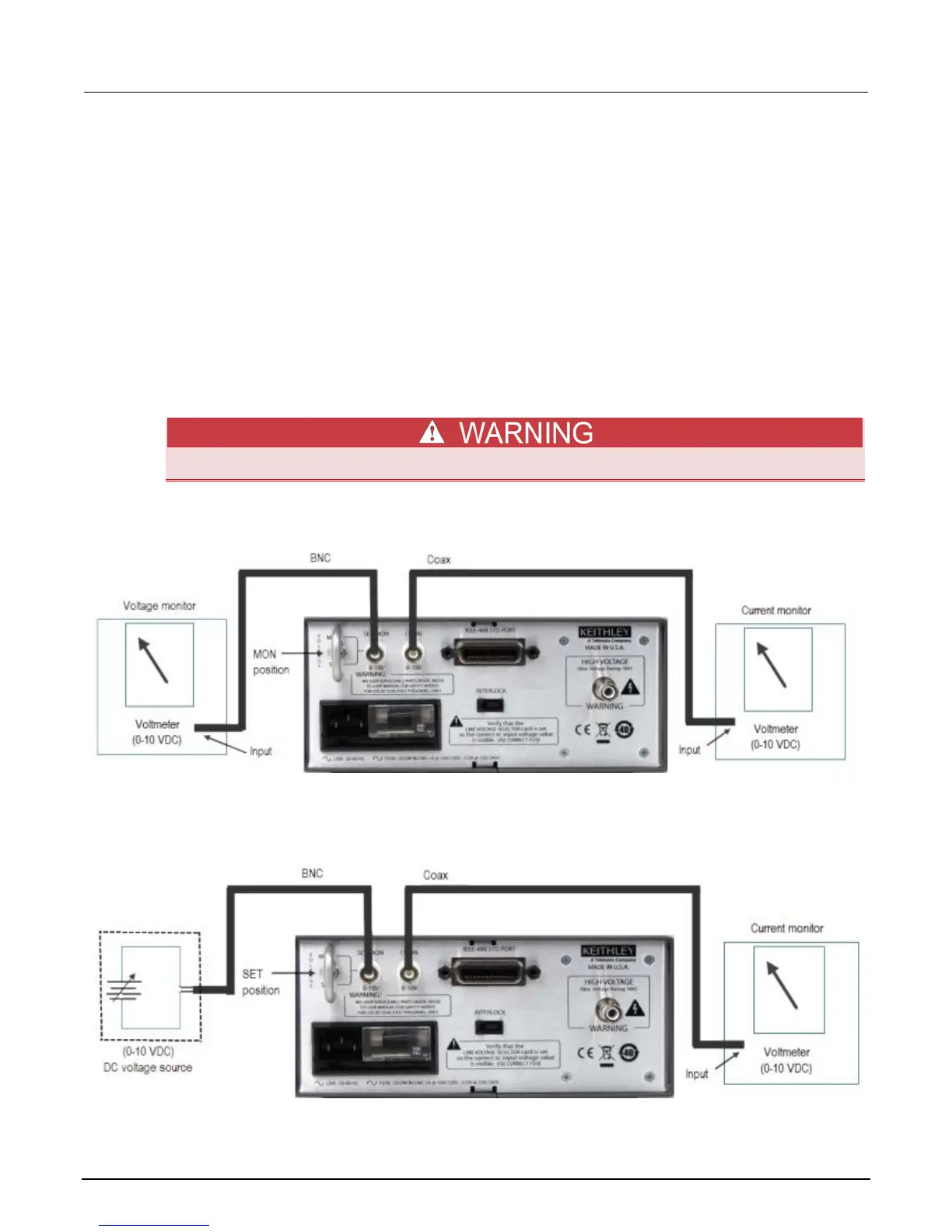
The rear panel VOLTAGE select switch determines whether the output voltage is set from the front
panel or from the rear panel SET/MON input. If the switch is in the MON (monitor) position, use the
front panel controls. If the switch is in the SET position, use the rear panel analog voltage to control
the output voltage.
When the VOLTAGE switch is in the SET position, the I MON jack remains an output signal, the
SET/MON jack becomes an input signal and sets the high voltage source value over the same range
as the control voltage input. For example, a 2 V analog voltage input results in a 1 kV source output
voltage. When the switch is in the SET position, the REAR LED on the front panel is lit, indicating that
high voltage is under analog control and cannot be adjusted using the front panel buttons. All signals
are positive voltages.
The next two figures show examples of analog output connections.
The BNC jack outer shells are connected to chassis ground and cannot be floated.
Figure 6: Model 2290-5 voltage and current monitor connections
Figure 7: Model 2290-5 Voltage set connections




 To Next Page