©2009 4Front Engineered Solutions, Inc.
January 2009 6004754F — HK and HK-S Hydraulic Dock Leveler, 3 Button — SafeTFrame
™
29
OPERATION, continued
On/Off
switch
push to
raise
Stop button
Push to
extend lip
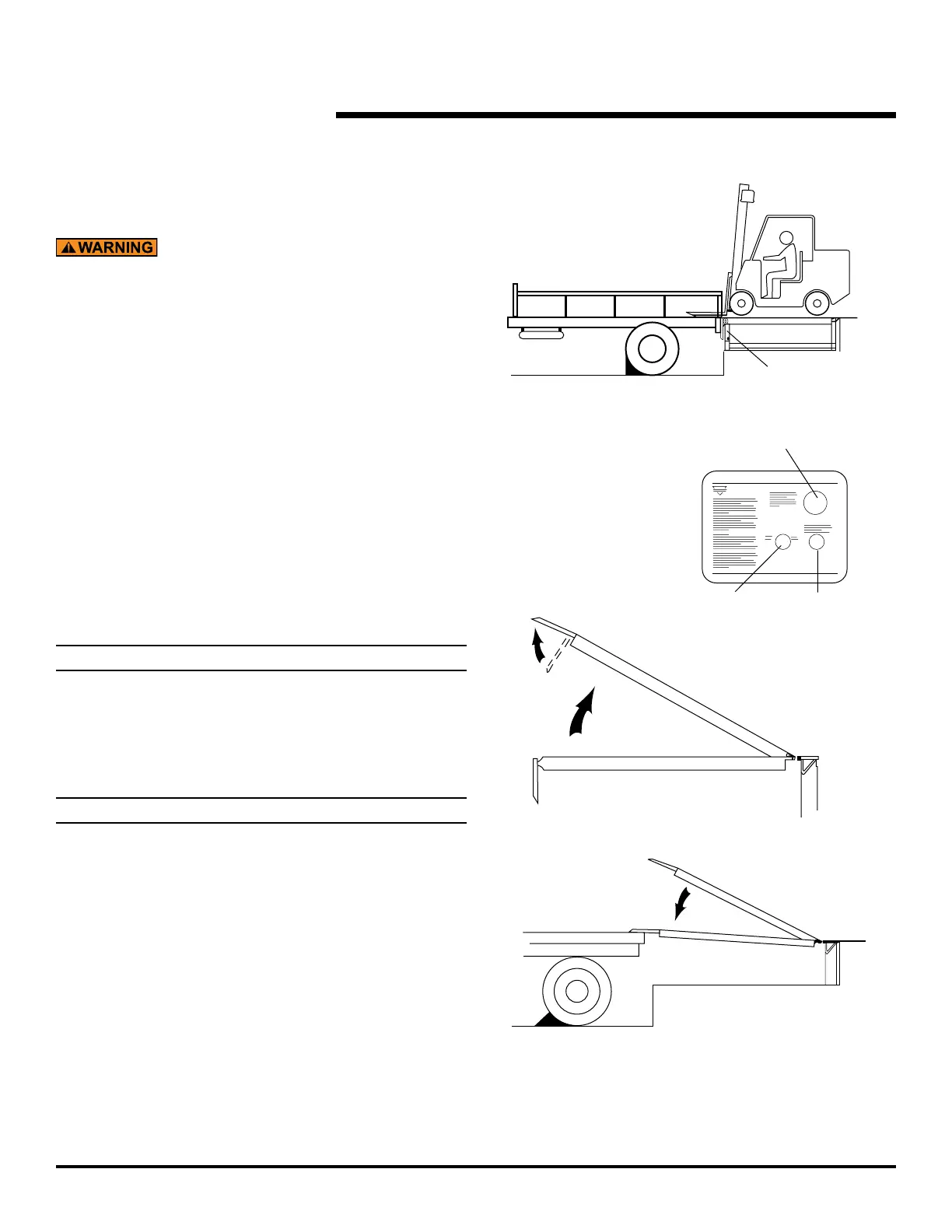
Fig. 29
Fig. 30
Fig. 31
DOCK LEVELERS WITH AUTO RETURN TO DOCK
OPTION
Do not operate the dock leveler when anyone is on or in
front of it.
Stay clear of the dock leveler when it is moving.
Do not walk on dock leveler or lip until the lip is fully
extended and supported by the vehicle bed.
Never use a fork truck or other material handling
equipment to lower the ramp and lip sections.
Do not operate the dock leveler until a vehicle is in
position against the dock bumpers.
Tell vehicle driver “Your vehicle must stay at the dock.”
Chock or hitch vehicle.
Pull “STOP” button out. (Pushing “STOP” button in at
any time stops movement of the ramp.)
If necessary, remove end loads with the ramp in the dock
level (stored) position. See Fig. 29.
NOTE:
If the vehicle to be serviced is below dock level, see operating
instructions for Below Dock Control (BDC) on page 30.
To extend the dock leveler lip into the vehicle:
6.1 Pull the “STOP” button out. See Fig. 30.
NOTE:
Pushing “STOP” button in at any time stops movement of
ramp.
rise and the lip will extend once the ramp reaches
the highest position. To extend the lip before the
ramp reaches its highest position, push and hold
the “EXTEND” button after lip edge is above vehicle
Fig. 30.
extended.
vehicle bed. See Fig. 31.
Proceed with loading or unloading.
1.
2.
3.
4.
5.
6.
7.


 To Next Page