23
Updating the System
Update the system firmware of the device.
For information regarding updates, visit the JVC
KENWOOD website at
http://www.kenwood.com/cs/ce/.
1.
Copy the system update le to the SD
card and then insert the SD card into
the SD card slot.
2.
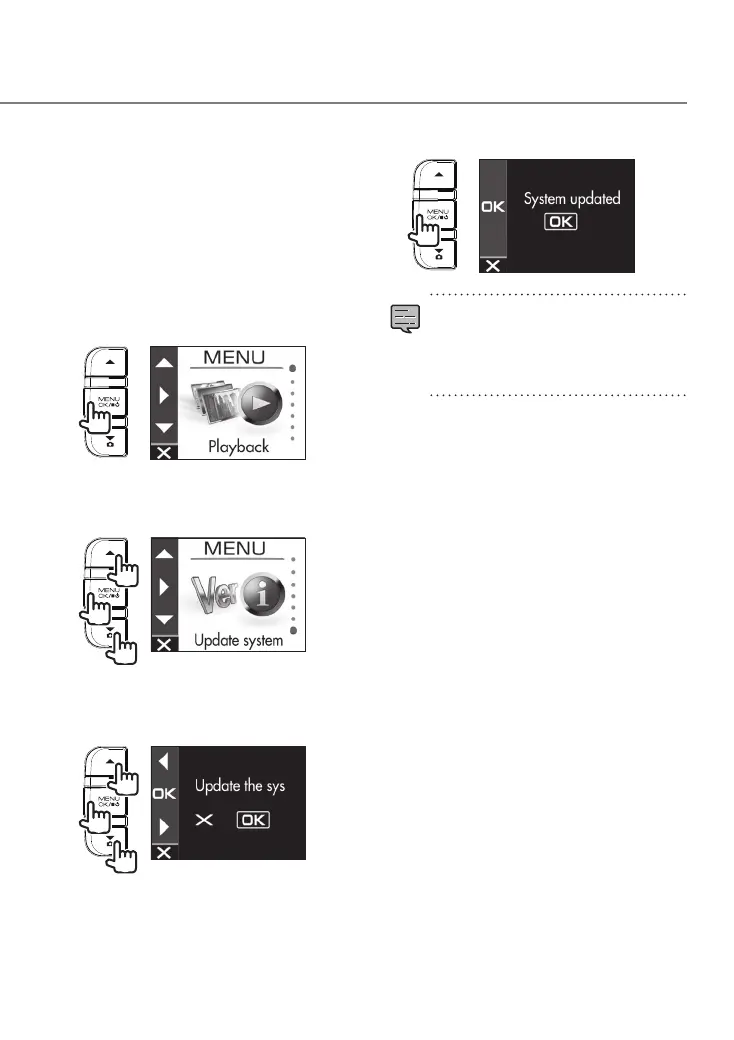
Press the [MENU/OK] button.
MENU appears.
3.
Use the [
J
]/[K] buttons to select
<Update system> and then press the
[MENU/OK] button.
2
1
1
4.
Use the [
J
]/[K] buttons to select
<OK> and then press the [MENU/OK]
button.
2
1
1
The firmware is updated.
5.
Press the [MENU/OK] button to end
the procedure.
•
Do not turn off the power of the device,
start the engine of the vehicle, or remove
the SD card during the update.
•
When the firmware update is finished,
the device restarts.
DRV-430_B5A-0959-01_EU_EN.indd 23 2017/12/21 12:13



 To Next Page