22
Various Settings
Setting the Date and Time
Set the date and time of the device.
1.
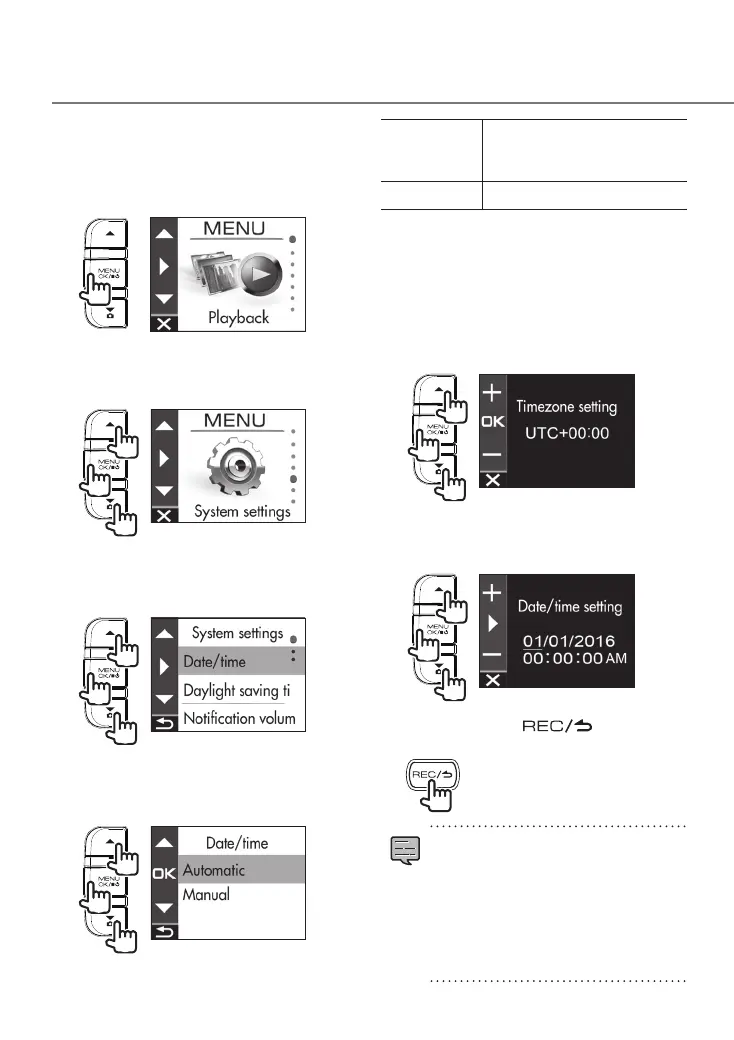
Press the [MENU/OK] button.
MENU appears.
2.
Use the [
J
]/[K] buttons to select
<System settings> and then press
the [MENU/OK] button.
2
1
1
3.
Use the [
J
]/[K] buttons to select
<Date/time> and then press the
[MENU/OK] button.
2
1
1
4.
Use the [
J
]/[K] buttons to select an
item and then press the [MENU/OK]
button.
2
1
1
Automatic
Set the date and time
automatically using the time
received from a GPS satellite.
Manual Set the date and time manually.
5.
Set the timezone setting or date/time
setting.
Use the [
J
]/[K] buttons to select the
time zone or date and time and then
press the [MENU/OK] button.
When automatic was selected, the timezone
settings is displayed.
2
1
1
When manual was selected, the date/setting is
displayed.
Repeat the same operation to set the
date and time.
2
1
1
6.
Hold down the [ ] button to
end the procedure.
•
The device sets the date and time
automatically using the coordinated
universal time (UTC) received from a GPS
satellite.
•
If the date and time are set automatically,
setting the correct time may not be
possible until a GPS satellite signal can
be received normally.
DRV-430_B5A-0959-01_EU_EN.indd 22 2017/12/21 12:13



 To Next Page