27
Backing Up Files
Back up the SD card data to the hard disk of a
PC, etc.
1.
Start KENWOOD DRIVE REVIEWER.
2.
Select the <JVCKENWOOD> drive for
the SD card with <SELECT FOLDER
(S)> from the FILE (F) menu.
3.
Select <BACKUP (B)> from FILE (F).
4.
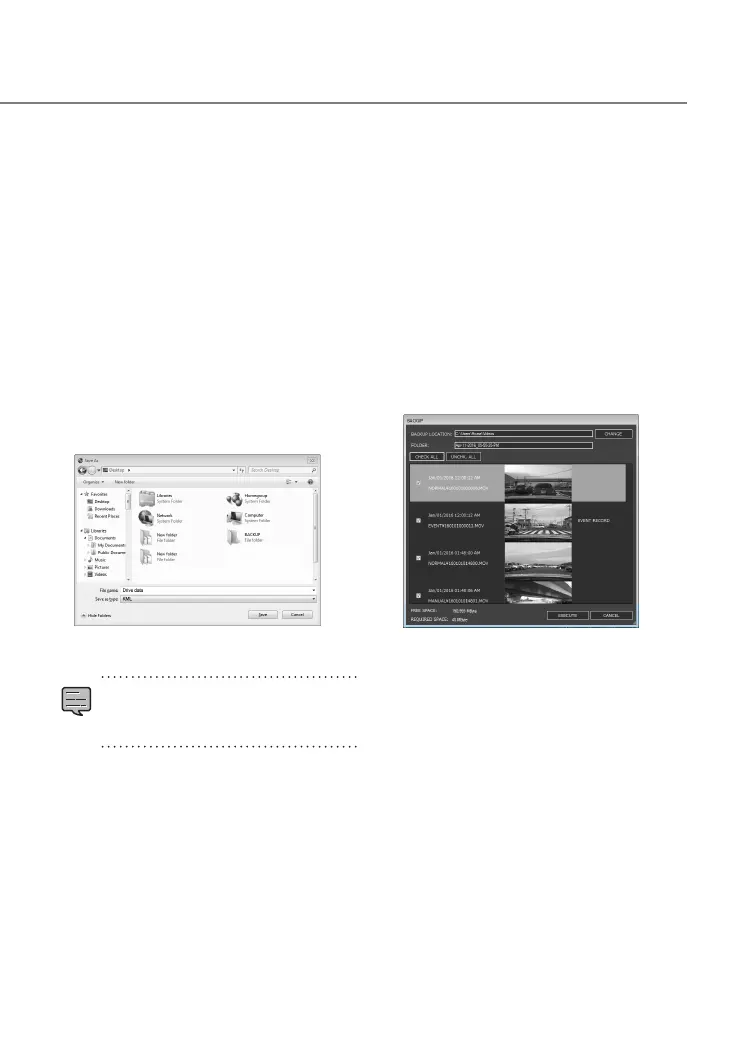
Select the backup destination folder.
5.
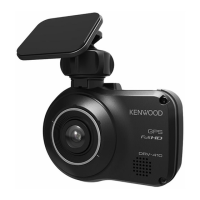
Select the les to back up by selecting
check boxes for the les you wish to
save.
6.
Press the [EXECUTE] button.
Outputting Driving
Information
Output a driving information file (kml/kmz) that
can be used with the GoogleMaps
TM
map service
or GoogleEarth
TM
map service.
1.
Start KENWOOD DRIVE REVIEWER.
2.
Select the <JVCKENWOOD> drive for
the SD card with <SELECT FOLDER
(S)> from the FILE (F) menu.
3.
Select <EXPORT kmz/kml (E)> from
FILE (F).
4.
Select the backup destination folder,
select the le type (kml/kmz), and
enter a le name.
5.
Press the [Save] button.
•
For how to use the file, see the help
of the GoogleMaps
TM
map service or
GoogleEarth
TM
map service.
DRV-430_B5A-0959-01_EU_EN.indd 27 2017/12/21 12:13


 To Next Page