32
Data Size: B6L (182 mm x 128 mm)
Book Size: B6L (182 mm x 128 mm)
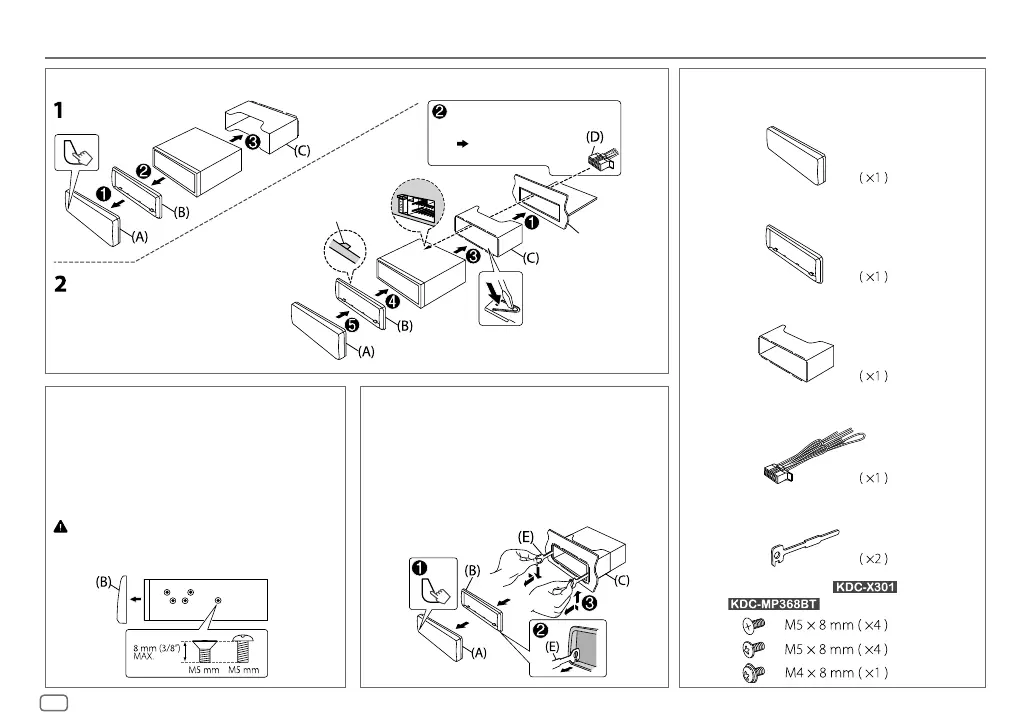
Do the required wiring.
( 33, 34)
Dashboard of
your car
Bend the appropriate tabs to hold the
mounting sleeve firmly in place.
How to remove the unit
1
Detach the faceplate.
2
Fit the catch pin on the extraction keys into the holes
on both sides of the trim plate, then pull it out.
3
Insert the extraction keys deeply into the slots on
each side, then follow the arrows as shown on the
illustration.
Installing the unit (in-dash mounting)
When installing without the mounting
sleeve
1
Remove the mounting sleeve and trim plate from
the unit.
2
Align the holes in the unit (on both sides) with the
vehicle mounting bracket and secure the unit with
screws (supplied/commercially available).
Use only the specified screws. Using wrong screws
might damage the unit.
Hook on the top side
Orientate the trim plate
as illustrated before
fitting.
INSTALLATION/CONNECTION
Part list for installation
(A)
Faceplate
(C)
Mounting sleeve
(B)
Trim plate
(D)
Wiring harness
(E)
Extraction key
(F)
Screws (supplied for /
)
ENGLISH
JS_KWD_KDC_X301_KN_EN_4.indd 32JS_KWD_KDC_X301_KN_EN_4.indd 32 21/7/2016 11:40:47 AM21/7/2016 11:40:47 AM







 To Next Page