8
Assemble units as described herein only. To do otherwise
may result in instability. All screws, nuts and bolts must be
tightened securely and must be checked periodically after
assembly. Failure to assemble properly, or to secure parts
may result in assembly failure and personal injury.
Balance
®
Overhead Cabinet
Assembly Instructions
Flexible WorkSpace™ Mounted
Overhead Units
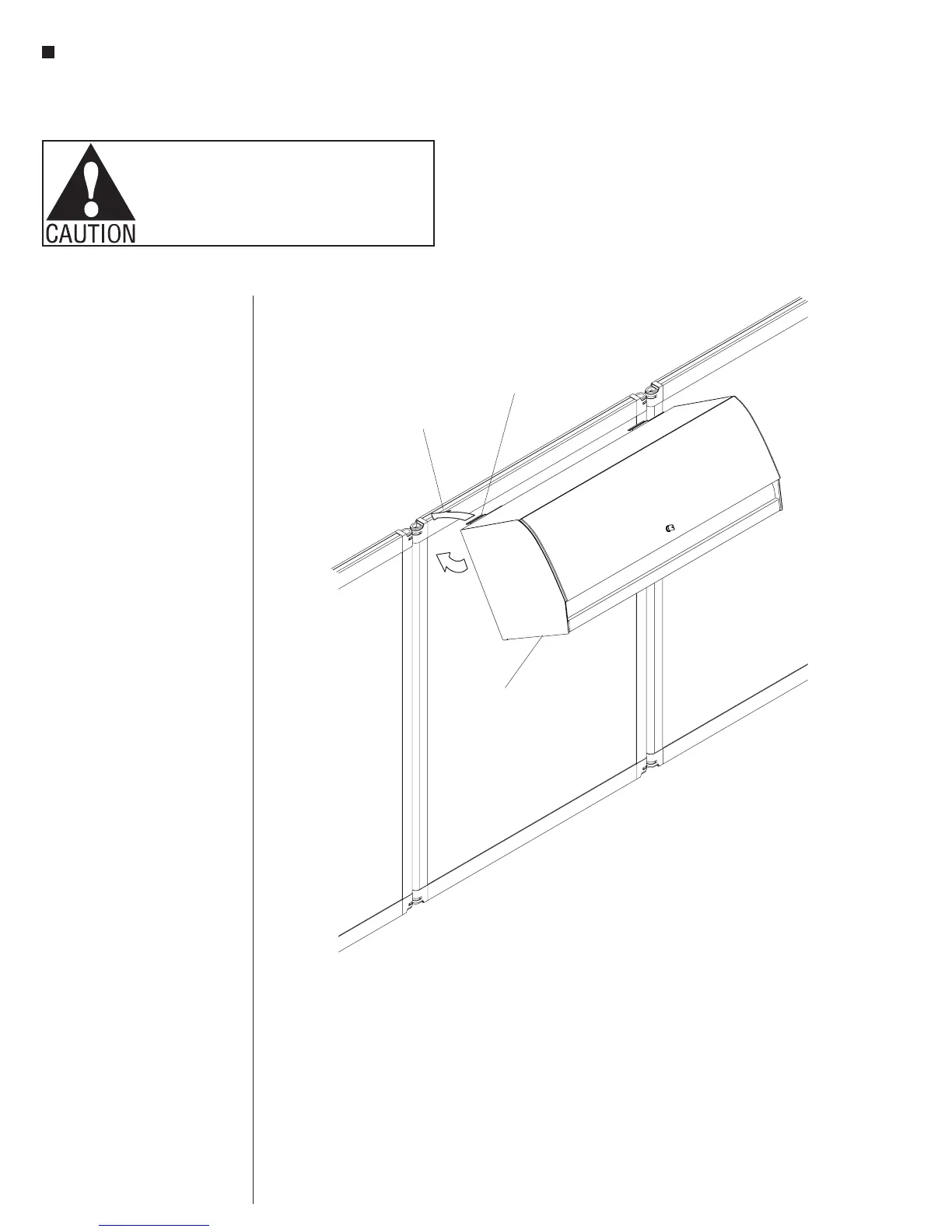
1. The mounting bracket for Flexible
WorkSpace has a formed flange that
is hooked into an aluminum channel
at the top of each panel. These
flanges are offset to allow overhead
units to be hung from a panel in a
back-to-back manner (Figure 7).
2. Engage the flange of the mounting
brackets into the groove at the top of
the panel by holding the unit bottom
out approximately 30°, then rotate
down until unit is secured in place
(Figure 7).
Note: The 42” overhead unit is
the only size available for Flexible
WorkSpace and can only be hung
centered on a 44” panel.
Caution: The aluminum channel of
the Flexible WorkSpace panel must
be oriented at the top of the panel
prior to hanging any overhead.
Figure 7
aluminum
channel
Flexible WorkSpace
mounting bracket
Flexible WorkSpace
mounted overhead unit



 To Next Page