OPTIMA FEATURES & FUNCTIONS GUIDE
14
*IF EQUIPPED
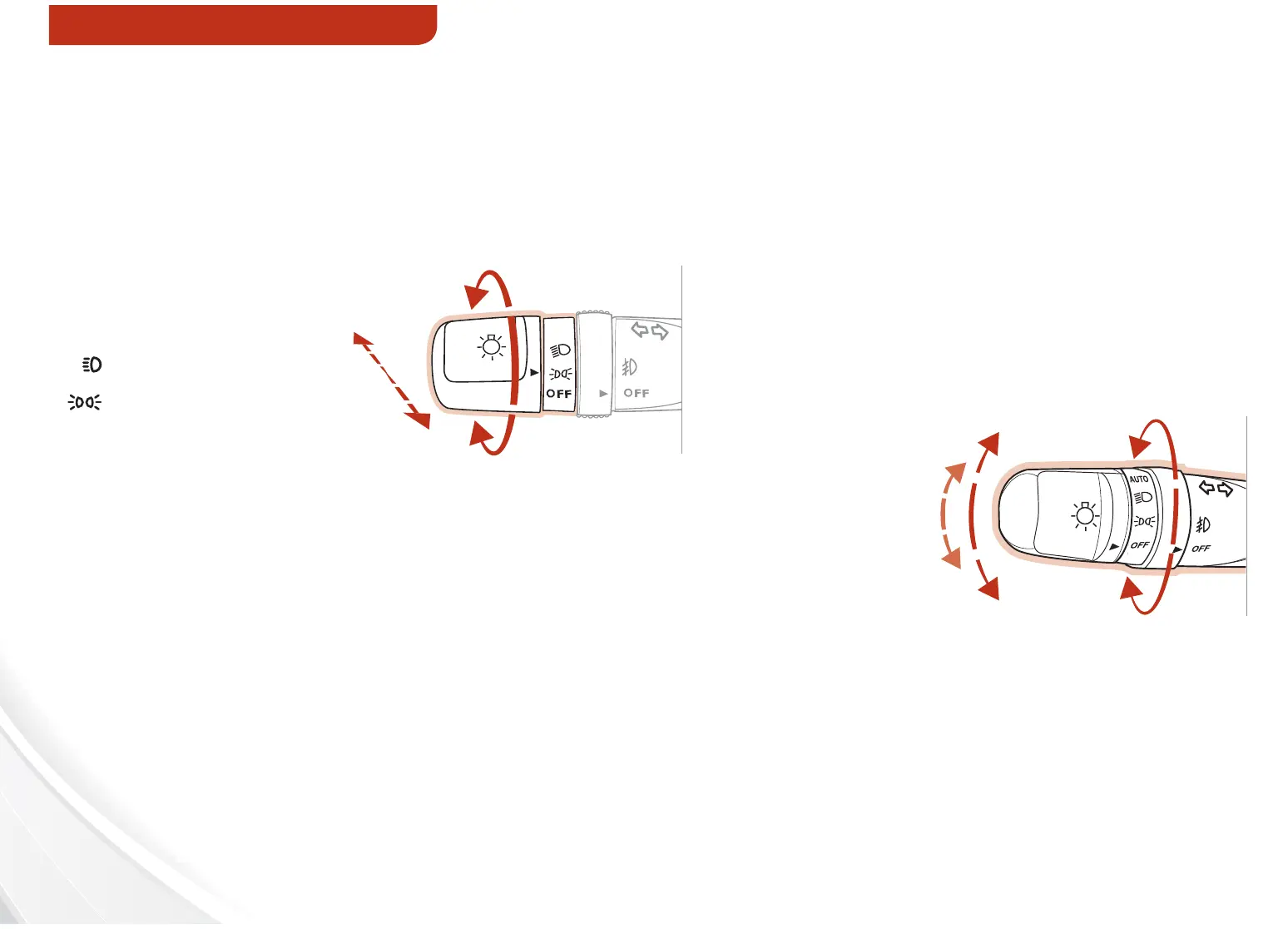
Headlights & High Beams
REMINDER: Headlights must be ON for Fog Light operation.
Turn Signals & Fog Lights
AUTO Light* function — When the light switch is in the
AUTO light position, the taillights and headlights will turn ON/
OFF automatically depending on the amount of light outside
the vehicle.
One-Touch Lane Change Signal is activated by
moving the Turn Signal Lever slightly for less than 1
second and then releasing. The lane change signal
will blink 3 times.
To change how many times the Lane Change Signal
blinks (3/5/7), go to User Settings Mode in the LCD
Display.
Push lever to turn High Beams ON. Pull
lever to flash Headlights / High Beams.
AUTO*
Automatic
Headlights position
Headlight position
Parking light position
OFF
OFF position
Move lever Up/
Down for Right/
Left Turn Signal.
Rotate lever ring to turn Fog Lights
ON/OFF.
AUTO
For more information on the User Settings Mode, please refer
to your Owner’s Manual.
Rotate lever to change the
Headlight function:
STEERING WHEEL CONTROLS















 To Next Page