EasyManua.ls Logo

KingSlim D5 - Kingslim Mobile App - Adding Device; Adding the Dash Cam to the App; Confirmation of Device Connection

KingSlim D5
41 pages
Print Icon
To Next Page IconTo Next Page
To Previous Page IconTo Previous Page
Loading...
Warm tip: You can tap “Skip” to enter the APP without bothering to create an
account for login.
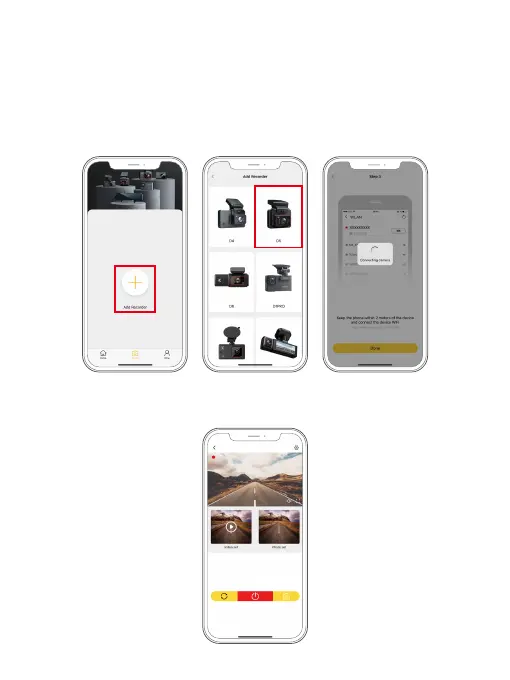
(5) Connect to the Kingslim APP. To do this, tap "Add Recorder" to add your camera
model, then wait for a few seconds till the APP loads past the Connecting screen
to enter the preview screen.
(6) Now your dash cam is successfully connected to the Kingslim APP.
D5_
******

󾙒󾙓
󾙒󾙔 󾙒󾙕 󾙒󾙖 󾙒󾙗 󾙒󾙘
󾙒󾙙 󾙒󾙚 󾙒󾙛 󾙓󾙒 󾙓󾙓
󾙓󾙔 󾙓󾙕 󾙓󾙖 󾙓󾙗 󾙓󾙘
󾙓󾙙 󾙓󾙚 󾙓󾙛 󾙔󾙒 󾙔󾙓
󾙔󾙔 󾙔󾙕 󾙔󾙖 󾙔󾙗 󾙔󾙘
󾙔󾙙
󾙔󾙚 󾙔󾙛 󾙕󾙒 󾙕󾙓
󾙕󾙔 󾙕󾙕 󾙕󾙖 󾙕󾙗 󾙕󾙘

Related product manuals