1.2 Display and control elements
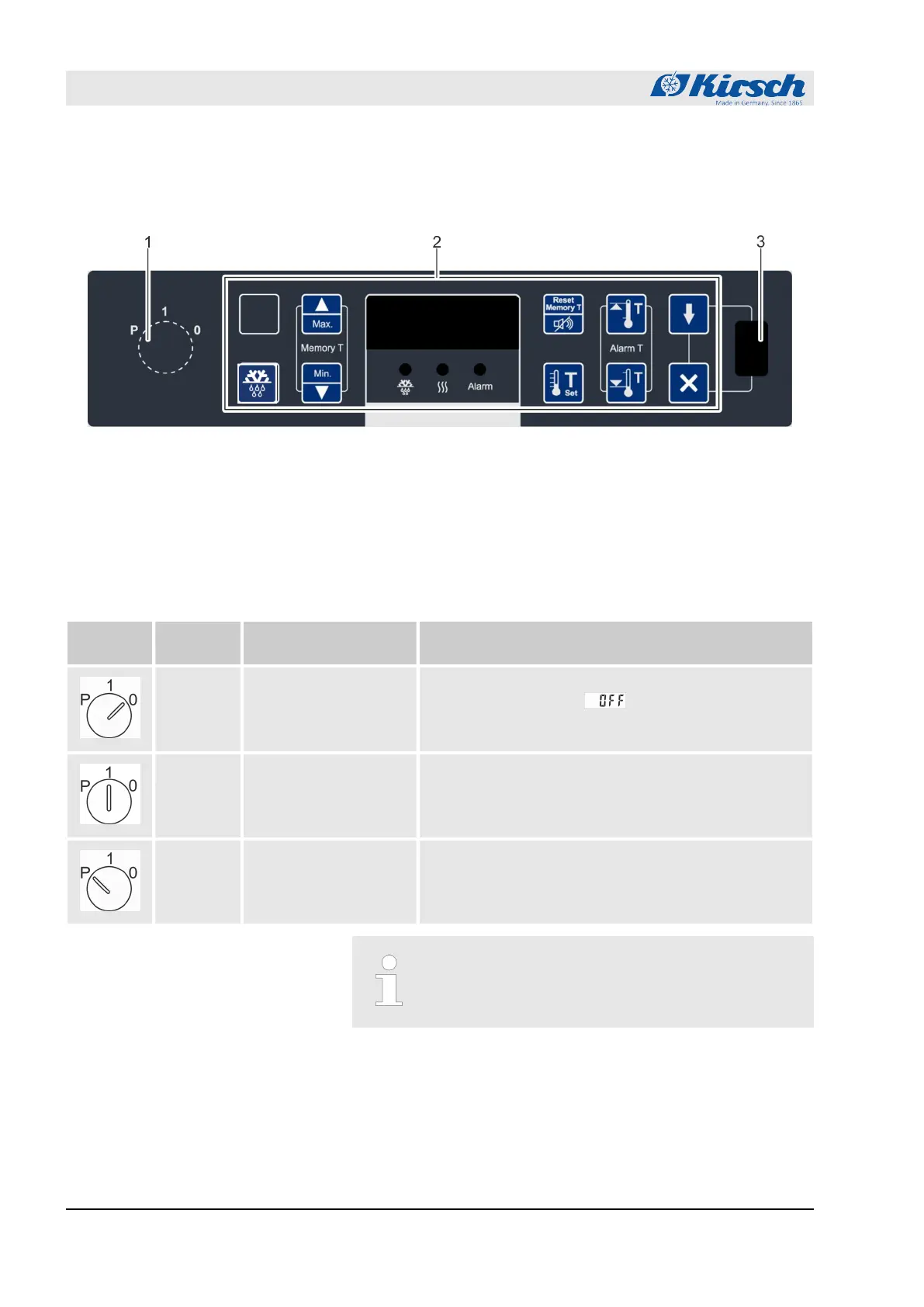
1.2.1 Design of the display and control unit
Fig. 5: Display and control unit
1 Key switch
2 Display and control unit (variable key assignment)
3 USB port
1.2.2 Function of the key switch
Tab. 1: Position of the key switch
Key posi-
tion
Position Function Description
“0” Switch off unit.
n Switch off unit (for example to perform a restart).
n The Display shows .
n To put the unit in a currentless state, unplug the
power plug.
“1” Switch on unit.
n Operate unit.
n Display and reset unit values (for example actual
temperature or temperature limits).
n Confirm alarms.
“P” Program unit.
n Adjust unit (for example target values or tempera-
ture warning limits).
n Display parameter lists.
n Confirm alarms.
Always operate unit in key position “1” in order to pre-
vent manipulation. During normal operation, remove
key and store it safely.
1.2.3 Function of buttons and displays
For the functions of buttons and displays, see the following over-
view:
Product description
Display and control elements > Function of buttons and displays
23.05.2023Refrigerator/freezer LABO series12



 To Next Page