OPERATING THE BLENDER
3
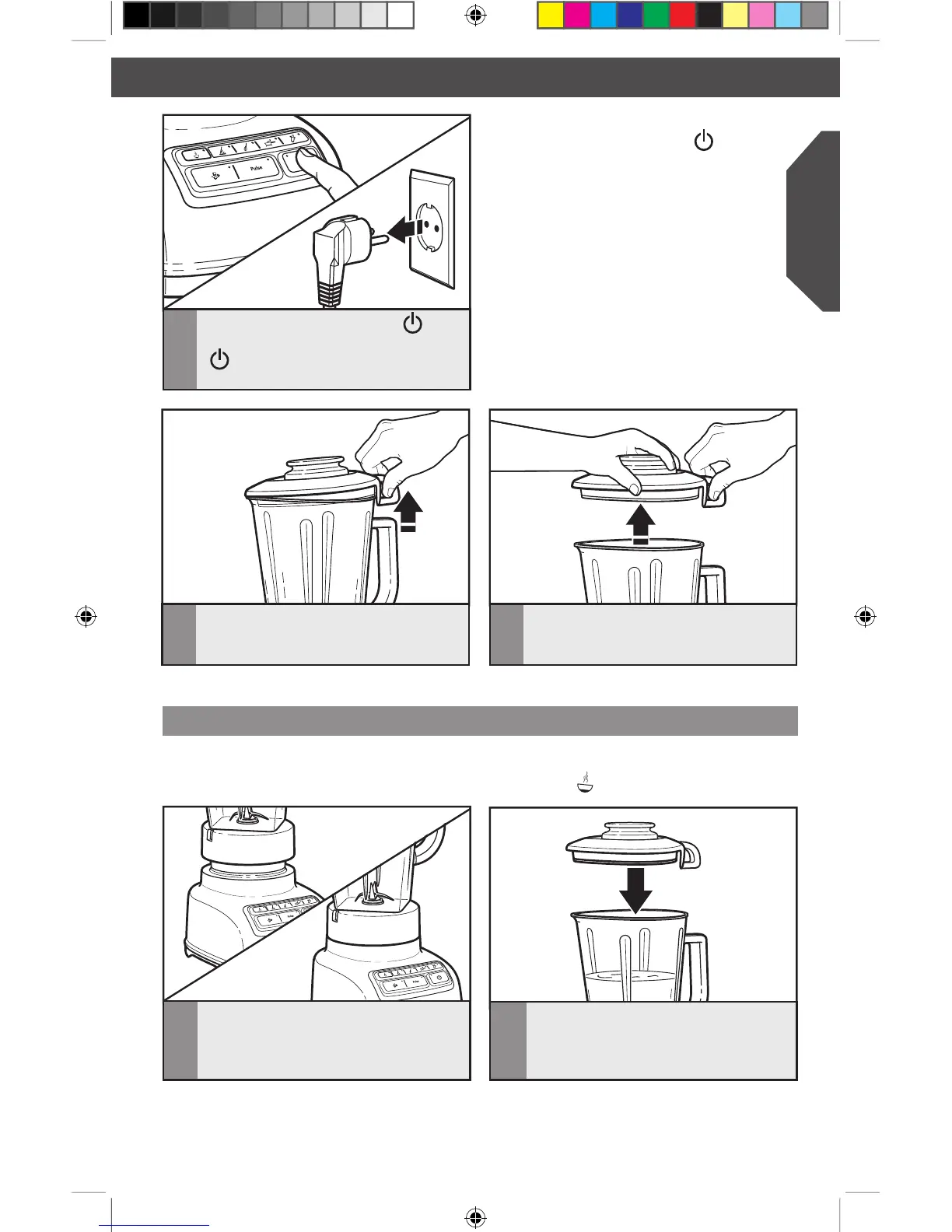
When finished, press POWER ( )
to stop the Blender, then press POWER
( ) a second time to turn off. Unplug
Blender before removing the pitcher.
NOTE: The Blender will operate only
when pressing the POWER
( )
button
(Power LED will flash) before selecting the
desired speed.
IMPORTANT: If blending hot foods or liquids – such as soups or sauces – be sure that
the lid is securely in place and use only the HOT FOODS ( ) function.
Using the Hot Foods function
1
Before operating the Blender, make sure
the pitcher is properly positioned on
the base.
2
Put ingredients into the pitcher, and
securely attach lid to pitcher, making
sure the handle on the lid aligns with the
handle on the pitcher, as shown.
4
To remove the lid, first use the loop
on the back of the lid to lift the lid and
break the seal.
5
Then lift the lid from the side to remove
completely from the pitcher.
W10517477A_ENv6.indd 11 12/13/13 3:38 PM








 To Next Page