12
OPERATING THE BLENDER
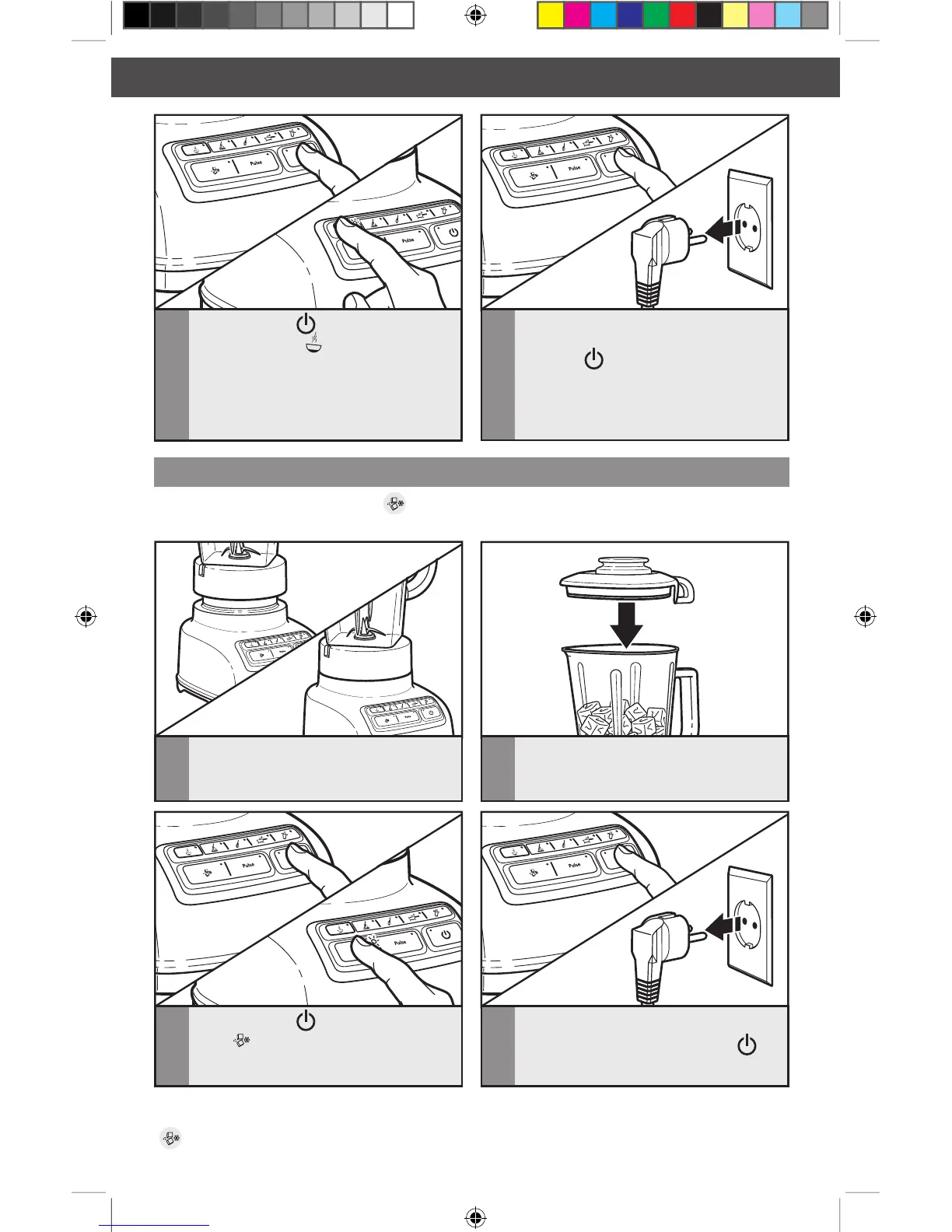
Using the Crush Ice function
4
When the timed function is finished, the
Blender will stop. Press POWER
( )
to turn off. Unplug Blender before
removing the pitcher.
3
Press POWER ( ), then press CRUSH
ICE
( ). The CRUSH ICE function is
a timed function.
1
Before operating the Blender, make sure
the pitcher is properly positioned on
the base.
2
Put ingredients into the pitcher and
firmly place lid.
Use up to 1/2 tray
of cubed ice.
Your Blender offers a CRUSH ICE ( ) function. When selected, the Blender will automatically
pulse for 30 seconds at staggered intervals at the optimal speed for crushing ice or other ingredients.
TIP: Process up to 1/2 standard ice cube tray or 6 to 7 standard ice cubes at a time.
Occasional stirring with a spatula will be helpful only when Blender is off. The CRUSH ICE
(
)feature has been optimized to crush and chop ice without adding any liquid ingredients.
3
Press POWER ( ), then press the
HOT FOODS ( ) button. The
indicator light above the Hot Foods
button will light up. The Hot Foods
feature starts at a low speed and slowly
ramps up to higher speeds over 90
seconds to avoid splashing of hot liquids.
4
When the Hot Foods function is
finished, the Blender will stop. Press the
POWER
( ) button to turn off. Unplug
Blender before removing the pitcher.








 To Next Page