38
2
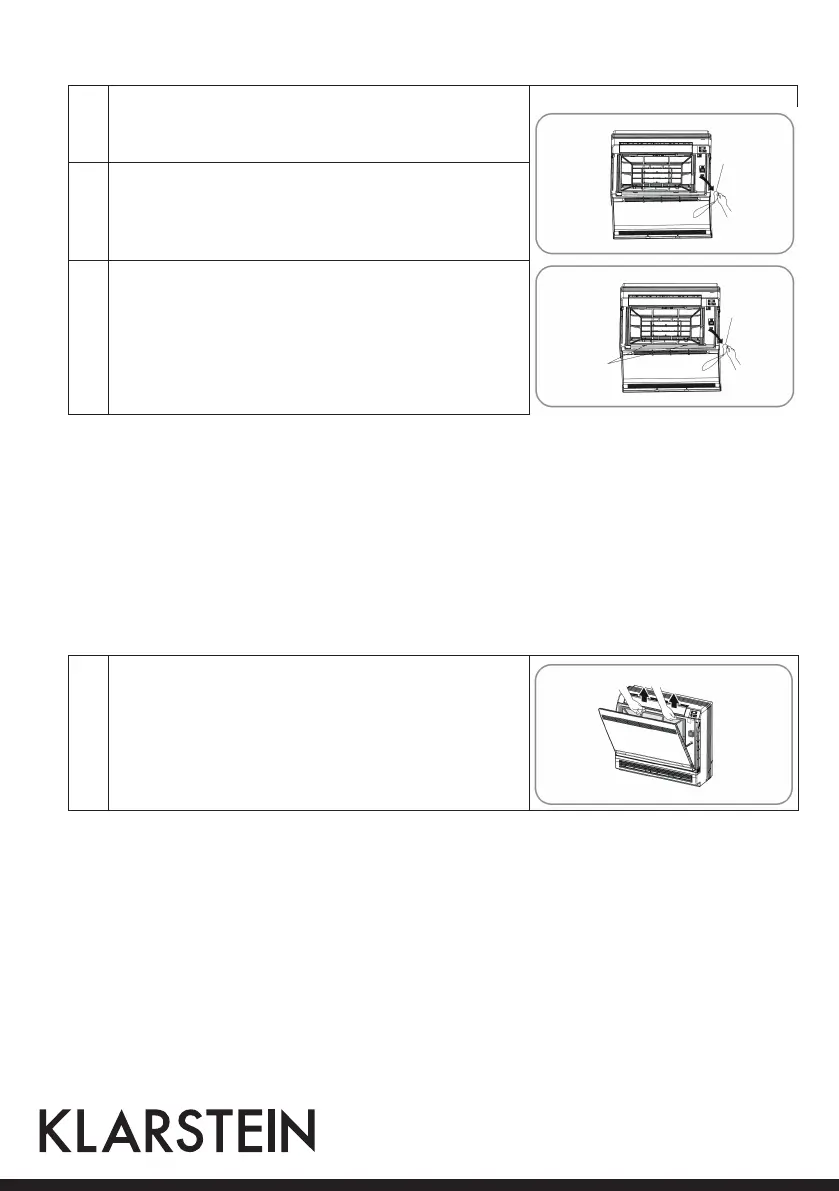
Remove the front panel: Remove the string. Allowing the
front panel to fall forward will enable you to remove it.
3
Clean the front panel: Wipe it with a soft cloth soaked in wa-
ter. Only neutral detergent may be used. In case of washing
the front panel with water,dry it with cloth, dry it up in the
shade after washing.
4
Attach the front panel: Insert the front panel into the
grooves of the unit (3 places). Attach the string to the right,
inner-side of the front grille. Close the panel slowly.
Important Hints on Cleaning
• Don’t touch the metal parts of the indoor unit. If you touch those parts, this may cause an injury.
• When removing or attaching the front panel, use a robust and stable stool and watch your steps carefully.
• When removing or attaching the front panel, support the panel securely with hand to prevent it from falling.
• For cleaning, do not use hot water above 40°C, benzine, gasoline, thinner, nor other volatile oils, polishing
compound, scrubbing brushes, nor other hand stuff.
• After cleaning, make sure that the front panel is securely fixed.
Cleaning the Filters
1
• Open the front panel.
• Remove the air filter: Press the claws on the right and left
of the air filter down slightly, then pull upward.
• Take off the Titanium Apatite Photocatalytic Air-Purify-
ing Filter: Hold the tabs of the frame, and remove the
claws in 4 places.
String
String
Place front
panel in
grooves.



 To Next Page