EasyManua.ls Logo

klover SOFT 80 - Support Panel

klover SOFT 80
57 pages
Print Icon
To Next Page IconTo Next Page
To Previous Page IconTo Previous Page
Loading...
18
SOFT 80, SOFT 100 PELLET-BURNING STOVE
EN - Rev. 1.0
Support panel
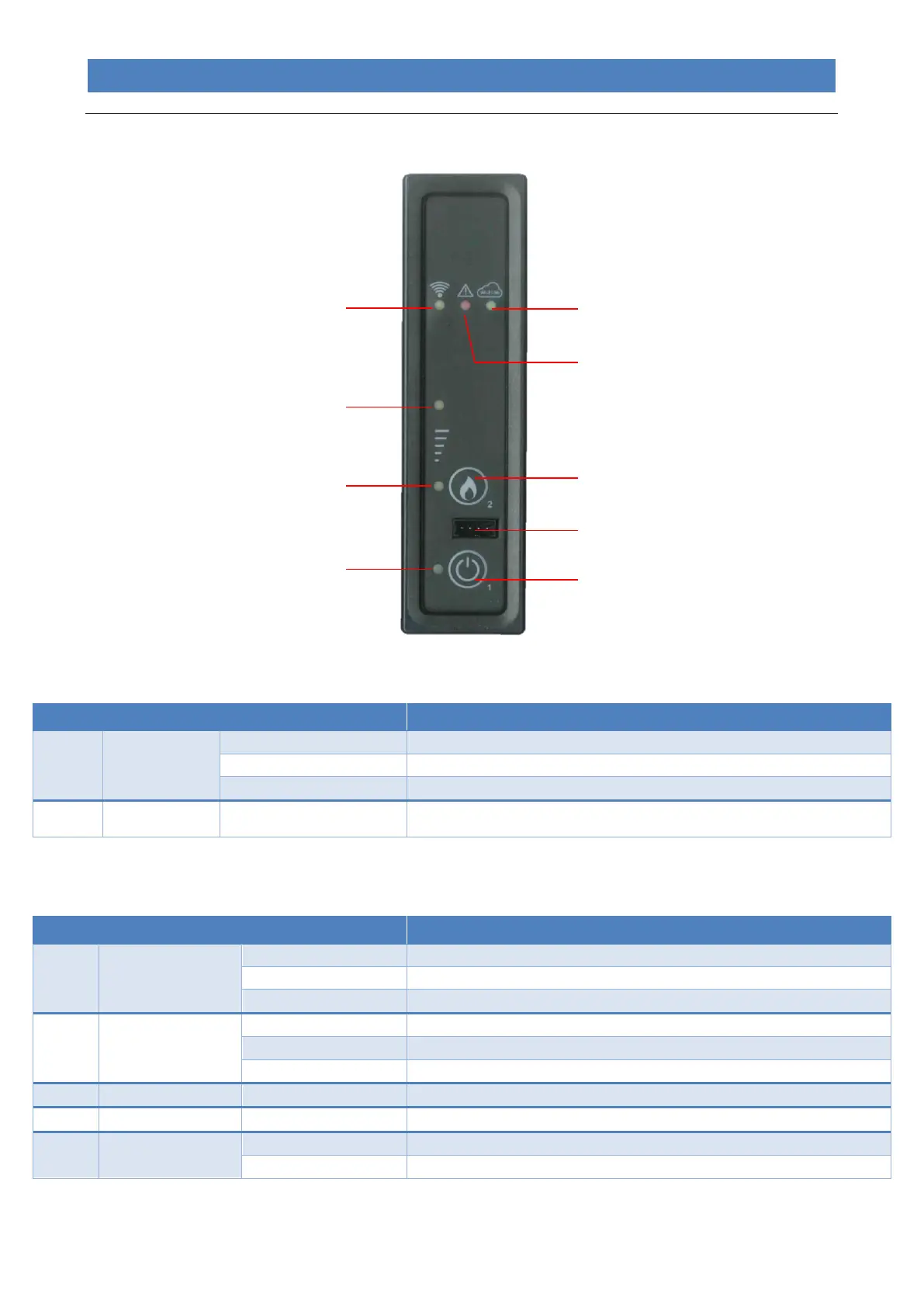
The underlying table describes the operation of the buttons on the remote control.
Button
Description
Mode
Action
1
ON/OFF
In work mode...
Switches the appliance off when pressed for 2 seconds.
In off mode...
Switches the appliance on when pressed for 2 seconds.
In alarm lock mode...
Disengages the alarm.
2
POWER
Whenever pressed...
Allows for modifying the “SET OUTPUT” working power, by selecting among 3
available power levels (1, 3 or 5).
The underlying table describes the operation of the LEDs present on the support panel.
LED
Description
Status
Action
1
ON/OFF
Off
The appliance is off.
Flashing
The appliance is switching off.
Lit
The appliance is on.
2 and 3
POWER STATUS
LED 2 Lit, LED 3 Off
Power set-point set to 1
LED 2 Lit, LED 3 Lit
Power set-point set to 3
LED 2 Off, LED 3 Lit
Power set-point set to 5
4
RECEPTION
Lit
Switches on when the PCB receives a signal from the remote control.
5
ALARM
Lit
The appliance is in alarm mode.
6
WI-FI
Off
The appliance is not connected to a Wi-Fi network.
Lit
The appliance is connected to a Wi-Fi network.
Button 1 ON/OFF
Button 2 POWER
LED 6 WI-FI
LED 4 RECEPTION
LED 5 ALARM
LED 3 POWER STATUS
LED 2 POWER STATUS
LED 1 ON/OFF
Serial connection for remote
control

Other manuals for klover SOFT 80

Related product manuals