KMS MD35 manual
Version 4.16 48
3.2.4.1.16 Speed settings
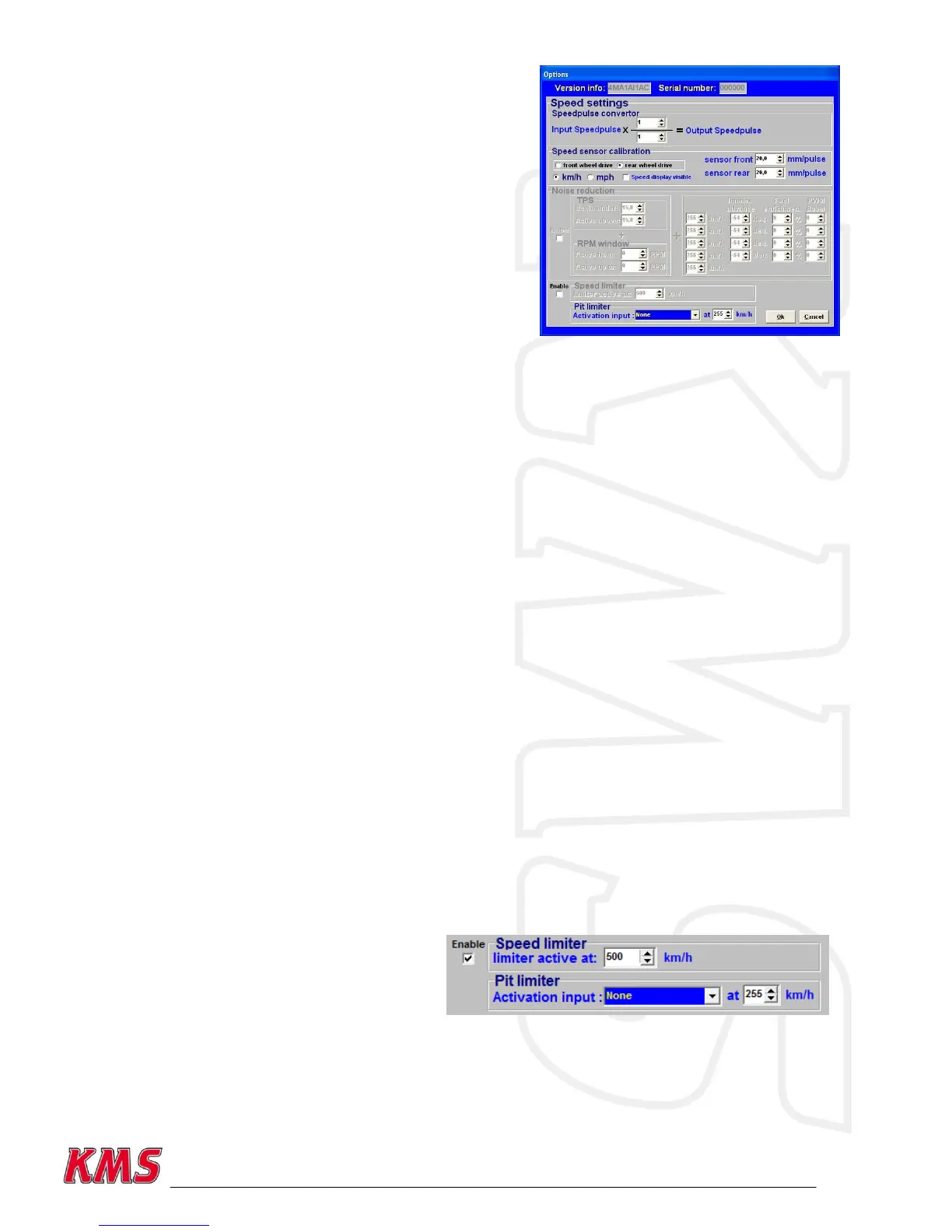
For the displaying of speed or the use of traction control
on the MD35 you have to define some settings in the
software. These functions can only be used in
combination with the KMS speed sensor -> CAN converter
4-channel!
3.2.4.1.16.1 Speedpulse convertor
When the incoming speedpulse (for example gearbox or
wheelspeed) is not matching the desired output
speedpulse for the tachometer it can be converted.
3.2.4.1.16.2 Speed sensor calibration
The calibration and display of the speed signals can be set here.
First the vehicle configuration must be defined as a front wheel drive car of rear wheel drive car.
This way, the KMS ECU knows which of the speed inputs is the real vehicle speed (non-driven
wheels) and how much slip the vehicle is having on the driven wheels.
You can choose to use the speed in km/h or mph. These settings apply for all the functions in the
management software.
Displaying of the speed inputs can be activated by enabling the box „Speed display visible‟. This
opens a small window in the right side of the main screen containing the four speed inputs, but also
the lowest vehicle speed and speed difference between the driven and non-driven wheels.
It‟s only possible to separately calibrate the speed sensors on the front and rear axle of the vehicle.
This means that if there are two sensors on one axle, these sensors must be mounted in the same
way and have the same trigger wheel to prevent an incorrect measurement of the speed on one side
of the vehicle. For example sensor 1: front left, sensor 2: front right, sensor 3: rear left and sensor
4: rear right, then sensor 1 and 2 must be mounted in the same way and have an equal trigger
wheel. The same goes for sensor 3 and 4.
To calibrate the speed sensors, users must specify the distance travelled by the vehicle for each
input speedpulse of the speed sensors. This can be easily calibrated if the circumference of the
tires and number of tooth of the speed sensor trigger wheel are known. For example when the tires
have a circumference of 2000 mm, and there are 20 tooth on the trigger wheel, the sensor has a
calibration value of 100 mm/pulse.
3.2.4.1.16.3 Noise reduction
Not available for MD35. MP24(i) only.
3.2.4.1.16.4 Speed limiter
It‟s possible to set a maximum speed limit
for the vehicle. The speed limiter must be
enabled to use it.
3.2.4.1.16.5 Pit limiter
There are five different activation inputs for the pit limiter to activate: Powershift, Launch control,
Analog aux 1 to 3. The pit limiter speed can be set between 0 and 255.


 To Next Page