KMS MD35 manual
Version 4.16 38
3.2.4.1.9 Boost control
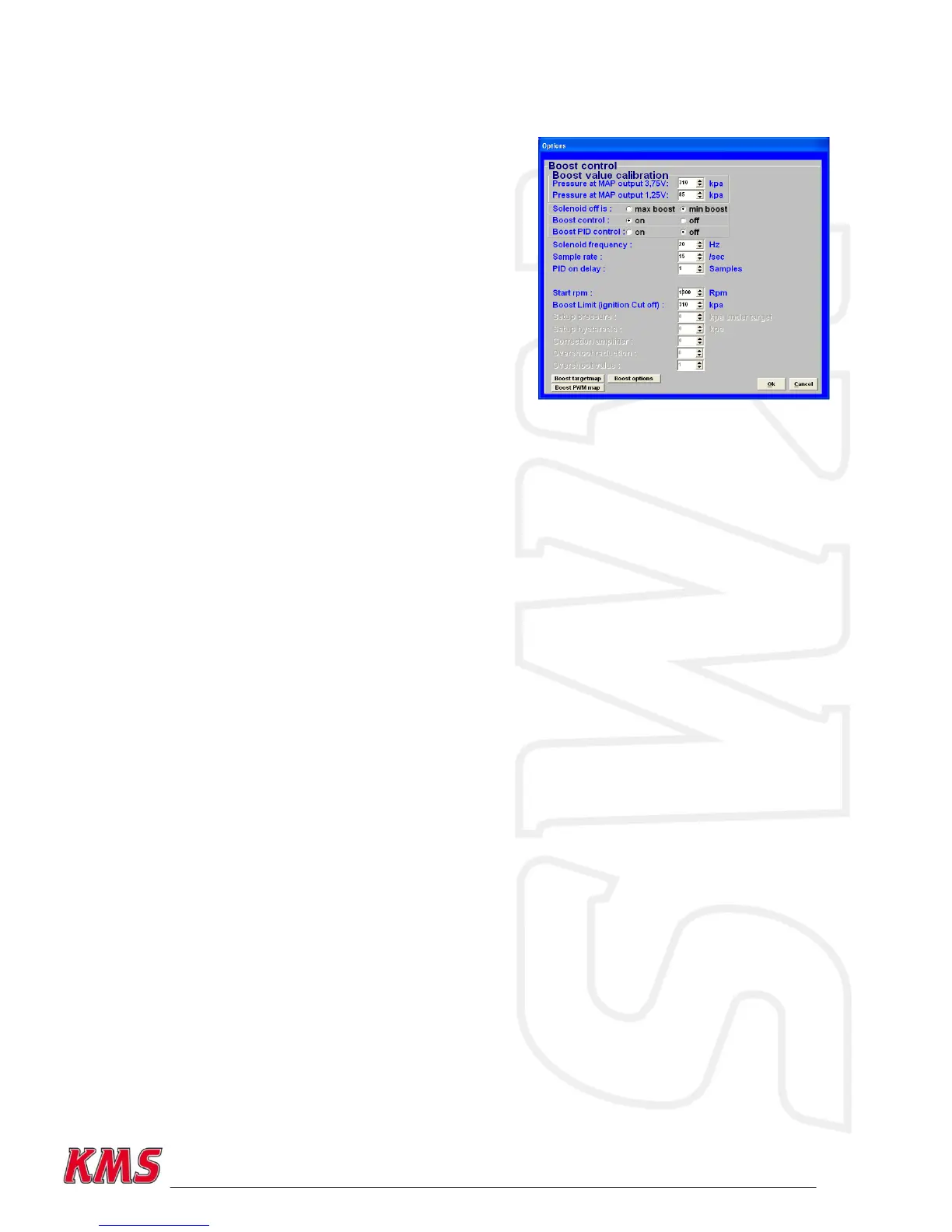
In this menu, the parameters for boost control can be
set.
Boost value calibration:
First of all, the boost pressure readout has to be
calibrated so that the boost pressure indicated in the
communication bar corresponds to the actual pressure.
Boost at MAP output 3.75 V:
For inputting the boost pressure (kpa) at a MAP sensor
(manifold pressure sensor) output voltage of 3.75 V.
These calibration values are included with the KMS MAP
sensors.
Boost at MAP output 1.25 V:
For inputting the boost pressure (kpa) at a MAP sensor (manifold pressure sensor) output voltage of
1.25 V. These calibration values are included with the KMS MAP sensors.
Solenoid off is:
If there is no current to the solenoid valve, the boost pressure will adopt either minimum or
maximum pressure depending on the connection of the solenoid valve. Here you need to select the
correct control boxes.
Boost control (on/off):
Here you can decide to switch the boost control on or off. If the boost control is activated in the
hardware configuration, the boost pressure will be regulated by the PWM percentages in the PWM
table.
Boost PID control:
Here you can activate the control to not only use the fixed PWM values from the PWM chart, but PID
control calculates an „error‟ value between the measured and the target boost. The controller
attempts to minimize the „error‟ by adjusting the solenoid position untill the desired boost is
reached.
This control will only reach the set target pressure if the throttle position value is >15. If the
throttle position value is not 15, this control will not be active. However, if the boost pressure
exceeds the target pressure in spite of the specified PWM values, the control will intervene to
prevent the boost pressure from increasing further.


 To Next Page