KMS MD35 manual
Version 4.16 44
3.2.4.1.11 AUX 1
The system features three extra outputs. These extra
outputs can be separately activated via direct ground (up
to 1A) or via relay. They can be used for shift indicators,
water injection, cooling fan, spray bar, etc.
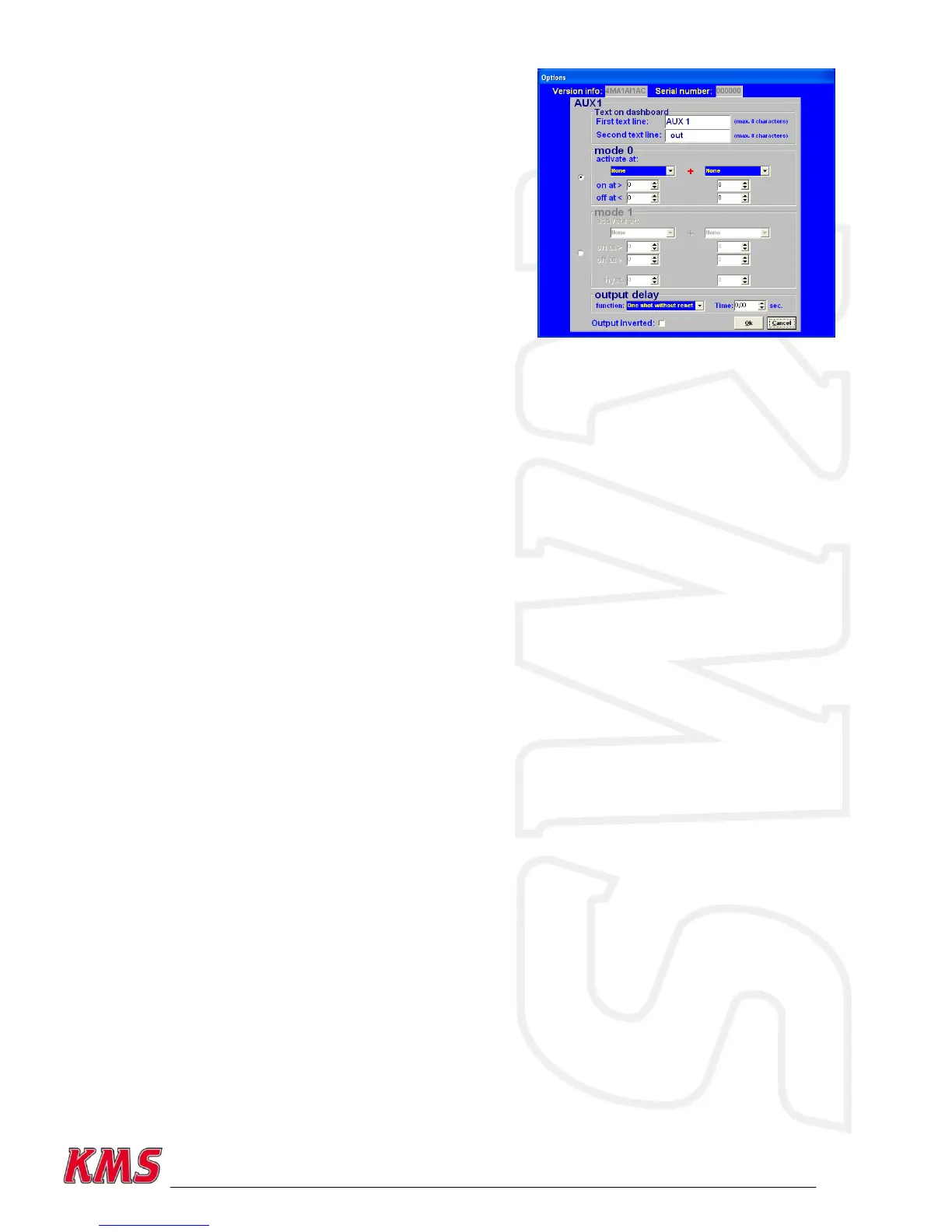
3.2.4.1.11.1 Text on dashboard
In these two rows you can set the name or function of
the aux output. The name or function will be visible in
the communication bar of the main screen. Both text
lines have a maximum of eight characters.
3.2.4.1.11.2 Mode 0
In the dropdown menu‟s various criteria can be selected to activate the aux output. There is a
choice of several combinations including engine speed, throttle position, boost pressure, analog
aux, oil pressure, lambda, water temp, air temp, powershift, launch, EGT, speed and speed
difference. If 'none' is selected, this channel will be ignored. The „on at >‟ values should be
exceeded for the AUX output to activate. When the criteria parameters drop below the preset „off
at <‟ values, the aux output will deactivate. An example is a cooling fan (water temp) that activates
(on at >) at 88° Celsius and deactivates (off at <) at 85° Celsius.
3.2.4.1.11.3 Mode 1
Mode 1 functions a lot like mode 0, except for two things. The aux output will deactivate when the
criteria parameters exceed the preset „off at >‟ values.
It‟s also possible to set a hysteresis for both criteria. This means that the aux output can also be
deactivated when the criteria parameters drop below the hysteresis and „on at >‟ values. The
advantage of this is that the output does not need to be switched on and off unnecessarily. For
example a cam switch which activates above (on at >) 2000 rpm and deactivates above (off at >)
5000 rpm, but also deactivates if the engine rpm drops below 1800 rpm (in case of a 200 rpm
hysteresis).
3.2.4.1.11.4 Output delay
The aux output can also be delayed using multiple timing possibility‟s. If the time is set to 0, the
aux output doesn‟t take the timer into effect. The duration of the timer can be set to one
hundred‟s of seconds in the time box. There are five possible timers which can be chosen.
One shot without reset
The aux output (aux pin in the graph) will be activated when the criteria (aux result) that have
been set for mode 0 or mode 1, are met/fullfilled. The aux output will stay active untill the timer
expires, regardless of the aux result.
See the following graph for more information.


 To Next Page