
 Need help?
Do you have a question about the Knox MedVault 2.5 Mini and is the answer not in the manual?
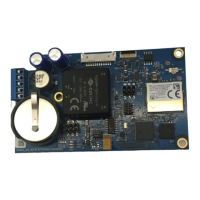
Details enhancements in the MedVault 2.5 circuit board, including automatic PIN updates and cloud integration.
Lists necessary tools like screwdrivers and wire cutters for the installation process.
Lists items included in MedVault 2.5 retrofit kits 91158 and 91160, such as cable ties and Kapton tape.
Advises on safety measures, including wearing safety glasses and proper ESD wrist strap attachment.
Stresses the importance of not discarding serialized labels and matching them with the circuit board for correct identification.
Covers opening the MedVault, removing the tech key cover, and disconnecting power and coax connections.
Details unlocking the back cover, removing the back plate, and unplugging the Wi-Fi board.
Guides on disconnecting lead wires from the terminal block and removing tape from board connections.
Explains how to remove screws from the circuit board and unplug the ethernet connection.
Instructions on snipping the cable tie eyelet or standoff holding the wiring bundle.
Details attaching the ESD wrist strap and connecting the ethernet, keypad display, and IO connectors.
Covers applying Kapton tape to connectors and fastening the new board using specific screws.
Instructs on connecting wires to the terminal block and securing the reset switch wire with a cable tie.
Covers moving the antenna cable, installing the Tech Lock, reconnecting power, and fastening the back plate.
Guides on powering up the MedVault and setting up KnoxConnect, referring to a separate networking guide.
Explains how to remove the old label and attach the new serial number label to the front of the MedVault.
Describes the optional step to attach an antenna for Wi-Fi Ready units to achieve Wi-Fi Standard.
 General
| Brand | Knox |
|---|---|
| Model | MedVault 2.5 Mini |
| Category | Motherboard |
| Language | English |

 To Next Page
