Chapter 3 Basic operation MDC-2200/2500 Series
0093125002-04 3-10
Measure distance/bearing (PI: Parallel index line)
This function is used to display a parallel straight line from own ship or optional location and measure
distance and bearing.
The number to be displayed of parallel index line is selectable from normal (number of the rings of the
range to be used), 1 to 7 lines.
Display single side (default) or both sides of screen can be switched over.
- Parallel index line can be shifted quickly when being operated by pressing the knob.
(For MDC-2200)
EBL2/VRM2 or Parallel index line is selectable to use in case for MDC-2200. It was set to EBL2/VRM2
in ex-factory.
Set up to Parallel index line from marker selection menu to use Parallel index cursor.
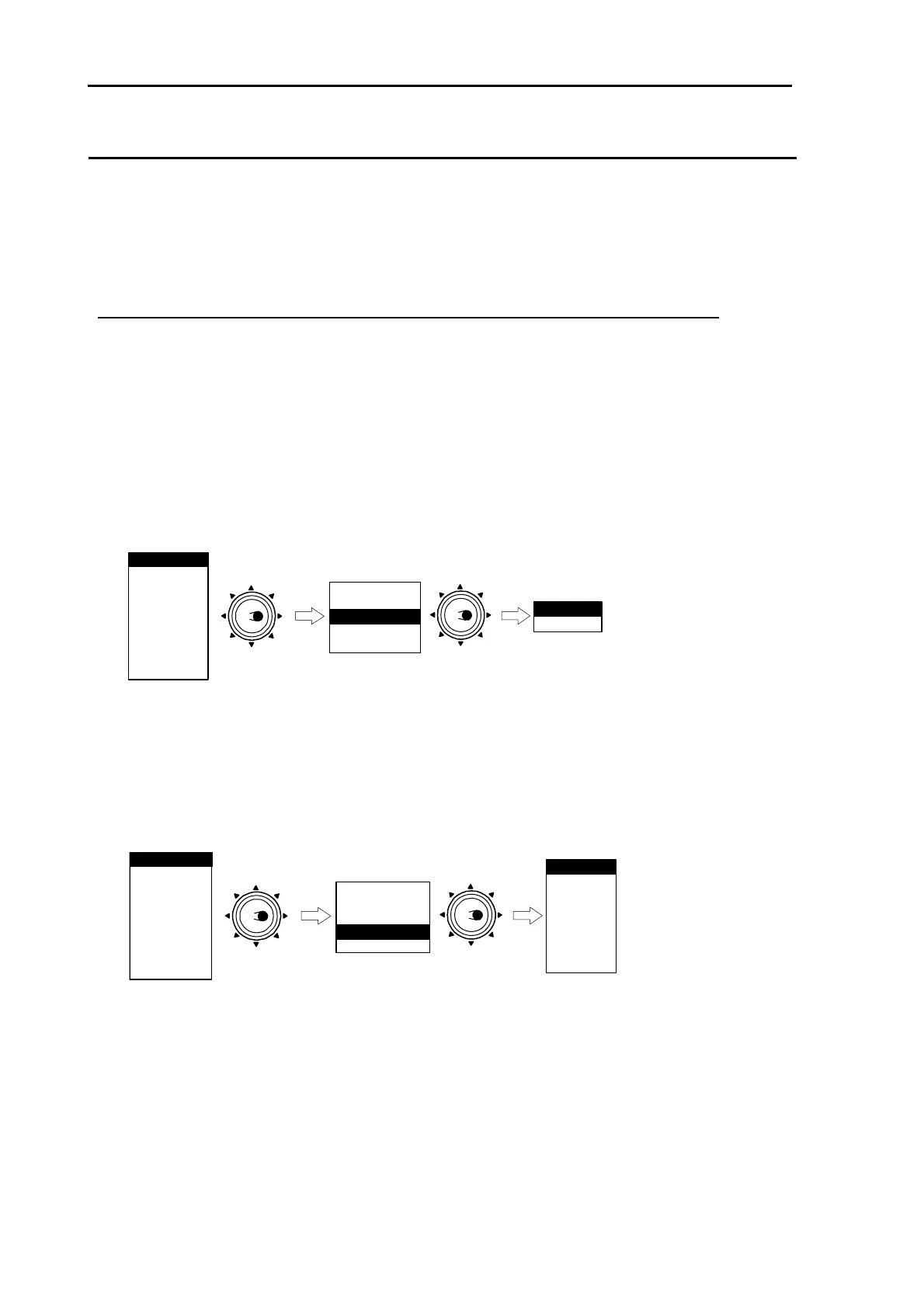
1 Setting of Parallel index cursor
Press [MENU] key to display “Menu”.
To proceed “MARKER” =>”MARKER SEL”, set up EBL2/VRM2 to the PI, then press [ENT] key.
NAV
ALARM
CHART
DATADISP
STARTUP
ECHO
RANGE RINGS
BRG TRUE/REL
CURSOR
EBL2/VRM2
MARKER
Move to
the right
PARALLEL INDEX
PI
ATA/EPA
MARKER SEL**
**:MARKER SEL is provided for MDC-2200 series onl
* : Displayed at installation ofAIS unit (optional).
AIS*
Move to
the right
y.
2 Display line number setting
Press [MENU] key to display “Menu”.
To proceed “MARKER” => “PARALLEL INDEX”, then select display number and press [ENT] key.
NAV
ALARM
CHART
DATADISP
STARTUP
ECHO
RANGE RINGS
BRG TRUE/REL
CURSOR
NORMAL
MARKER
Move to
the right
PARALLEL INDEX
1
2
3
4
5
6
7
ATA/EPA
MARKER SEL**
**:MARKER SEL is provided for MDC-2200 series onl
* : Displayed at installation of AIS unit (optional).
AIS*
Move to
the right
y.
In Normal, line number is equal to number of Range ring.
Designated number of PI is displayed when 1 – 7 value is selected.
3 PI is displayed by pressing [EBL2] or [VRM2].
4 Bearing is displayed middle lower left of the screen, and distance between PI line is displayed
middle lower right of the screen during PI display.







 To Next Page