.
EXPLANATION OF COMPONENTS
JOYSTICK (STEERINTG, DIRECTIONAL AND GEAR SHIFT LEVER)
(PCCS lever Type R)
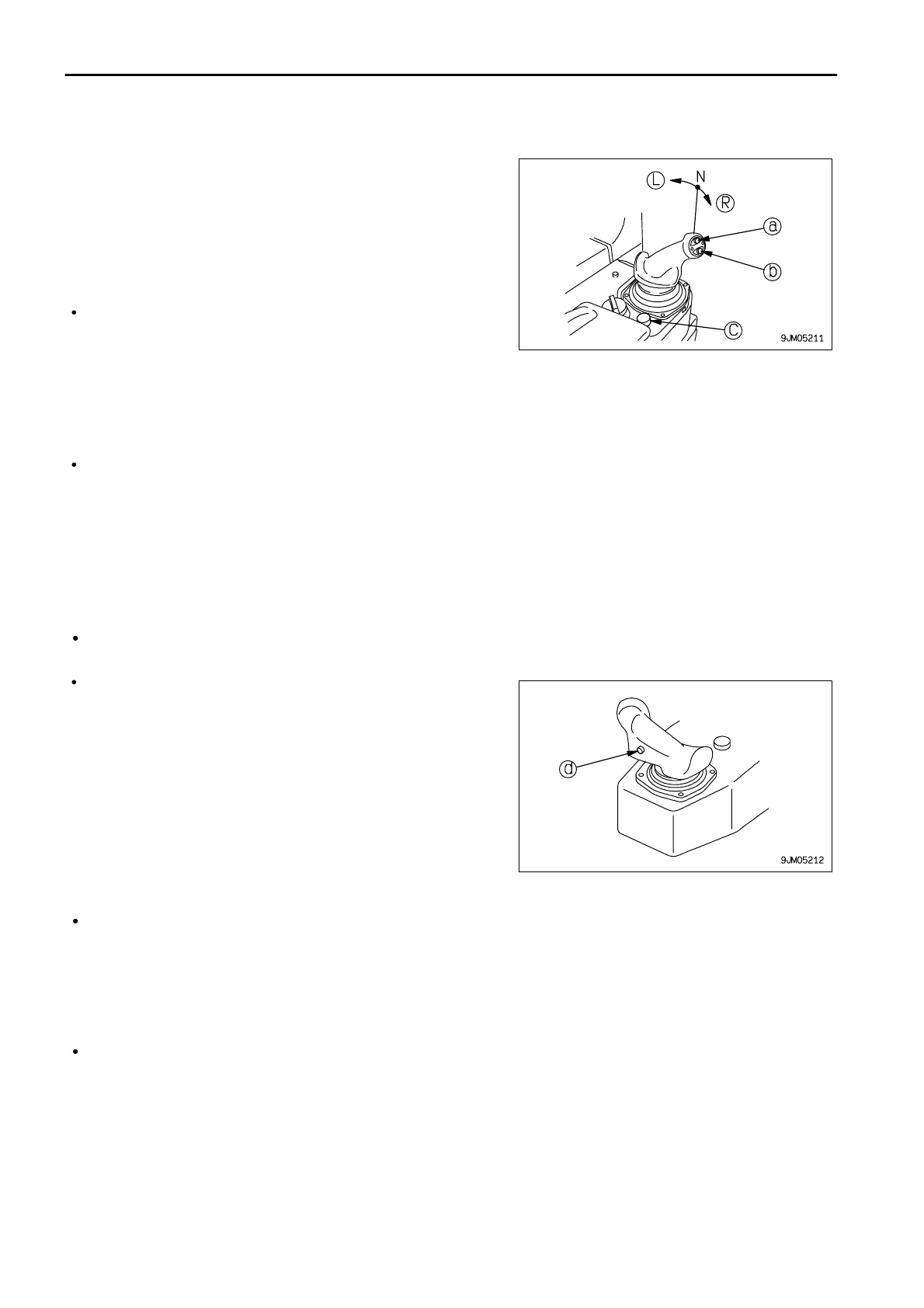
This lever (2) is used to switch between forward and reverse to
steer and gear shift the machine or carry out counter rotation turns.
PCCS: Palm command control system
The direction of travel (FORWARD, REVERSE) is selected by
pressing switch (a) or switch (b).
Press switch (c) to return to neutral.
FORWARD switch (a): Press once to set to FORWARD
REVERSE switch (b): Press once to set to REVERSE
NEUTRAL switch (c): Press once to set to NEUTRAL
(L)Left turn
(R)Right turn
With the switch operated to the front or rear, operate the lever partially to the left or right to turn the machine. The
machine will turn gradually in the same direction as the lever is operated.
If the lever is operated fully to the left or right, the machine will turn in a small radius.
If the lever is released when steering the machine, the lever will return to the (N) position and the machine will
be returned to straight movement.
Press switch (d) to shift gear when traveling in forward or reverse.
For details of the maximum speed for each speed range, see
SPECIFICATIONS (5-2).
Shift switch (d): Each time switch is pressed, speed range changes
1st → 2nd → 1st
The speed range being used is displayed on the monitor panel according to the gearshift operation.
<Example>
Neutral: N is displayed on the display panel.
FORWARD 1st: F1 is displayed on the display panel.
REVERSE 2nd: R2 is displayed on the display panel.
When the parking lever is locked, P is displayed.
For details of the method of shifting gear according to the shift mode, see the "SHIFTING GEAR (PAGE 3-98)".
Shift mode selection means that the selected speed range is displayed at the N position before starting.



 To Next Page