V3F25/18 drive
Installation Instruction
© 2004 KONE Corporation AM-11.65.020
All rights reserved. 17 (42) (E) 2004-01-08
4.3 Setting the input information
4.3.1 Adjusting the tacho test potentiometer
4.3.2 Checking the MXTORQ
Step Action Note
1 Read the value of TAC (6_10)
parameter.
This voltage reading is negative (-).
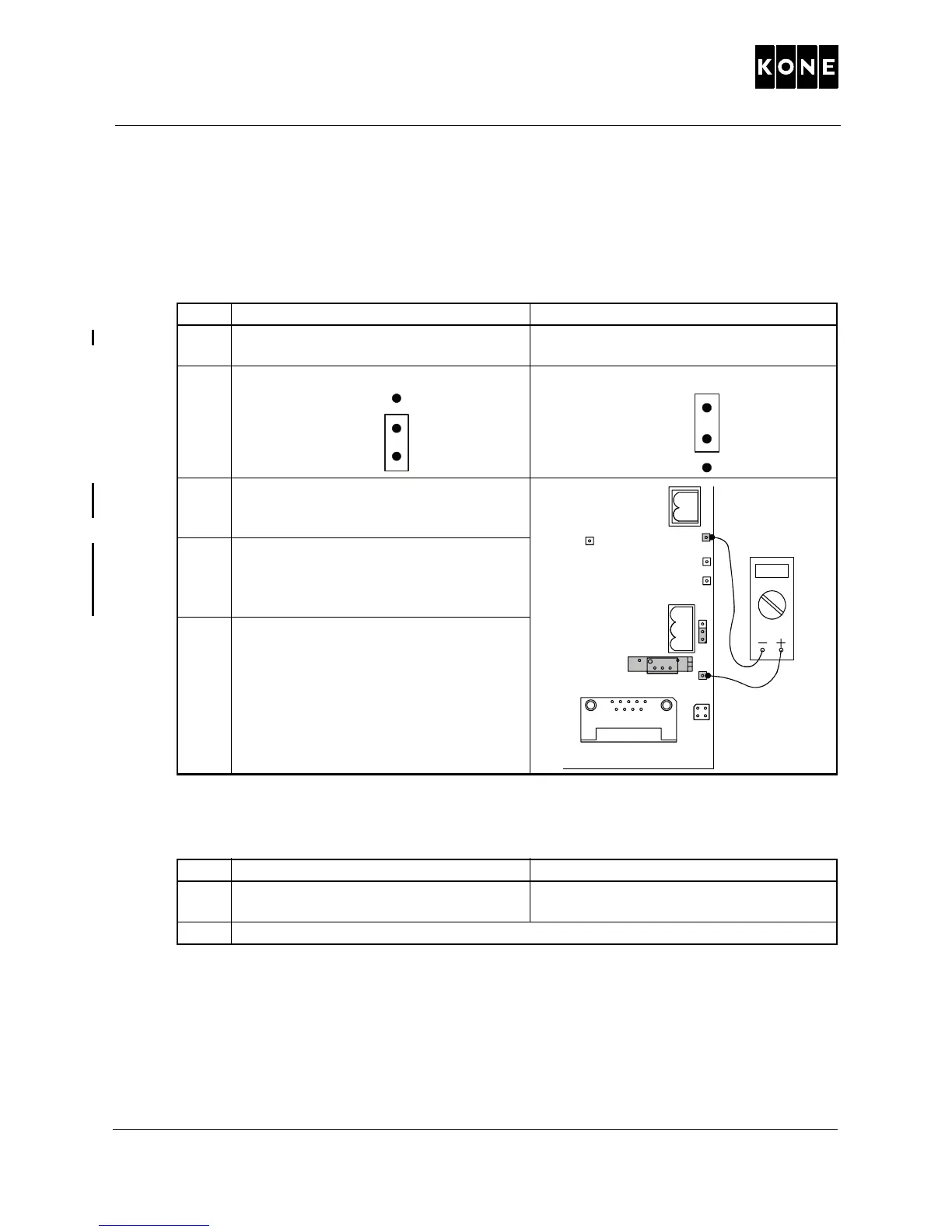
2 Set jumper S5 to the test position.
Test position: Normal position:
3 Measure the tacho-test-voltage by
connecting a meter between AGND (-)
and TAC (+).
4
Adjust the TACHO potentiometer until
the meter reads the same value as
shown in the read only parameter TAC
(6_10).
5
After the adjustment is done, reset
jumper S5 to normal position.
Step Action Note
1 Check the value of MXTORQ (6_9)
parameter (this is a “read only” value).
The correct value is between 1.00 and
4.90.
2 If the display shows -.--, recheck the drive parameter settings.
1
2



 To Next Page