E-6
(4) Touch “END.”
(5) Repeat the steps (1) to (6), “Measuring DF skew”
described on E-5, to check if the value of “Avg.
Value” falls within the specified range.
(6) Touch “END.”
(7) Touch “Exit” on the Service Mode screen.
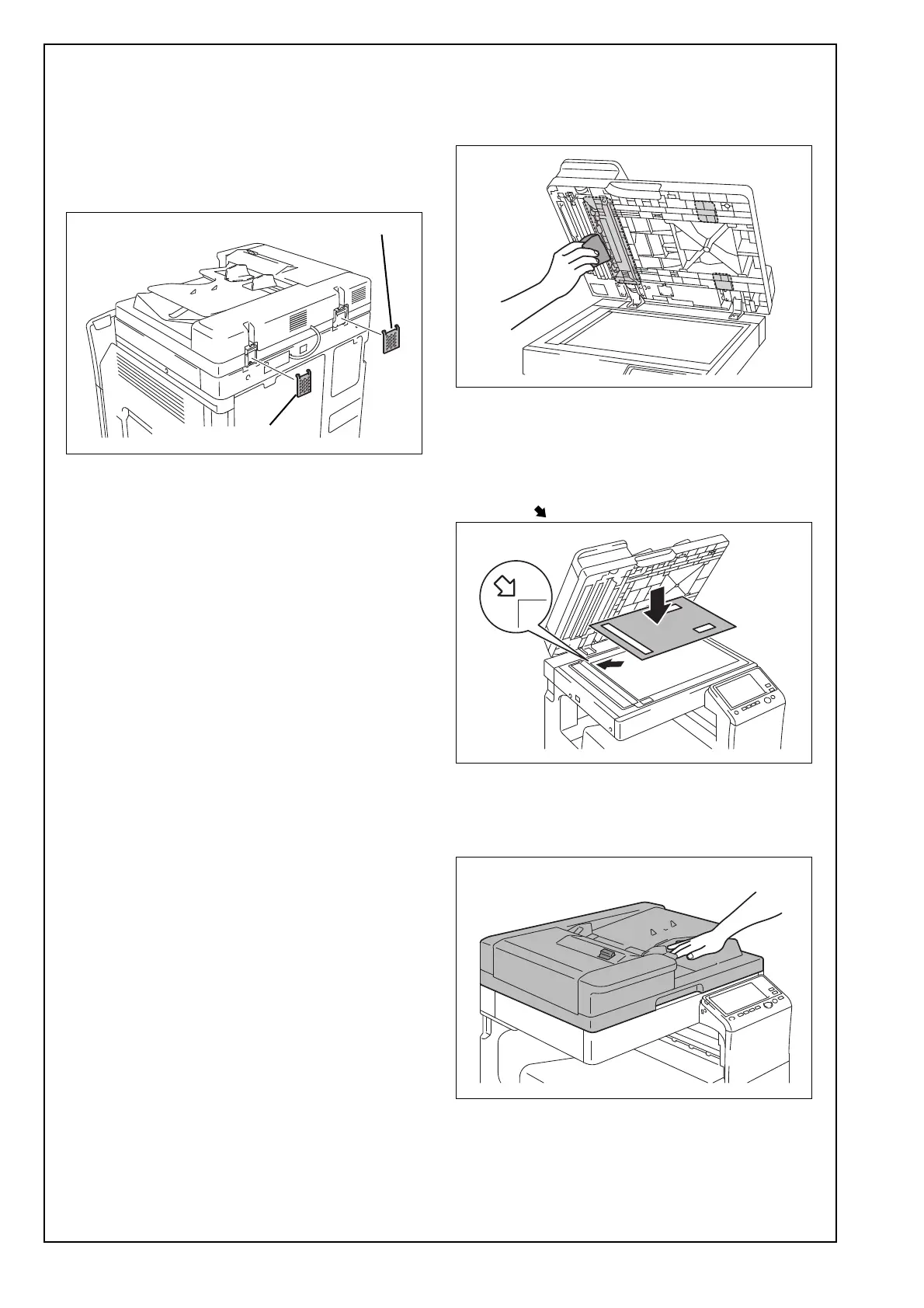
(8) Attach the two supplied hinge covers as shown
in the illustration.
(9) Tighten the mounting screw on the right hinge
that has been loosened in step (1) using a
screwdriver.
<Affixing the original mat>
(1) Open the Reverse Automatic Document Feeder.
(2) Using a cleaning pad dampened with alcohol,
wipe the area shown in the illustration.
(3) With the double-sided tape facing up, position
the original mat on the original glass as shown in
the illustration.
Note:
Place the original mat while pressing it up against
the mark at the left back of the original scale.
(4) Peel the backing paper off the double-sided tape
on the original mat.
(5) Close the Reverse Automatic Document Feeder
and press gently.
Hinge cover (large)
Hinge cover (small)













 To Next Page