22 Dimage scan launcher
DiMAGE Scan Launcher
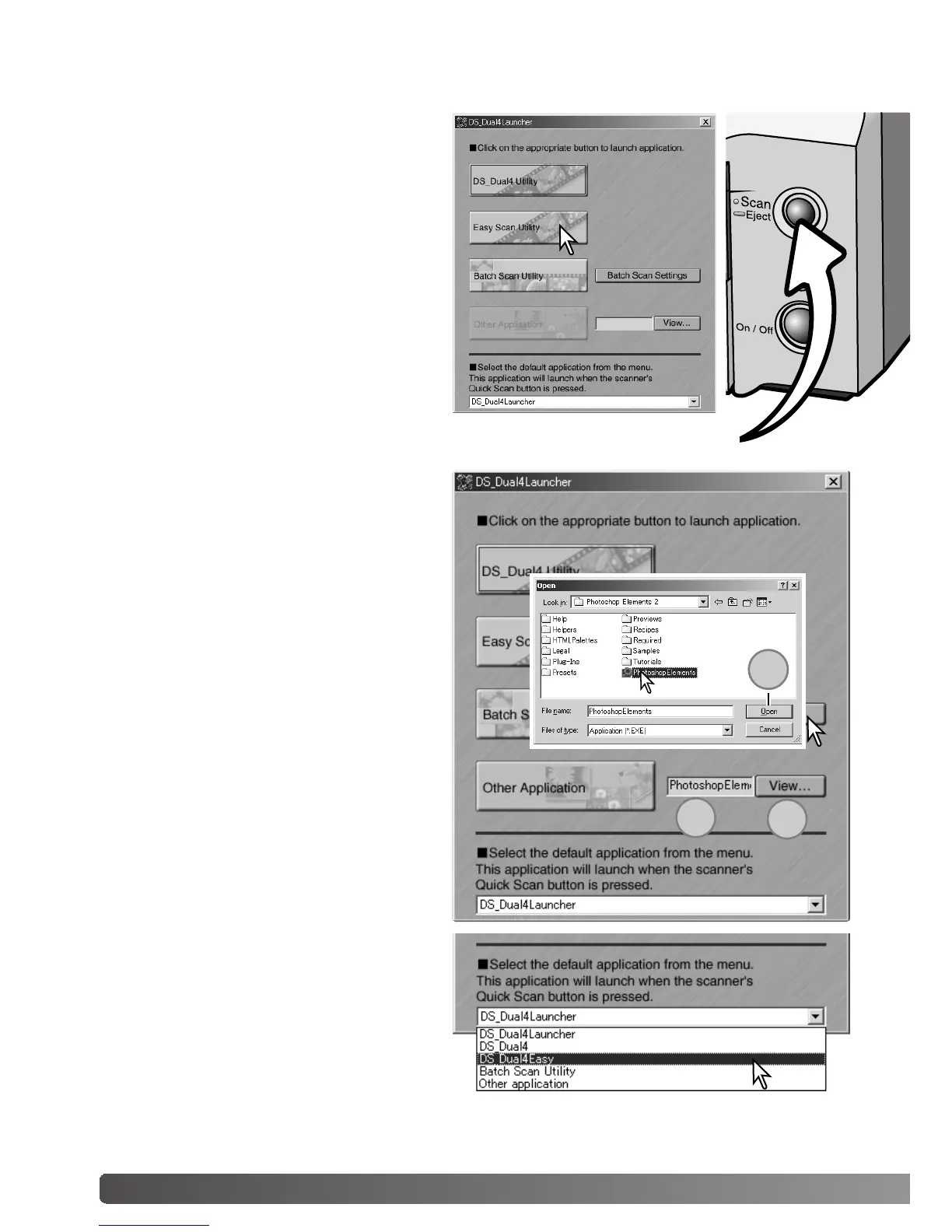
The Quick Scan button launches the
DiMAGE Scan applications. When the but-
ton is pressed, the launcher is displayed;
the button is disabled when a scanner
application is open. Simply click on one of
the launcher buttons to start the appropri-
ate application. There should be no holder
in the scanner. Refer to the following sec-
tions for more information on the use of the
applications:
DS Dual4 Utility - page 28
Easy Scan Utility - page 23
Batch Scan Utility - page 76
The launcher can be used to directly open
an image-processing application with
which the scanner will be used.
To specify the application, click the view
button (1); the open dialog box will be dis-
played. Locate and click on the application
to highlight it. Click the open button (2) to
complete the procedure; the name of the
application will be displayed in the launch-
er (3).
The Quick Scan button can be used to
launch a single application directly. Simply
select the application from the drop-down
menu at the bottom of the launcher; each
time the Quick Scan button is pressed, that
application will open along with the launch-
er.
Quick Scan button
2
3
1



 To Next Page
 Loading...







