220
Effects
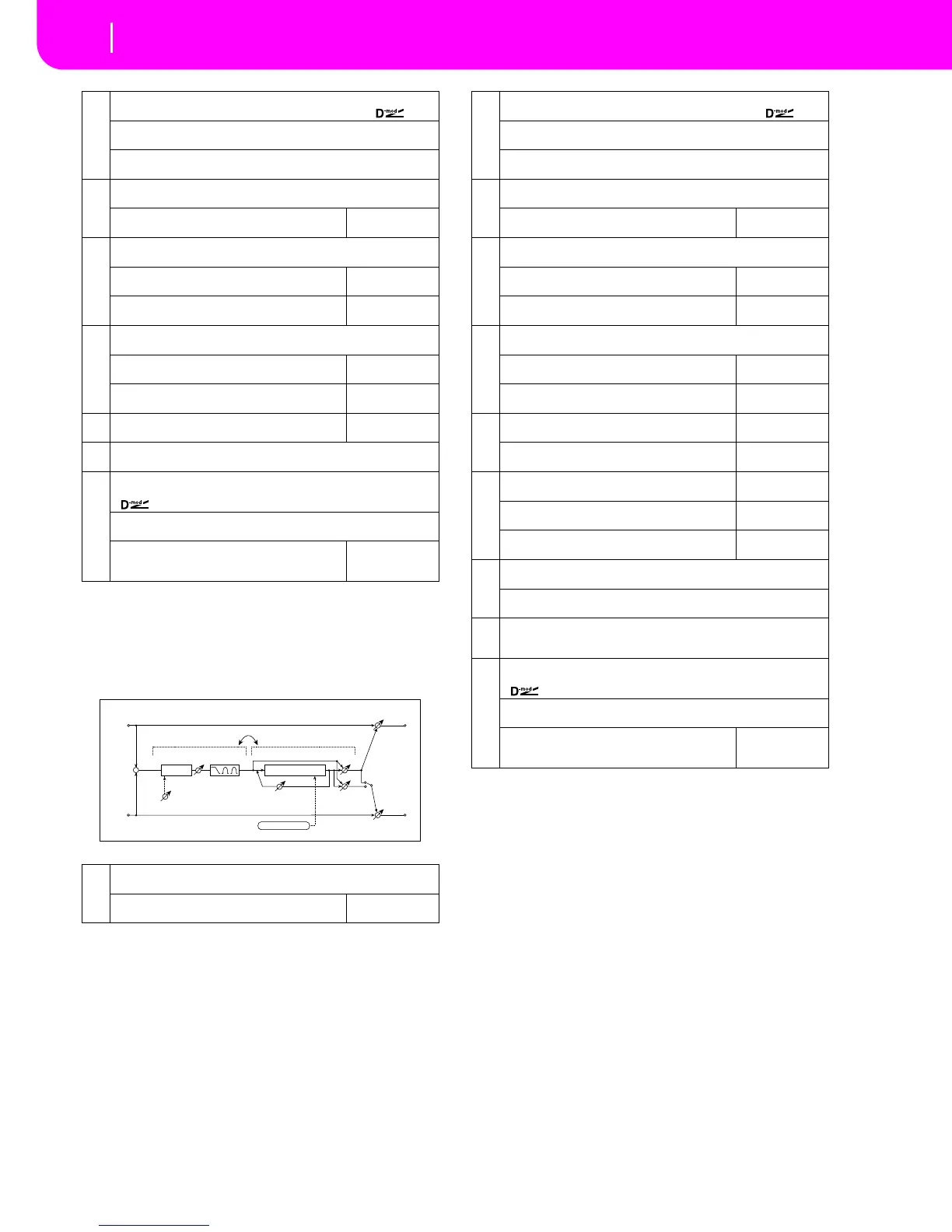
Mono – Mono Chain
080: OD/HG-ChoFl
(Overdrive/Hi.Gain – Chorus/Flanger)
This effect combines a mono-type overdrive/high-gain dis-
tortion and a chorus/flanger. You can change the order of the
effect connection.
b
[O] Output Level 0...50
Sets the overdrive output level
☞ Fx:006,
Src Off...Tempo
Selects the modulation source for the overdrive output level
Amt –50...+50
Sets the modulation amount of the overdrive output level
c
[O] Low Cutoff [Hz] 20...1.00kHz
Sets the center frequency for Low EQ (shelving type)
Gain [dB]
Table , “Sets the gain of Low EQ,” on page 176
–18...+18dB
d
[O] Mid1 Cutoff [Hz] 300...10.00kHz
Sets the center frequency for Mid/High EQ 1 (peaking type)
Q
Sets the band width of Mid/High EQ 1
0.5...10.0
☞ Fx:006
Gain [dB]
Sets the gain of Mid/High EQ 1
–18...+18dB
e
[O] Mid2 Cutoff [Hz] 500...20.00kHz
Sets the center frequency for Mid/High EQ 2 (peaking type)
Q
Sets the band width of Mid/High EQ 2
0.5...10.0
☞ Fx:006
Gain [dB]
Sets the gain of Mid/High EQ 2
–18...+18dB
f
[A] Amplifier Type
Selects the type of guitar amplifier
SS, EL84, 6L6
g
Routing OD→AMP, AMP→OD
Switches the order of the overdrive and amp simulation connection
h
Wet/Dry Dry, 1:99...99:1, Wet
Table , “Sets the balance between the effect and dry sounds,” on page 175
Src Off...Tempo
Table , “Selects the modulation source of the effect balance,” on page 175
Amt
Table , “Sets the modulation amount of the effect bal-
ance,” on page 175
–100...+100
a
[O] Drive Mode Overdrive, Hi-Gain
Switches between overdrive and high-gain distortion
Drive
Sets the degree of distortion
1...100
☞ Fx:006
Left
Right
Wet / Dry
Wet / Dry
Wet: Mono In - Stereo Out / Dry: Stereo In - Stereo Out
+
Routing
Chorus/Flanger
Chorus/Flanger
Feedback
LFO: Tri / Sine
Cho/Flng Wet / Dry
Normal
Wet Invert
Output Mode
–
+
Overdrive / Hi-Gain
3 Band PEQ
Output Level
Mode: Overdrive / Hi-Gain
Drive
Driver
b
[O] Output Level 0...50
Sets the overdrive output level
☞ Fx:006,
Src Off...Tempo
Selects the modulation source for the overdrive output level
Amt –50...+50
Sets the modulation amount of the overdrive output level
c
[O] Low Cutoff [Hz] 20...1.00kHz
Sets the center frequency for Low EQ (shelving type)
Gain [dB]
Table , “Sets the gain of Low EQ,” on page 176
–18...+18dB
d
[O] Mid1 Cutoff [Hz] 300...10.00kHz
Sets the center frequency for Mid/High EQ 1 (peaking type)
Q
Sets the band width of Mid/High EQ 1
0.5...10.0
☞ Fx:006
Gain [dB]
Sets the gain of Mid/High EQ 1
–18...+18dB
e
[O] Mid2 Cutoff [Hz] 500...20.00kHz
Sets the center frequency for Mid/High EQ 2 (peaking type)
Q
Sets the band width of Mid/High EQ 2
0.5...10.0
☞ Fx:006
Gain [dB]
Sets the gain of Mid/High EQ 2
–18...+18dB
f
[F] LFO Frequency [Hz]
Sets the LFO speed
0.02...20.00Hz
LFO Waveform
Selects LFO Waveform
Triangle, Sine
g
[F] Delay Time [msec]
Sets the delay time
0.0...50.0msec
Depth
Sets the depth of LFO modulation
0...100
Feedback
Sets the feedback amount
–100...+100
☞ Fx:020
h
[F] Cho/Flng Wet/Dry –Wet...–2:98, Dry, 2:98...Wet
Sets the effect balance of the chorus/flanger
☞ Fx:010, 020
Output Mode Normal, Wet Invert
Selects the output mode for the chorus/flanger
☞ Fx:067
i
Routing OD → FLNG, FLNG → OD
Switches the order of the overdrive and chorus/flanger connection
☞ Fx:067
j
Wet/Dry Dry, 1:99...99:1, Wet
Table , “Sets the balance between the effect and dry sounds,” on page 175
Src Off...Tempo
Table , “Selects the modulation source of the effect balance,” on page 175
Amt
Table , “Sets the modulation amount of the effect bal-
ance,” on page 175
–100...+100


 To Next Page
 Loading...