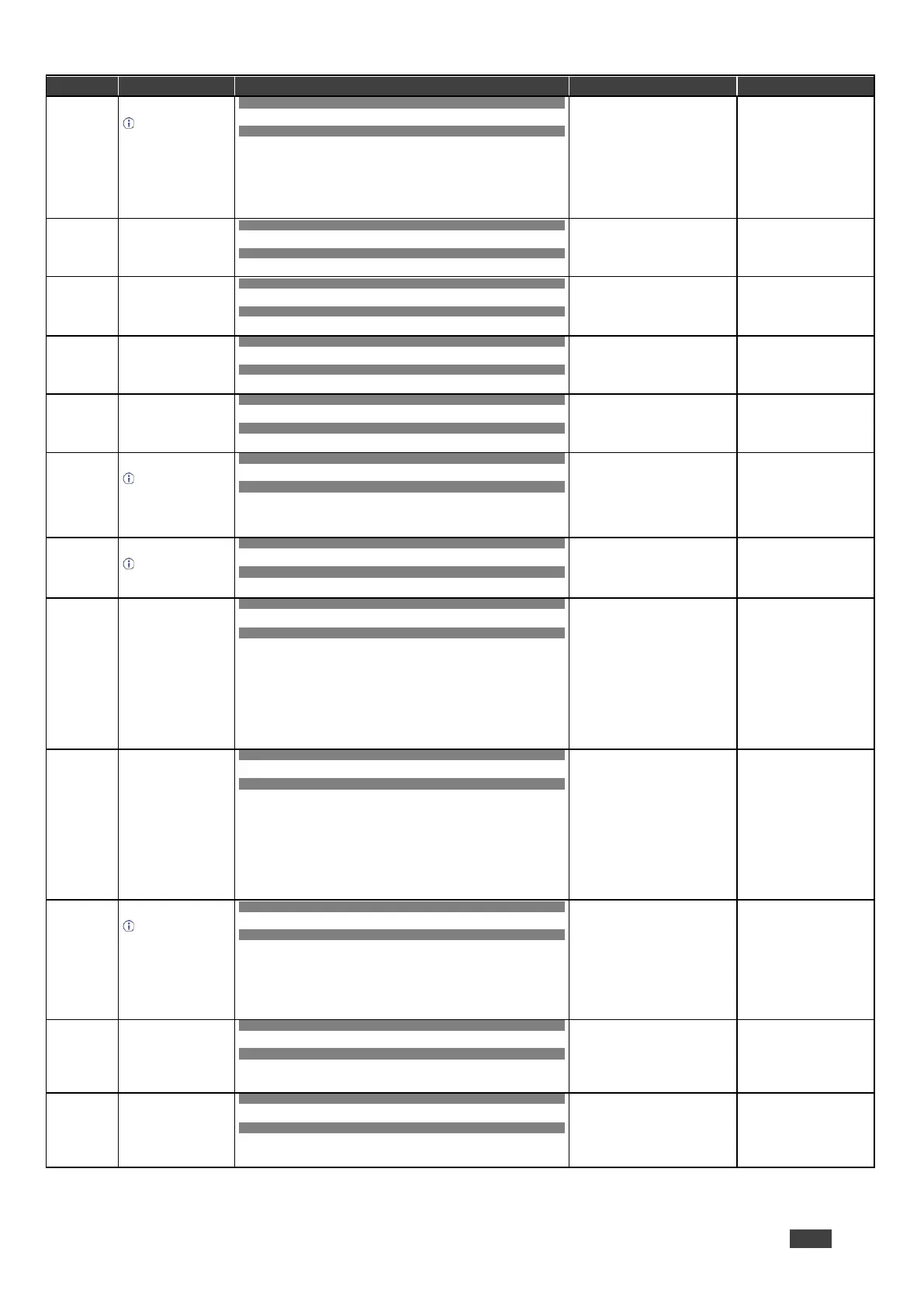
Get the image size.
Gets the image
properties of the selected
scaler.
COMMAND
#IMAGE-PROP? P1,…,P6<CR>
FEEDBACK
~nn@IMAGE-PROP P1 ,P2…<CR><LF>
scaler = 1
status – Status
0 = Over scan
1 = Full
2 = Best fit
3 = Pan scan
4 = Letter box
5 = Under 2
6 = Under 1
7 = Follow in
Get the image size:
#IMAGE-PROP? 1<CR>
COMMAND
#LOCK-FPLock/Unlock<CR>
FEEDBACK
~nn@LOCK-FP Lock/Unlock<CR><LF>
Lock/Unlock – On/Off
0 = Off unlocks front panel
1 = On locks front panel
Unlock front panel:
#LOCK-FP 0<CR>
Get the front panel lock
state.
COMMAND
#LOCK-FP? <CR>
FEEDBACK
~nn@LOCK-FP Lock/Unlock<CR><LF>
Lock/Unlock – On/Off
0 = Off unlocks front panel
1 = On locks front panel
Get the front panel lock state:
#LOCK-FP?<CR>
COMMAND
#LOUDNESSchannel,loudness<CR>
FEEDBACK
~nn@LOUDNESSchannel,loudness<CR><LF>
channel = 1
loudness – On/Off
0 = Off
1 = On
Set audio loudness:
#LOUDNESS1,1<CR>
COMMAND
#LOUDNESS?channel<CR>
FEEDBACK
~nn@LOUDNESSchannel,loudness<CR><LF>
channel = 1
loudness – On/Off
0 = Off
1 = On
Get audio loudness:
#LOUDNESS?1<CR>
Set the microphone gain.
Sets the microphone
input audio gain.
COMMAND
#MIC-GAIN P1,P2,P3<CR>
FEEDBACK
~nn@MIC-GAIN P1,P2,P3<CR><LF>
P1 = 0
P1 – Mic number
0 = Mic 1
1 = Mic 2
P3 – Level = 0 to 100
++ increase current value
– decrease current value
Set mic 1 gain to 35:
#MIC-GAIN 0,0,35<CR>
Get the microphone gain.
Gets the microphone
input audio gain.
COMMAND
#MIC-GAIN? P1,P2<CR>
FEEDBACK
~nn@MIC-GAIN P1,P2,P3<CR><LF>
P1 = 0
P1 – Mic number
0 = Mic 1
1 = Mic 2
P3 – Level = 0 to 100
Get the mic 2 gain:
#MIC-GAIN? 0,1<CR>
Set mic talkover
parameters.
COMMAND
#MIC-TLKchannel,P1,value<CR>
FEEDBACK
~nn@MIC-TLK channel,P1 ,value<CR><LF>
channel = 0
P1 – Parameter setting
0 = Depth
1 = Trigger
2 = Attack time
3 = Hold time
4 = Release time
value – P1 value (in corresponding
to P1 units)
Depth: 0-100%
Trigger: 0-100 (-60dB to 40dB)
Attack time/Hold time/Release time:
0-200 (0 to 20sec)
Set mic depth to 50:
#MIC-TLK 0,0,50<CR>
Get mic talkover
parameters.
COMMAND
#MIC-TLK? channel,P1<CR>
FEEDBACK
~nn@MIC-TLK channel,P1 ,value<CR><LF>
channel = 0
P1 – Parameter setting
0 = Depth
1 = Trigger
2 = Attack time
3 = Hold time
4 = Release time
value – P1 value (in corresponding
to P1 units)
Depth: 0-100%
Trigger: 0-100 (-60dB to 40dB)
Attack time/Hold time/Release time:
0-200 (0 to 20sec)
Get mic trigger value:
#MIC-TLK? 0,1<CR>
Get device model.
This command
identifies equipment
connected to VP-551X
and notifies of identity
changes to the connected
equipment. The Scaler
saves this data in
memory to answer
REMOTE-INFO requests.
COMMAND
#MODEL?<CR>
FEEDBACK
~nn@MODELmodel_name<CR><LF>
model_name – String of up to 19
printable ASCII chars
Get the device model:
#MODEL?<CR>
COMMAND
#MUTEchannel,mute_mode<CR>
FEEDBACK
~nn@MUTEchannel,mute_mode<CR><LF>
channel –
0 = Output
1 – Scaler
mute_mode – On/Off
0 = Off
1 = On
Set output to mute:
#MUTE0,1<CR>
COMMAND
#MUTE?channel<CR>
FEEDBACK
~nn@MUTEchannel,mute_mode<CR><LF>
channel –
0 = Output
1 – Scaler
mute_mode – On/Off
0 = Off
1 = On
Get mute status of output
#MUTE0?<CR>


 To Next Page