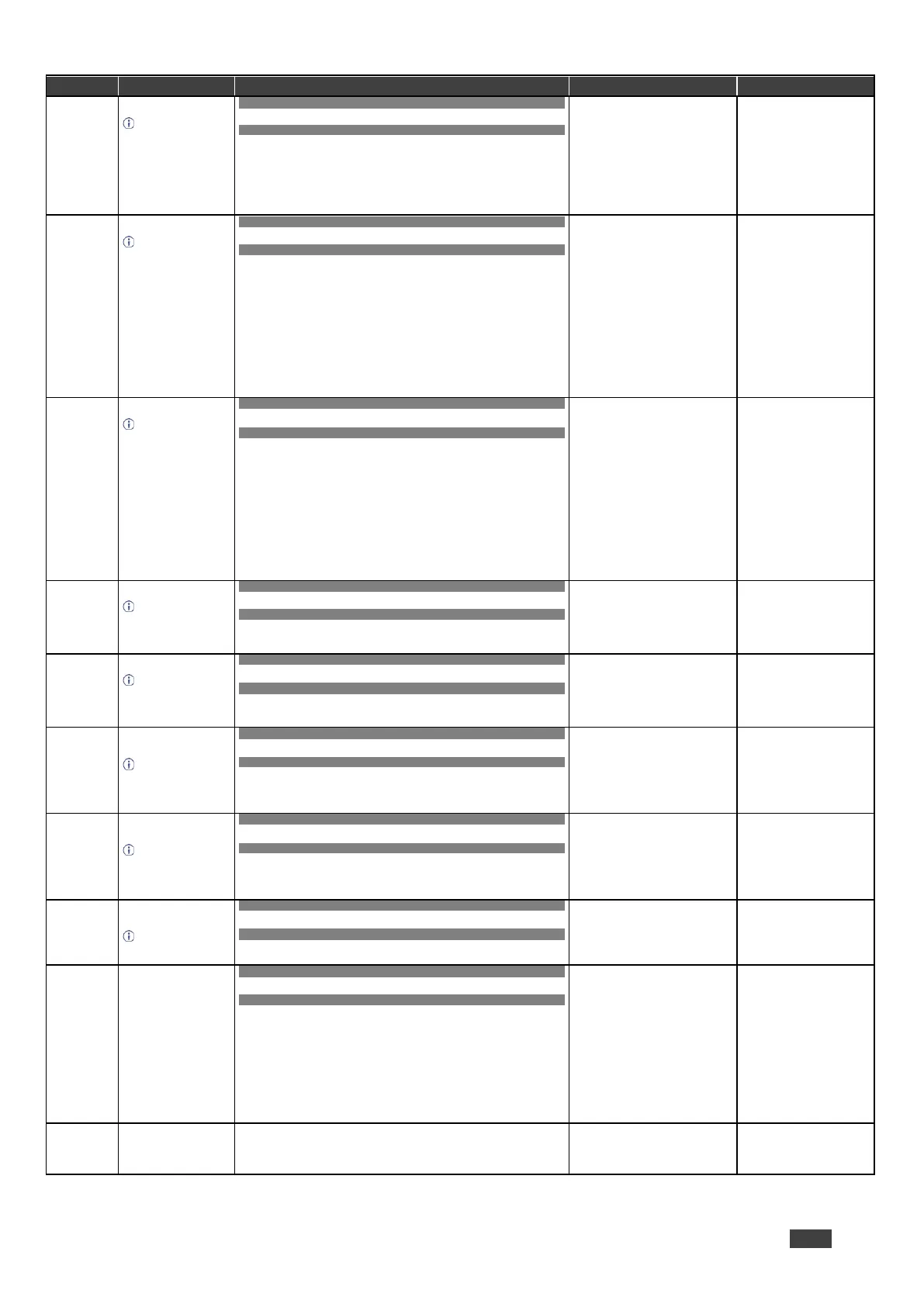
Reset device.
To avoid locking the
port due to a USB bug in
Windows, disconnect
USB connections
immediately after running
this command. If the port
was locked, disconnect
and reconnect the cable
to reopen the port.
COMMAND
#RESET<CR>
FEEDBACK
~nn@RESETOK<CR><LF>
Reset the device:
#RESET<CR>
Set layer routing.
This command
replaces all other routing
commands.
COMMAND
#ROUTElayer,dest,src<CR>
FEEDBACK
~nn@ROUTElayer,dest,src<CR><LF>
layer Layer Enumeration
1 = Video+audio
dest
1 = Scaler
src – Source id
1 = HDMI 1
2 = HDMI 2
3 = HDMI 3
4 = HDMI 4
5 = HDMI 5
6 = HDMI 6
7 = HDMI 7
8 = HDMI 8
9 = PC
10 = CV
Route HDMI 2 to the output:
#ROUTE1,1,2<CR>
Get layer routing.
This command
replaces all other routing
commands.
COMMAND
#ROUTE?layer,dest<CR>
FEEDBACK
~nn@ROUTElayer,dest,src<CR><LF>
layer Layer Enumeration
1 = Video+audio
dest
1 = Scaler
src – Source id
1 = HDMI 1
2 = HDMI 2
3 = HDMI 3
4 = HDMI 4
5 = HDMI 5
6 = HDMI 6
7 = HDMI 7
8 = HDMI 8
9 = PC
10 = CV
Get the layer routing:
#ROUTE? layer,dest
<CR>
Set auto-sync features.
Sets the auto sync
features for the selected
scaler.
COMMAND
#SCLR-ASP1,P2<CR>
FEEDBACK
Set / Get :
~nn@SCLR-AS P1,P2….<CR><LF>
P1 –1
P2 – Sync Speed
0 = disable
1 = fast
2 = slow
3 = immediate
Set auto-sync to fast:
#SCLR-AS 1,1<CR>
Get auto-sync features.
Gets the auto sync
features for the selected
scaler.
COMMAND
#SCLR-AS? P1<CR>
FEEDBACK
Set / Get :
~nn@SCLR-AS P1,P2….<CR><LF>
P1 –1
P2 – Sync Speed
0 = disable
1 = fast
2 = slow
3 = immediate
Get auto-sync features:
#SCLR-AS? 1<CR>
Set the scaler audio
delay.
Sets the audio delay
for the selected audio
output.
COMMAND
#SCLR-AUDIO-DELAYP1,P2<CR>
FEEDBACK
~nn@SCLR-AUDIO-DELAYP1,P2<CR><LF>
P1 – Audio output number
1 = Scaler
P2 – Delay
0 = Off
1 = 40ms
2 = 110ms
3 = 150ms
Set the scaler audio delay to
40ms:
#SCLR-AUDIO-DELAY1,1<C
R>
Get the scaler audio
delay.
Gets the audio delay
for the selected audio
output.
COMMAND
#SCLR-AUDIO-DELAY?P1<CR>
FEEDBACK
~nn@SCLR-AUDIO-DELAYP1,P2<CR><LF>
P1 – Audio output number
1 = Scaler
P2 – Delay
0 = Off
1 = 40ms
2 = 110ms
3 = 150ms
Get the scaler audio delay:
#SCLR-AUDIO-DELAY?1<CR
>
Set PC auto sync of
scaler.
Trigger the Auto
Adjust feature of PC
input.
COMMAND
#SCLR-PCAUTO P1,P2<CR>
FEEDBACK
~nn@SCLR-PCAUTOP1,P2….<CR><LF>
P1 – Scaler Number
1 = Scaler1
P2 –Yes (“Yes” triggers the Auto-scan
function. When complete, the unit
returns to the “No” state)
Set PC auto sync of scaler:
#SCLR-PCAUTO 1,yes<CR>
COMMAND
#SIGNAL?inp_id<CR>
FEEDBACK
~nn@SIGNALinp_id,status<CR><LF>
inp_id – Input number
1 = HDMI 1
2 = HDMI 2
3 = HDMI 3
4 = HDMI 4
5 = HDMI 5
6 = HDMI 6
7 = HDMI 7
8 = HDMI 8
status – Signal status according to
signal validation:
0 = Off
1 = On
Get the input signal lock status
of IN 1:
#SIGNAL?1<CR>
Get device serial
number.
COMMAND
#SN?<CR>
FEEDBACK
~nn@SNserial_number<CR><LF>
serial_number – 14 decimal digits,
factory assigned
Get the device serial number:
#SN?<CR>


 To Next Page