EXCAVATOR OPERATION48
BHow to Resume the AUX Setting While
Processing the DPF Regeneration
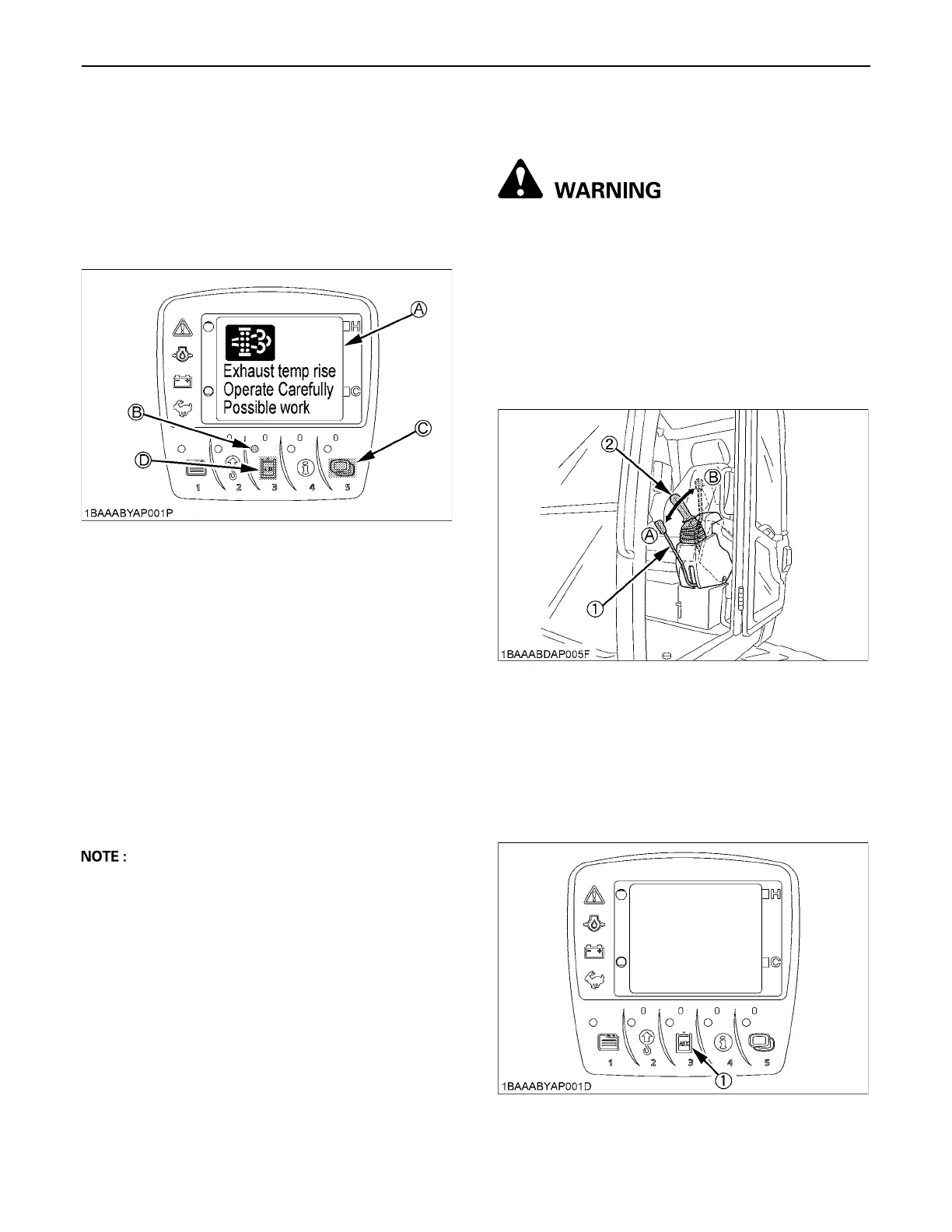
When the automatic regeneration process of DPF gets
started with the AUX port in use, the warning (A) is
displayed on the LCD. The indicator (B) turns off,
however, the operator can continue to use the AUX port
function. To resume the AUX port settings while the
warning is displayed, follow the procedure.
1. The indicator turns off, and the warning appears on the
LCD.
2. Press the switch 5.
3. The warning disappears temporarily and the normal
display shows up again.
4. Press the switch 3 to continue to set the AUX settings
as usual.
Even when the warning temporarily disappears according
to the above procedure, however, the warning reappears
in a certain period of time during the automatic
regeneration.
A While a warning message like as “Raise up engine
speed.” is on the LCD, operator is requested to take
directive procedure and take above procedure if
operator require to continue to set AUX setting.
HOW TO RELEASE PRESSURE TRAPPED
IN THE HYDRAULIC SYSTEM
To avoid personal injury or death:
A Relieve residual hydraulic pressure
immediately after the engine has stopped.
1. Lower the attachments and the blade down to the
ground.
2. Turn the key to "STOP" position and shut off the
engine.
3. After stopping the engine, turn the key to "RUN"
position.
4. Set the pilot control lock lever to "UNLOCK" position.
5. Move the operating lever to release pressure in the
hydraulic system.
[How to release pressure trapped in the AUX port]
1. Perform the above operations of 1 to 4.
2. Turn "ON" the AUX port enable switch.
(A) Warning
(B) Indicator
(C) Switch 5
(D) Switch 3
(1) Pilot control lock lever
(2) Attachment control lever (left)
(A) "UNLOCK"
(B) "LOCKED"
(1) AUX port enable switch (Switch 3)


 To Next Page