- 22 -
- 23 -
KVM6000
Function Code Table
KVM6000
Function Code Table
040AH
P4-10
0000
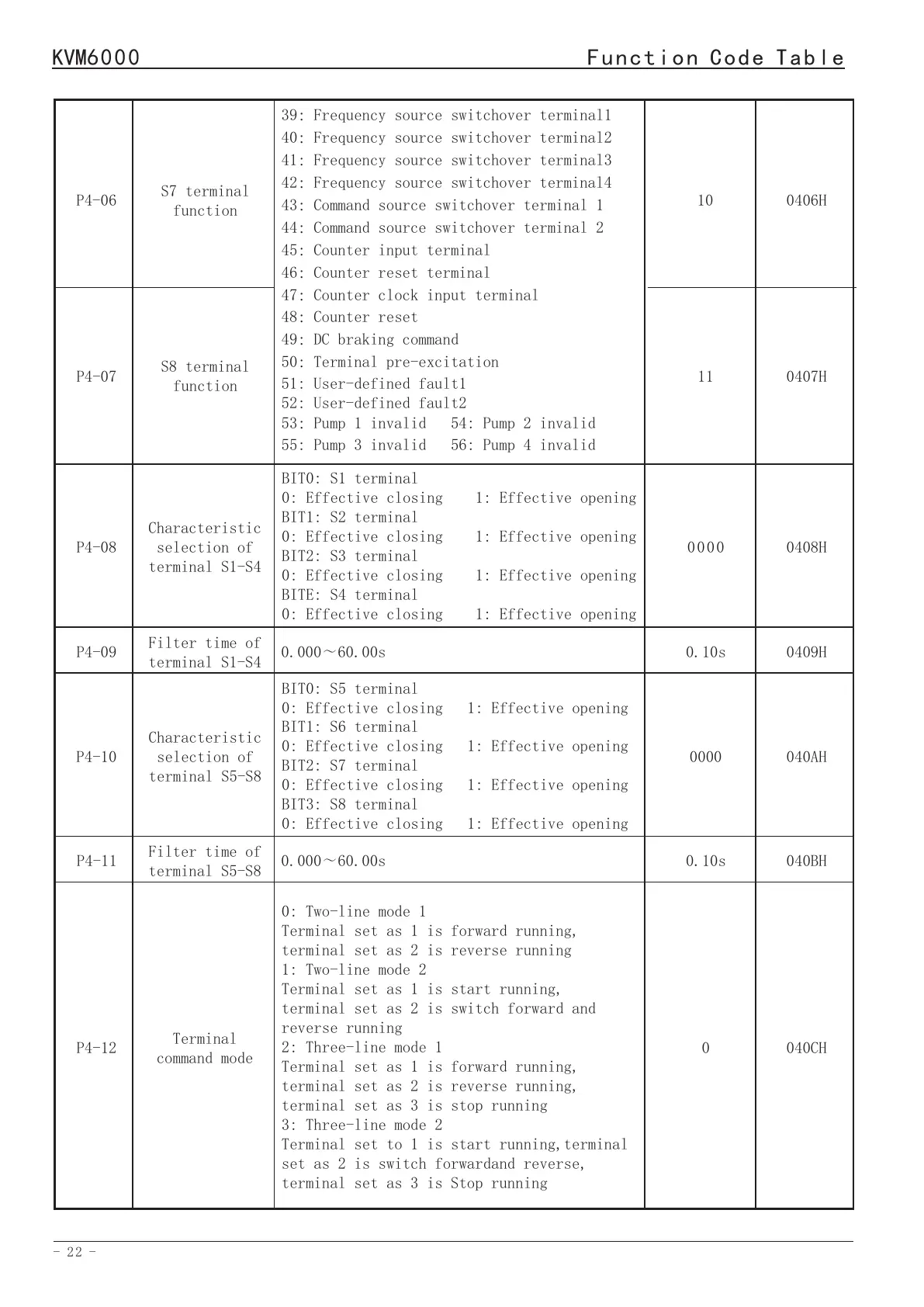
39:Frequency source switchover terminal1
40:Frequency source switchover terminal2
41:Frequency source switchover terminal3
42:Frequency source switchover terminal4
43:Command source switchover terminal 1
44:Command source switchover terminal 2
45:Counter input terminal
46:Counter reset terminal
47:Counter clock input terminal
48:Counter reset
49:DC braking command
50:Terminal pre-excitation
51: User-defined fault1
52: User-defined fault2
53:Pump 1 invalid 54: Pump 2 invalid
55: Pump 3 invalid 56: Pump 4 invalid
BIT0: S5 terminal
0: Effective closing 1: Effective opening
BIT1: S6 terminal
0: Effective closing 1: Effective opening
BIT2: S7 terminal
0: Effective closing 1: Effective opening
BIT3: S8 terminal
0: Effective closing 1: Effective opening
Characteristic
selection of
terminal S5-S8
P4-06
S7 terminal
function
10
0406H
P4-07
S8 terminal
function
11
0407H
Characteristic
selection of
terminal S1-S4
0408HP4-080000
BIT0: S1 terminal
0: Effective closing 1: Effective opening
BIT1: S2 terminal
0: Effective closing 1: Effective opening
BIT2: S3 terminal
0: Effective closing 1: Effective opening
BITE: S4 terminal
0: Effective closing 1: Effective opening
0409HP4-09
0.10s
0.000~60.00s
Filter time of
terminal S1-S4
040BH
P4-11
0.10s
0.000~60.00s
Filter time of
terminal S5-S8
0: Two-line mode 1
Terminal set as 1 is forward running,
terminal set as 2 is reverse running
1: Two-line mode 2
Terminal set as 1 is start running,
terminal set as 2 is switch forward and
reverse running
2: Three-line mode 1
Terminal set as 1 is forward running,
terminal set as 2 is reverse running,
terminal set as 3 is stop running
3: Three-line mode 2
Terminal set to 1 is start running,terminal
set as 2 is switch forwardand reverse,
terminal set as 3 is Stop running
P4-12
Terminal
command mode
040CH0
P4-13
Terminal
action mode
selection
040DH
0111
P4-16
P4-17
P4-18
Terminal
protection
function
selection
UP/DW frequency
value
UP /DW frequency
adjustment
selection
BIT0:
0: Invalid terminal operation command when
power on
1:Valid terminal operation command when
power on
BIT1: When the run commandsetting channel
terminal switching,selection of run command
is valid
0: The running command is valid after
stopping during switching
1: The run command is valid immediately when
switching
0.0~100.0%
0: Retentive at power failure
1: Non-retentive at power failure
2: Valid operation, stop and reset
0000
0.0%
2.0
0410H
0411H
0412H
BIT0: Terminal of coast to stop
recovery mode
0: Restore the original instruction after
invalidation
1: Do not restore the original instruction
after invalidation
BIT1: Terminal of emergency stop recovery
mode
0: Restore the original instruction after
invalidation
1: Do not restore the original instruction
after invalidation
BIT2: Select the terminal operation mode
after fault reset
0: The terminal operation command is valid
immediately
1: The terminal operation command is valid
only after it is canceled
P4-14
Reserved
--
040EH
P4-15
Reserved
--
040FH
0.01~50.00Hz/sP4-19
Speed of UP/DW
frequency
increase
and decrease
1
0413H
P4-20
Y1 terminal
function
2
0414H
P4-21
Y2 terminal
function
3
0415H
P4-22
Y3 terminal
function
4
0416H
0:No output
1:Forward running 2:Reverse running
3:Fault output1 (no output at auto-reset
period)
4:Fault output2 (output at auto-reset
period)
5:Ready for RUN 6:Frequency reached
7:Frequency-level detection FDT1 output
8:Frequency-level detection FDT2 output
9:Frequency upper limit reached
10:Frequency lower limit reached


 To Next Page