Display speed
factor
P7-03
P7-04
P7-05
P7-06
P7-07
P7-08
MF.K Key
function
selection
Copy of function
parameters
First line
run display
First line
stop display
Second line
run display
0703H
0704H
0705H
0706H
0707H
0708H
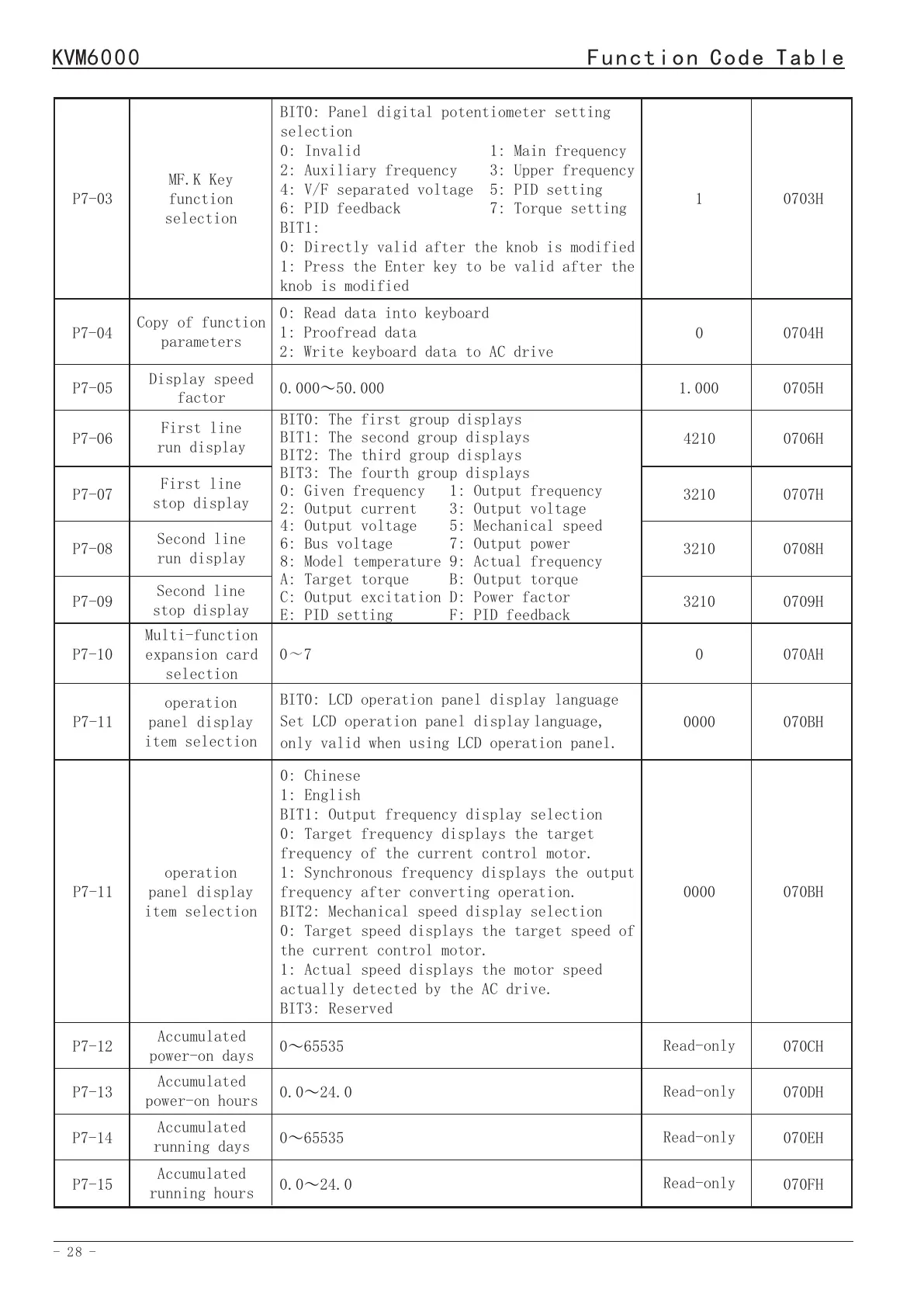
BIT0: Panel digital potentiometer setting
selection
0: Invalid 1: Main frequency
2: Auxiliary frequency 3: Upper frequency
4: V/F separated voltage 5: PID setting
6: PID feedback 7: Torque setting
BIT1:
0: Directly valid after the knob is modified
1: Press the Enter key to be valid after the
knob is modified
0: Read data into keyboard
1: Proofread data
2: Write keyboard data to AC drive
0.00050.000
~
BIT0: The first group displays
BIT1: The second group displays
BIT2: The third group displays
BIT3: The fourth group displays
0: Given frequency 1: Output frequency
2: Output current 3: Output voltage
4: Output voltage 5: Mechanical speed
6: Bus voltage 7: Output power
8: Model temperature 9: Actual frequency
A: Target torque B: Output torque
C: Output excitation D: Power factor
E: PID setting F: PID feedback
1
1.000
4210
3210
3210
0
0709HP7-09
Second line
stop display
3210
070AH
0~7
P7-10
Multi-function
expansion card
selection
0
070BH
BIT0: LCD operation panel display language
Set LCD operation panel displaylanguage,
only valid when using LCD operation panel.
P7-11
operation
panel display
item selection
0000
070CH
070DH
070EH
070FH
065535
~
0.024.0~
065535~
0.024.0~
P7-12
P7-13
P7-14
P7-15
Accumulated
power-on days
Accumulated
power-on hours
Accumulated
running days
Accumulated
running hours
Read-only
Read-only
Read-only
Read-only
070BH
0: Chinese
1: English
BIT1: Output frequency display selection
0: Target frequency displays the target
frequency of the current control motor.
1: Synchronous frequency displays the output
frequency after converting operation.
BIT2: Mechanical speed display selection
0: Target speed displays the target speed of
the current control motor.
1: Actual speed displays the motor speed
actually detected by the AC drive.
BIT3: Reserved
P7-11
operation
panel display
item selection
0000
0710H
0711H
0~655.35 million kWh
0~9999kWh
P7-16
P7-17
Accumulative power
consumption
(10000 kWh)
Accumulative
power
consumption
Read-only
Read-only
BIT0: 0: Stop 1: Run
BIT1: 0: Forward RUN 1: Reverse RUN
BIT2: Reserved BIT3: Reserved
AC drive status
before power off
P7-180712H
Read-only
0.00Hz to maximum frequency
5.00Hz
5.00Hz
10.0s
Forward JOG
running
frequency(FJOG)
Reverse JOG
running
frequency(RJOG)
JOG acceleration
time
P8-00
P8-01
P8-02
0800H
0801H
0802H
P8 Auxiliary Functions
Function
Code
Parameter Name
Setting Range
Default
Address
0.00Hz to maximum frequency
10.0s
JOG deceleration
time
P8-030803H
10.0s
Acceleration
time 2
P8-040804H
10.0s
Deceleration
time 2
P8-050805H
10.0s
Acceleration
time 3
P8-060806H
10.0sP8-070807H
0.1~6500.0s
10.0s
Acceleration
time 4
P8-080808H
10.0s
Deceleration
time 4
P8-090809H
10.0s
Emergency stop
deceleration
time
P8-10
080AH
0.0~360.00s0.00Hz
Forward/Reverse
rotation dead-
zone time
P8-11
080BH
Jump frequency 1
P8-12
0.00Hz
080CH
Jump frequency 2
P8-13
0.00Hz
080DH
0.00Hz to maximum frequency
Jump frequency
amplitude
P8-14
0.00Hz
080DH
Deceleration
time 3
Frequency
detection value
(FDT1)
P8-15
30.00Hz
080FH
Detection range
of FDT1
P8-16
0.00Hz
0810H
- 28 -
- 29 -
KVM6000
Function Code Table
KVM6000
Function Code Table


 To Next Page