EasyManua.ls Logo

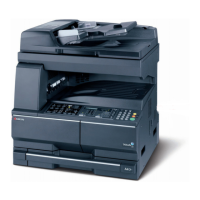
Kyocera TASKalfa 1801 - User Manual

Kyocera TASKalfa 1801
268 pages
Print Icon
To Next Page IconTo Next Page
Loading...
operatioN guide
PRINT
COPY
SCAN
FAX
TASKalfa 1801
TASKalfa 2201

Table of Contents

Other manuals for Kyocera TASKalfa 1801

Questions and Answers

  • C
    Christopher ClarkSep 8, 2025
    How to fix Kyocera Fax Machine when it cannot receive document?
    • A
      Angel Scott MDSep 8, 2025
      If your Kyocera Fax Machine is unable to receive a document, ensure the modular cord is correctly connected. Remedy the cause of any error and ask the sender to retry. Alternatively, you can cancel the RX restriction.
  • A
    Ann AllenSep 9, 2025
    What to do if Kyocera Fax Machine says 'The phone receiver is off the hook. Hang Up.'?
    • H
      Heather PatelSep 10, 2025
      If your Kyocera Fax Machine displays 'The phone receiver is off the hook. Hang Up,' put down the receiver.
  • J
    josephdavidSep 12, 2025
    Why cannot I use the remote switching function on my Kyocera Fax Machine?
    • D
      David ScottSep 12, 2025
      If you cannot use the remote switching function on your Kyocera Fax Machine, it could be because a pulse line is being used. Some phones may transmit tone signals using buttons, so refer to your phone's operation manual. Also, check the registration; the default is 55.
  • J
    Jose FernandezSep 13, 2025
    Why is there no print output after reception on my Kyocera Fax Machine?
    • W
      William AdamsSep 13, 2025
      If there is no print output after reception on your Kyocera Fax Machine, check the forwarding destination.
  • N
    nathannguyenSep 15, 2025
    What to do if Kyocera Fax Machine cannot perform memory reception?
    • P
      Peter ArnoldSep 15, 2025
      If your Kyocera Fax Machine cannot perform memory reception, receive after the memory has free space, or create free space in the memory.
  • S
    Stacy RollinsSep 18, 2025
    How to troubleshoot Kyocera Fax Machine when it cannot perform memory forwarding?
    • A
      Adam ButlerSep 18, 2025
      If your Kyocera Fax Machine cannot perform memory forwarding, check the memory forwarding setting.

Summary

Installing and Setting Up the Machine

Network Setup and Bonjour

Details configuring network connections, IP addresses, and Bonjour settings.

Installing Machine Software

Instructions for installing printer drivers and utility software on PCs.

Preparation for Machine Use

Using the Operation Panel

Explains the keys and functions of the machine's control panel.

Loading Paper

Provides instructions for loading paper into cassettes and trays.

Printing from a PC

Printing Procedures

Steps to print documents from PC applications using the printer driver.

Machine Operation

Copying Functions

Covers basic copying, interrupt copy, and ID card copy features.

Scanning Operations

Explains scanning procedures via USB, network, and TWAIN.

System Menu and KYOCERA Client Tool

Job Accounting Management

Enabling and Setting Accounts

Steps to enable job accounting and create user accounts.

Troubleshooting and Maintenance

Toner and Waste Toner Replacement

Instructions for replacing toner containers and waste toner boxes.

Solving Malfunctions

A guide to diagnosing and resolving common machine errors and symptoms.

Responding to Error Messages

Explains how to handle various error messages displayed by the machine.

Clearing Paper Jams

Detailed steps for locating and removing paper jams from different machine areas.

Kyocera TASKalfa 1801 Specifications

General IconGeneral
Duplex printingNo
Print technologyLaser
Maximum resolution600 x 600 DPI
Time to first page (black, normal)5.7 s
Print speed (black, normal quality, A3)8 ppm
Print speed (black, normal quality, A4/US Letter)18 ppm
Copier resize25 - 400 %
Maximum copy resolution- DPI
Maximum number of copies999 copies
N-in-1 copy function (N=)2, 4
Scan toE-mail
Grayscale levels256
Image formats supportedBMP, JPG, TIF
Document formats supportedPDF
FaxingMono faxing
Fax memory4 MB
Modem speed33.6 Kbit/s
Fax coding methodsMH, MMR (Fax coding method), MR
Fax resolution (black)200 x 400 DPI
Fax transmission speed4 sec/page
Digital sender-
Printing colorsBlack
Maximum duty cycle- pages per month
Number of print cartridges1
Processor familyARM
Maximum internal memory256 MB
Sound pressure level (copying)62 dB
Sound pressure level (quiet mode)40 dB
Paper input typeCassette, Paper tray
Multi-Purpose trayYes
Total input capacity400 sheets
Total output capacity250 sheets
Maximum input capacity1300 sheets
Multi-Purpose tray input capacity100 sheets
Paper tray media typesPlain paper
Paper tray media weight64 - 105 g/m²
Non-ISO print media sizesLedger (media size)
ISO A-series sizes (A0...A9)A3, A4, A5, A6
Maximum ISO A-series paper sizeA3
Multi-Purpose Tray media weight46 - 160 g/m²
DisplayLCD
Market positioningBusiness
Mobile printing technologiesNot supported
Standard interfacesUSB 2.0
Optional connectivityEthernet
USB 2.0 ports quantityUSB 2.0 ports have a data transmission speed of 480 Mbps, and are backwards compatible with USB 1.1 ports. You can connect all kinds of peripheral devices to them.
AC input voltage220 - 240 V
AC input frequency50 - 60 Hz
Power consumption (standby)75 W
Power consumption (PowerSave)1.54 W
Power consumption (average operating)385 W
Server operating systems supportedWindows Server 2003, Windows Server 2008, Windows Server 2012
Windows operating systems supportedWindows 7 Home Basic, Windows 7 Home Basic x64, Windows 7 Home Premium, Windows 7 Home Premium x64, Windows 7 Professional, Windows 7 Professional x64, Windows 7 Starter, Windows 7 Starter x64, Windows 7 Ultimate, Windows 7 Ultimate x64, Windows 8, Windows 8 Enterprise, Windows 8 Enterprise x64, Windows 8 Pro, Windows 8 Pro x64, Windows 8 x64, Windows Vista Business, Windows Vista Business x64, Windows Vista Enterprise, Windows Vista Enterprise x64, Windows Vista Home Basic, Windows Vista Home Basic x64, Windows Vista Home Premium, Windows Vista Home Premium x64, Windows Vista Ultimate, Windows Vista Ultimate x64, Windows XP Home, Windows XP Home x64, Windows XP Professional, Windows XP Professional x64
Sustainability certificatesENERGY STAR
Weight and Dimensions IconWeight and Dimensions
Depth527 mm
Width565 mm
Height485 mm

Related product manuals