EasyManua.ls Logo

Kyocera TASKalfa 352ci - Functions Key

Kyocera TASKalfa 352ci
470 pages
Print Icon
To Next Page IconTo Next Page
To Previous Page IconTo Previous Page
Loading...
2-18
Installing and Setting up the Machine > Touch Panel
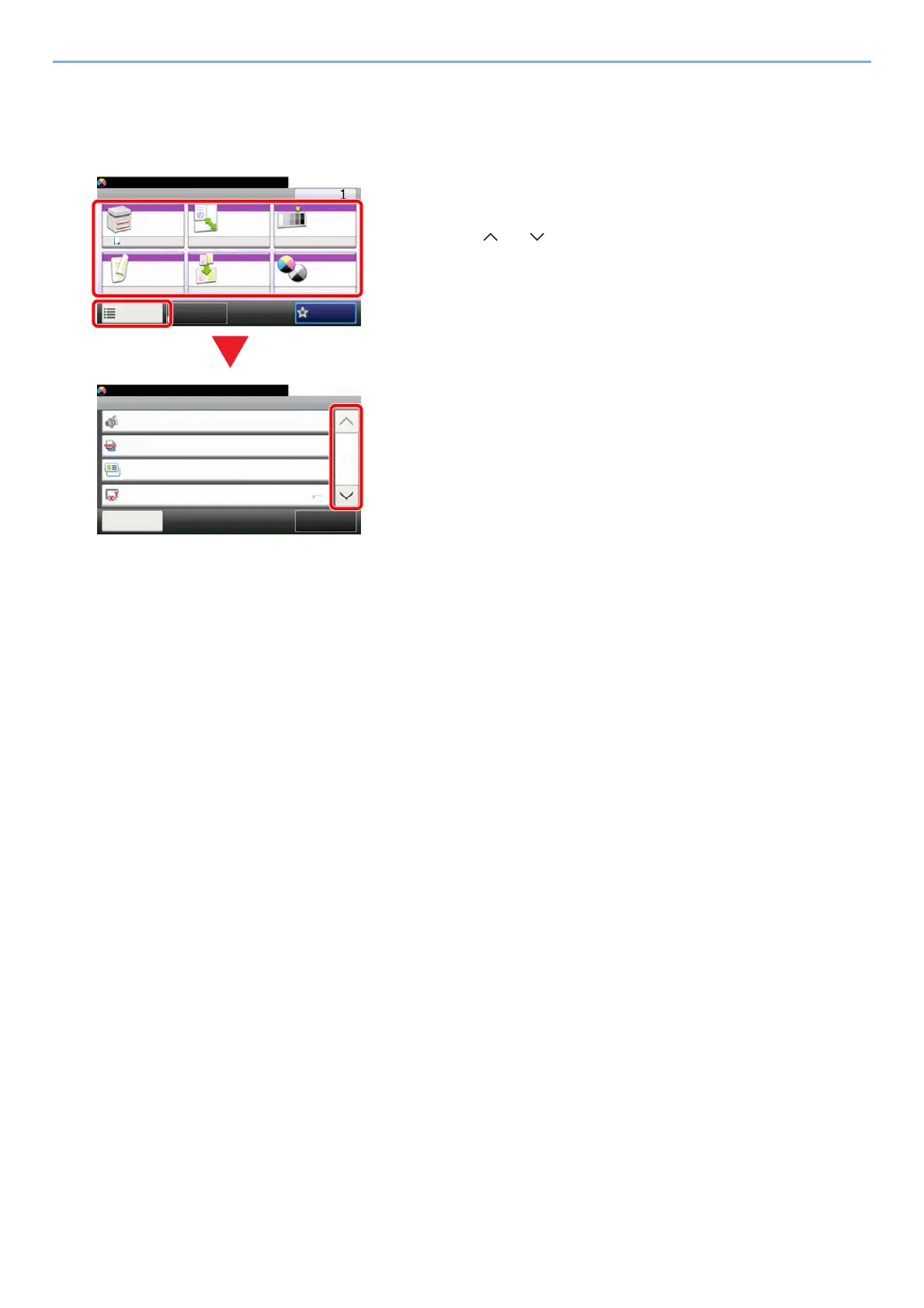
Functions key
This screen appears when the Functions icon is selected.
Ready to copy. (Full Color)
Copy Copies
Paper
Selection
Zoom Density
Duplex Combine Color
Selection
1-sided>>1-sided
A4 100% Normal 0
Full ColorOff
Functions
10:10
FavoritesID Card Copy
Functions
ID Card Copy
Close
10:10
Original Size
On
Off
Off
Quiet Mode
Collate
1/5
Add/Edit
Shortcut
Ready to copy. (Full Color)
A4
1 Display functions.
2Select [Functions] to display other functions.
3 Select [ ] or [ ] to scroll up and down.
1
2
3

Table of Contents

Other manuals for Kyocera TASKalfa 352ci

Related product manuals