FORECAST
14
Viewing Your Forecast Data
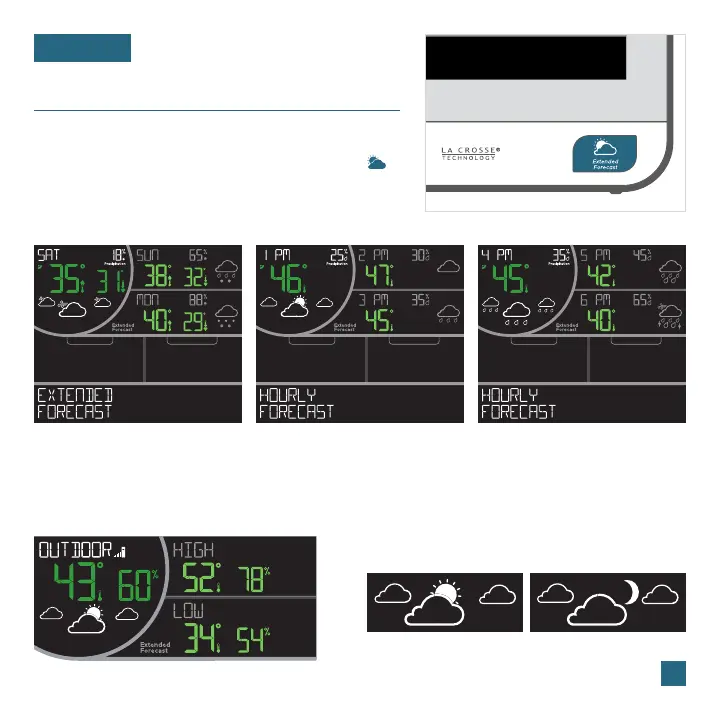
Extended Forecast Examples
Forecast When not Connected Day/Night Forecast
When not connected to Wi-Fi, you’ll see current
temperature and humidity, as well as daily high/low
temperature and humidity records from your sensor.
Forecast icons will only appear in the circular area.
When clear or partly clear conditions are predicted,
the sun icon will show during daylight hours and
the moon icon will show during nighttime hours.*
The times the sun and moon icons appear are
pre-programmed and cannot be adjusted.
Forecast data for upcoming 4-6 days Forecast data for next, 2
nd
, and 3
rd
hours Forecast data for upcoming 4
th
, 5
th
, and 6
th
hours
Sun Icon (7:00am to 6:59pm) Moon Icon (7:00pm to 6:59am)
Press and release the EXTENDED FORECAST ( )
button to toggle through your next 3 days and next
12 hours of forecasts.
Viewing Extended Forecast
* The station must be connected Wi-Fi to activate
the day/night forecast feature.















 To Next Page