Bonus Station Settings
BONUS STATION
When the station is first powered on, it will begin searching for the included
Thermo-Hygro Sensor, which should connect within the first 10 minutes.
Search for Outdoor Sensor
• If the signal is lost, the station will display the last data recorded for 10 minutes. After 10 minutes, the station
will display dashes “--”. After 30 minutes, the station will automatically start searching for the sensor.
• Hold the +/SEARCH button to manually search for the outdoor sensor. The Reception Icon will
animate while searching and be solid when signal is received.
Navigating the Settings Menu
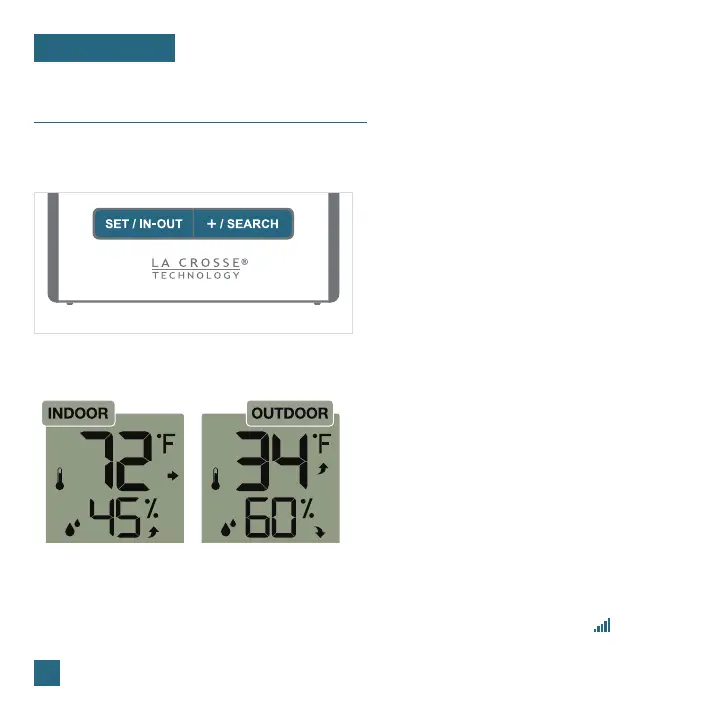
Front of Station
Hold the SET/IN-OUT button to enter the
Settings Menu.
1.
Use the +/SEARCH button to adjust the
values.
2.
Press the SET/IN-OUT button to confirm
your selection & move to the next setting.
3.
17
Settings Menu Order
12/24 Hour Time Format • Hour • Minutes • Temperature Units (Fahrenheit/Celsius)
Your indoor/outdoor temperature and humidity
readings share the same section on the LCD.
Press the SET/IN-OUT button to view either
Indoor or Outdoor Readings.
Accessing Indoor/Outdoor Readings















 To Next Page