16
Relative Pressure
Low Battery Indicators
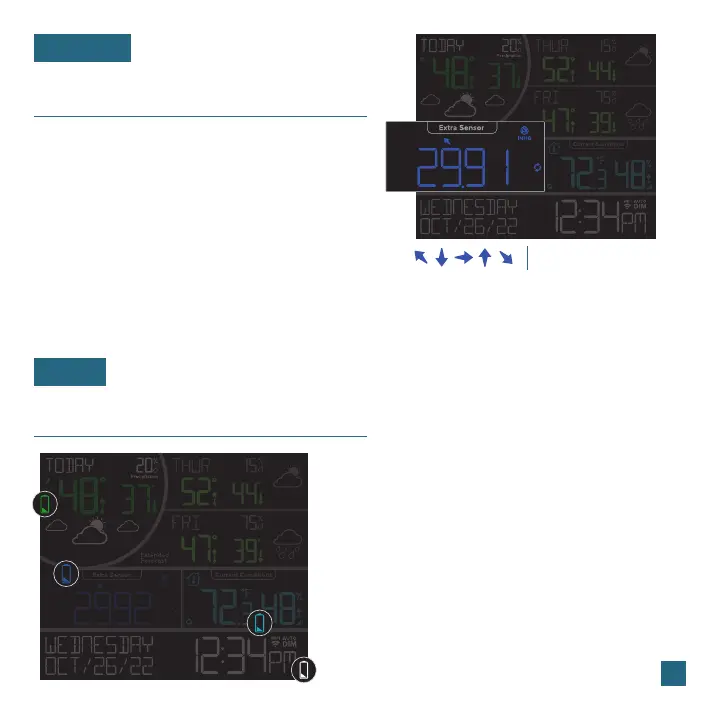
Note: The default pressure reading is 29.91 InHg (1013 hPa). The station will acclimate on its own if the pressure number is not set.
• Your Relative Pressure reading will come
from your station’s internal barometer.
• Please allow up to 10 days for automatic
calibration, or program your local pressure
value in the Settings Menu.
• The dark blue arrows located above the values
represent Pressure Tendency.
• If a green low battery indicator appears in the forecast/
circular section, replace batteries in the TH sensor.
You’ll only see this icon if you’re not connected to Wi-Fi.
• If a dark blue low battery indicator appears in the extra
sensor section, replace batteries in the extra sensor.
• If a light blue battery indicator appears in the outdoor
temperature section, replace batteries in the TH sensor.
• If a white low battery indicator appears next to the time
display, replace the coin cell battery in the station.
• Select your desired unit of measurement (InHg or hPa) in the Settings Menu.
You can also set a specific pressure number setting if desired.
Pressure Tendency Arrows
BASICS
FORECAST















 To Next Page