Viewing Temperature & Humidity Data
BONUS STATION
18
Station Buttons
SET/IN-OUT
Press to view indoor or outdoor readings.
Hold to enter settings menu.
+/SEARCH
Hold to search for sensor. While in the settings
menu, press and/or hold to increase values.
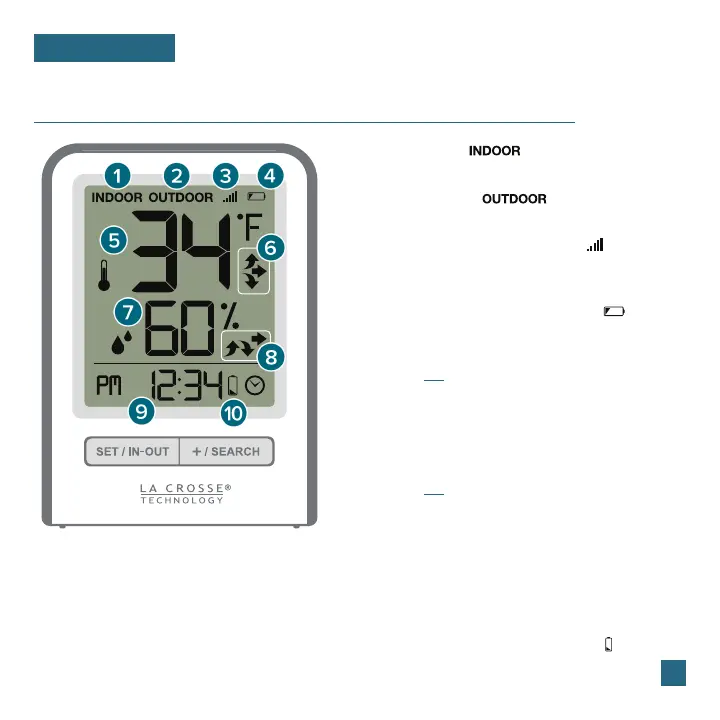
1. INDOOR ICON ( )
2. OUTDOOR ICON ( )
3. SENSOR RECEPTION INDICATOR ( )
4. SENSOR LOW BATTERY INDICATOR ( )
10. STATION LOW BATTERY INDICATOR ( )
5. INDOOR OR OUTDOOR TEMPERATURE
7. INDOOR OR OUTDOOR HUMIDITY
6. TEMPERATURE TREND INDICATORS
8. HUMIDITY TREND INDICATORS
9. TIME DISPLAY
Indicates you are viewing indoor readings
Indicates you are viewing outdoor readings
Indicates if the station is receiving data from
the sensor
Indicates batteries in the sensor should be
replaced soon
Indicates batteries in the station should
be replaced soon
Current indoor or outdoor temperature
(based on setting)
Current indoor or outdoor humidity
(based on setting)
Represents changes in temp. over the past hour
Represents changes in humidity over the past hour
Current time in 12 or 24-hour format















 To Next Page