Mascot FT, Heating Only, Boiler
Page 57
5.4SettingtheClock
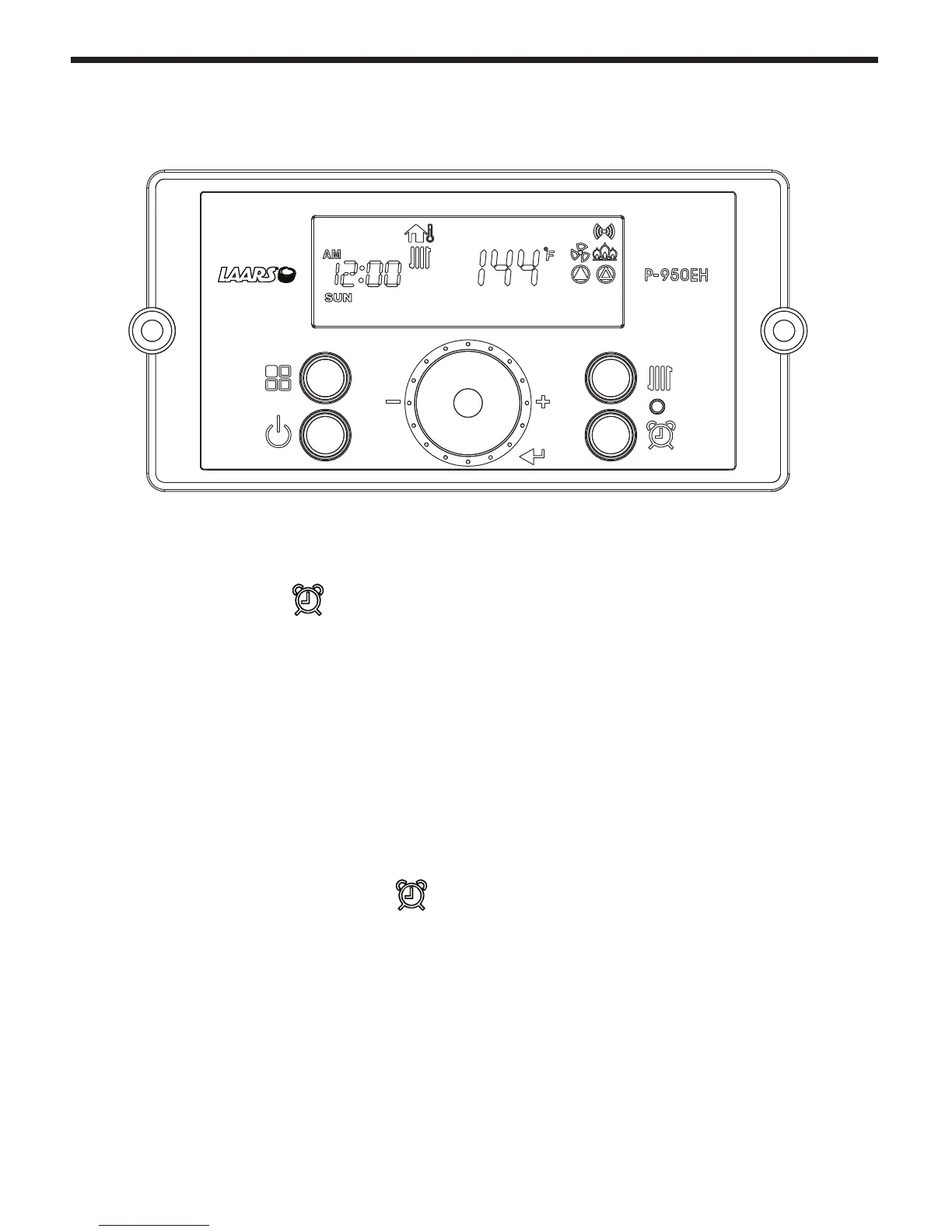
The P-950EH Control Display does NOT have a daily timer or programmable thermostat.
Setting the Clock
a. Press and hold the
‘Clock button’ for about 5 seconds. Set the ‘Year’ by turning the dial E. And
then, press the dial E to Save.
b. Set the ‘MON’ (Month) by turning the dial E to the desired month number. Then press the dial E to Save.
c. Set the ‘DATE’ (1-31, Day of the Month) by turning the dial E. Then press the dial E to Save.
d. Set the ‘HOUR’ (1-24, Hour of the Day) by turning the dial
E. Then press the dial E to Save.
e. Set the ‘MIN’ (1-60, Minute of the Hour) by turning the dial
E. Then press the dial E to Save.
f. Set the ‘Day’ (Sun - Sat) by turning the dial E. Then press the dial E to Save.
To Exit at any time, press and hold the
‘Clock button’ for about 5 seconds.
B C
E
A D



 To Next Page