34 | HPI Combi Flow User Guide | Version 3.11 www.lafert.com
5.8.4. Adjusting Individual Digits
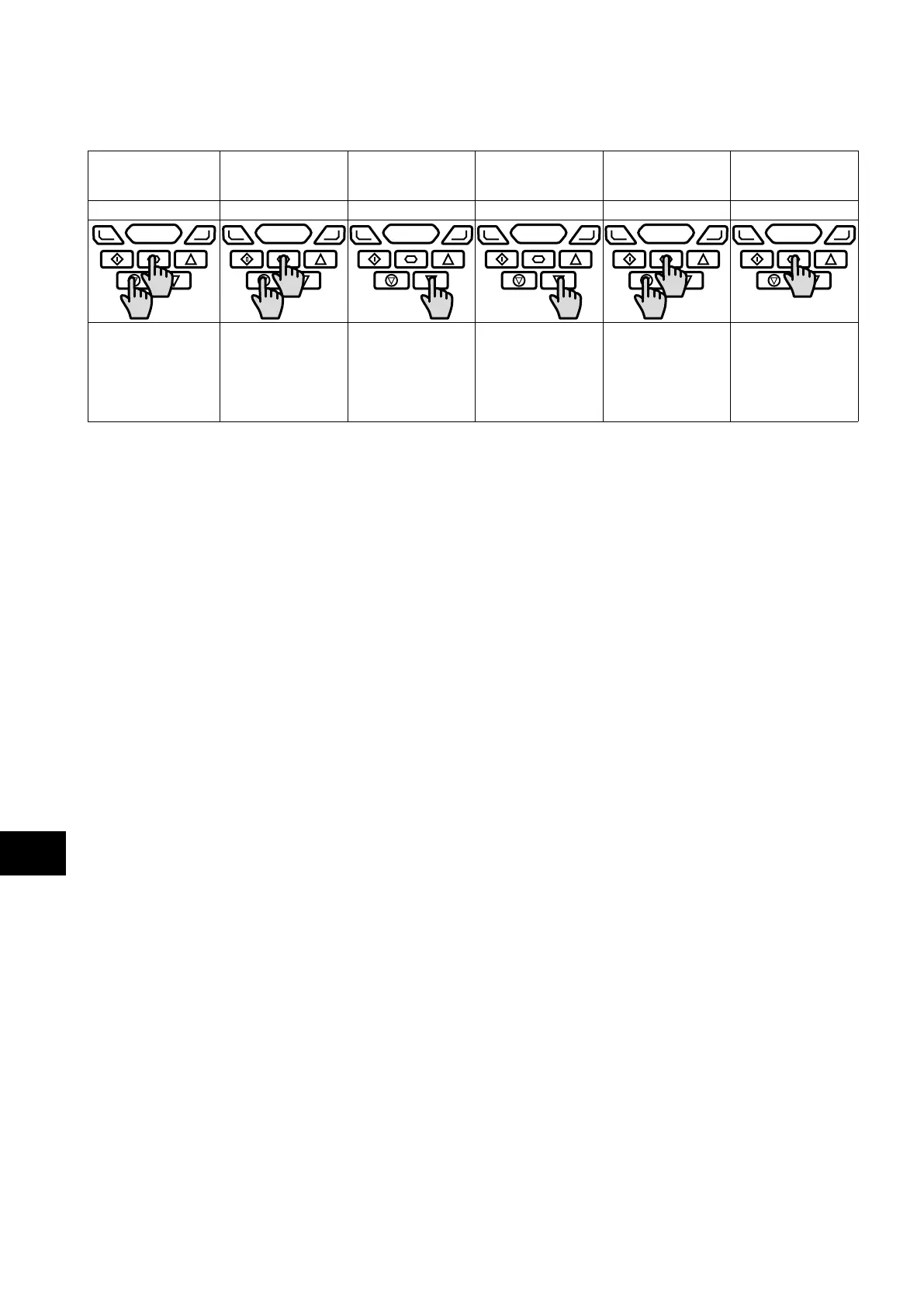
When editing parameter values and making large changes, e.g. setting the motor rated speed from 0 to 1500 Rpm, it is possible to
directly select the parameter digits using the following method.
Extended menu access
Extended menu access Extended menu access Extended menu access Extended menu access Extended menu access
0 _0 _0 100 100 100
P1-14
30 000 0
P1-14
30 000 0
P1-14
30 000 0
P1-14
30 000 0
P1-14
30 000 0
P1-14
30 000 0
Whilst editing a
parameter value, press
the Stop and Navigate
keys simultaneously.
The cursor will step
one digit to the left.
Repeating the key
press will move
another digit to the
left.
The individual digit
value may be
adjusted using the up
and down keys.
Adjust the value using
the Up and Down
keys.
When the cursor reaches
the highest accessible
digit, pressing Stop and
Navigate will return the
cursor to the right most
digit.
Press the Navigate
key to return to the
parameter selection
menu.
5
LED Keypad and Display Operation



 To Next Page