56 | HPI Combi Flow User Guide | Version 3.11 www.lafert.com
10. Serial Communications
10.1. RS-485 Communications
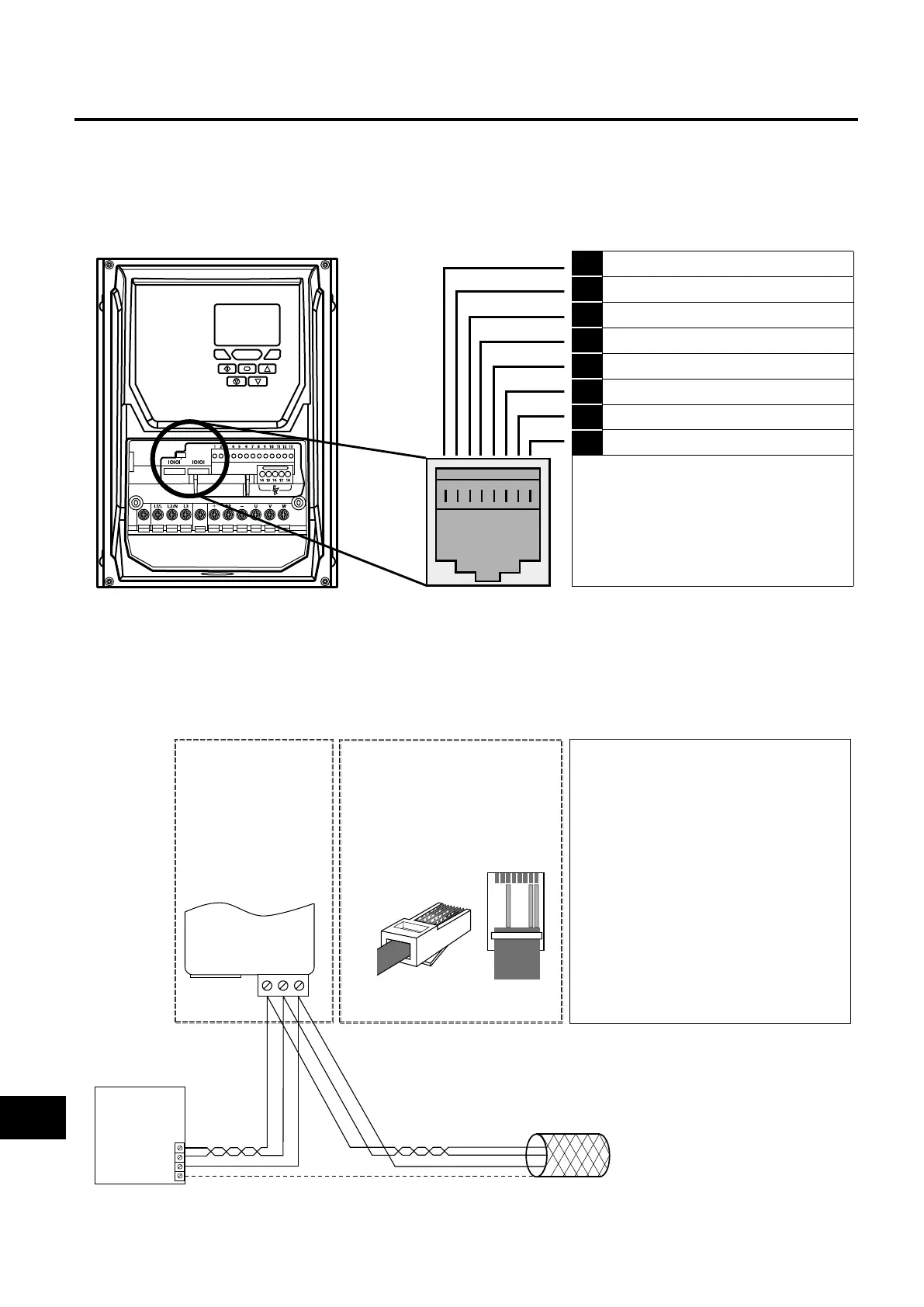
HP Combi Flow has an RJ45 connector located within the wiring enclosure of the drive. This connector allows the user to set up a
drive network via a wired connection. The connector contains two independent RS485 connections, one for Lafert Group’s Optibus
Protocol and one for Modbus RTU / BACnet MSTP. Both connections can be used simultaneously.
The electrical signal arrangement of the RJ45 connector is shown as follows:
1 Not used
2 Not used
3 0 Volts
4 -RS485 (PC)
5 +RS485 (PC)
6 +24 Volt
7 RS 485- Modbus RTU / BACnet MSTP
8 RS 485+ Modbus RTU / BACnet MSTP
Warning:
This is not an Ethernet connection. Do not connect
directly to an Ethernet port.
Warning:
When using Modbus RTU or BACnet, ensure that the
0V signal (T3) is also used to avoid comms errors
and potentially damaging common mode voltages.
There are two RJ45 ports present in the IP66 outdoor rated drive. The two RJ45 ports are connected in parallel internally to help
support a network connection without the need for a splitter. Either port can be used.
The Optibus data link is only used for connection of Lafert Group peripherals and inter-drive communication.
The Modbus interface allows connection to a Modbus RTU network as described in section 10.2. Modbus RTU Communications.
10.1.1. RS-485 Communications Electrical Connections
Modbus RTU/BACnet
RS485 Controller
RS485+
RS485-
0 Volt / Common
Ground
NOTES
• Use 3 or 4 Conductor Twisted Pair Cable
•RS485+ and RS485- must be twisted pair
• Ensure the network taps for the drive
are kept as short as possible
• Using Option OPT-2-BNTSP-IN is
preferred
•Terminate the network cable shield at
the controller only. Do not terminate at
the drive!
•0 Volt common must be connected
across all devices and to reference 0 Volt
terminal at the controller
•Do not connect the 0V Common of the
network to power ground
RS485+
RS485-
0 Volt / Common
Shield
OPT-2-BNTSP-IN
OPT-2-BNTSP-IN
12 3
RS485+
0 Volt / Common
Connection to the
drive through the
option
OPT-2-BNTSP-IN
RS485-
Pin 3 –0 Volt / Common
Pin 7 – RS485- (Modbus RTU)
Pin 8 – RS485+ (Modbus RTU)
RJ45 connector pinout
Direct connection to the drive
through the built-in RJ45 port
1 2 3 4 5 6 7 8
1
2
3
4
5
6
7
8
10
Serial Communications



 To Next Page