24
SETTING THE CLOCK
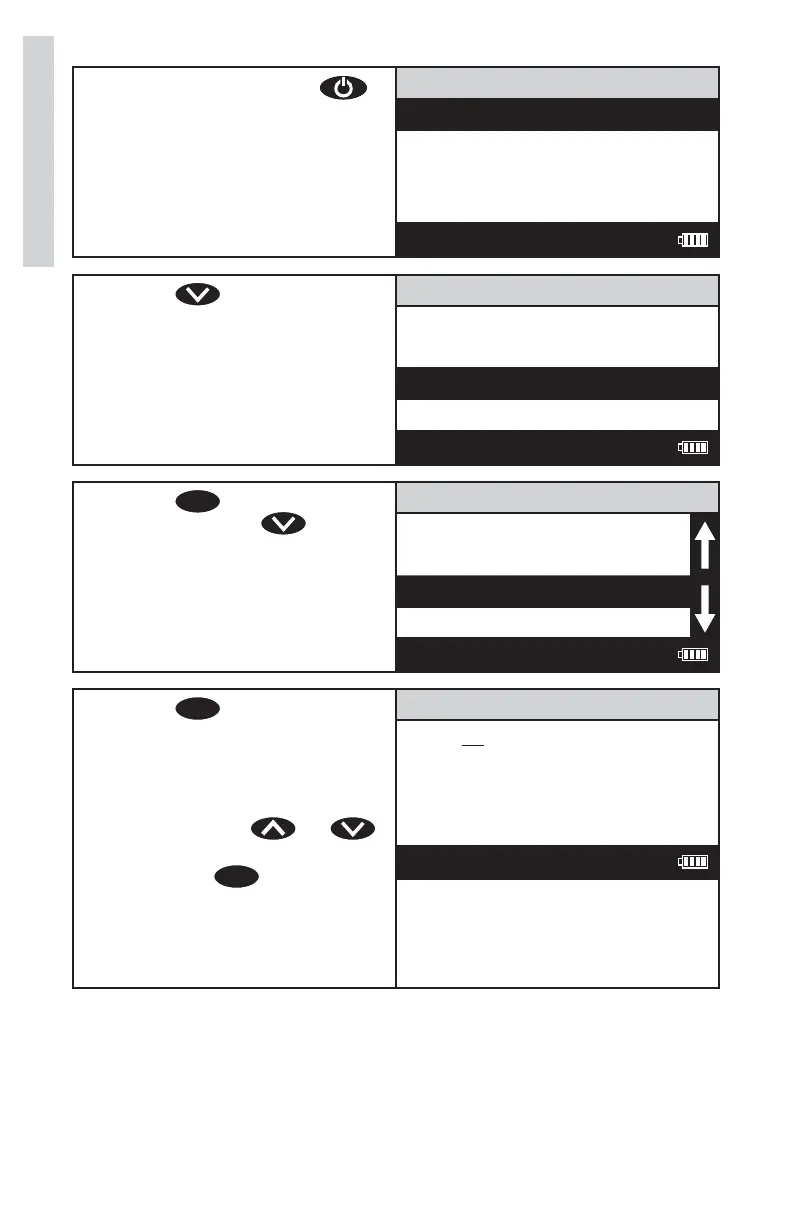
1. Press and briefl y hold
to turn the meter on. The
LaMotte logo screen will
appear for about 3 seconds
and the Main Menu will
appear.
Main Menu
Measure
Data Logging
Options
Run PC Link
12:00:00 001/500
2. Press to scroll to
Options.
Main Menu
Measure
Data Logging
Options
Run PC Link
12:00:00 001/500
3. Press
ENTER
to select
Options. Press
to scroll
to Set Clock.
Options Menu
Averaging
Turbidity Options
Set Clock
Set PWR Save
12:00:00 001/500
4. Press
ENTER
to select
Set Clock. The date is
displayed as month-day-year.
The time is displayed as
hours:minutes:seconds
AM/PM. Press
or
to the appropriate character
and press
ENTER
to select. The
cursor will move to the next
character. Set all characters
in the same manner. This is a
scrolling menu.
Set Time
Date: 07-09-2010
Time: 02:09:08 PM
12:00:00 001/500
Options/Set Up













 To Next Page