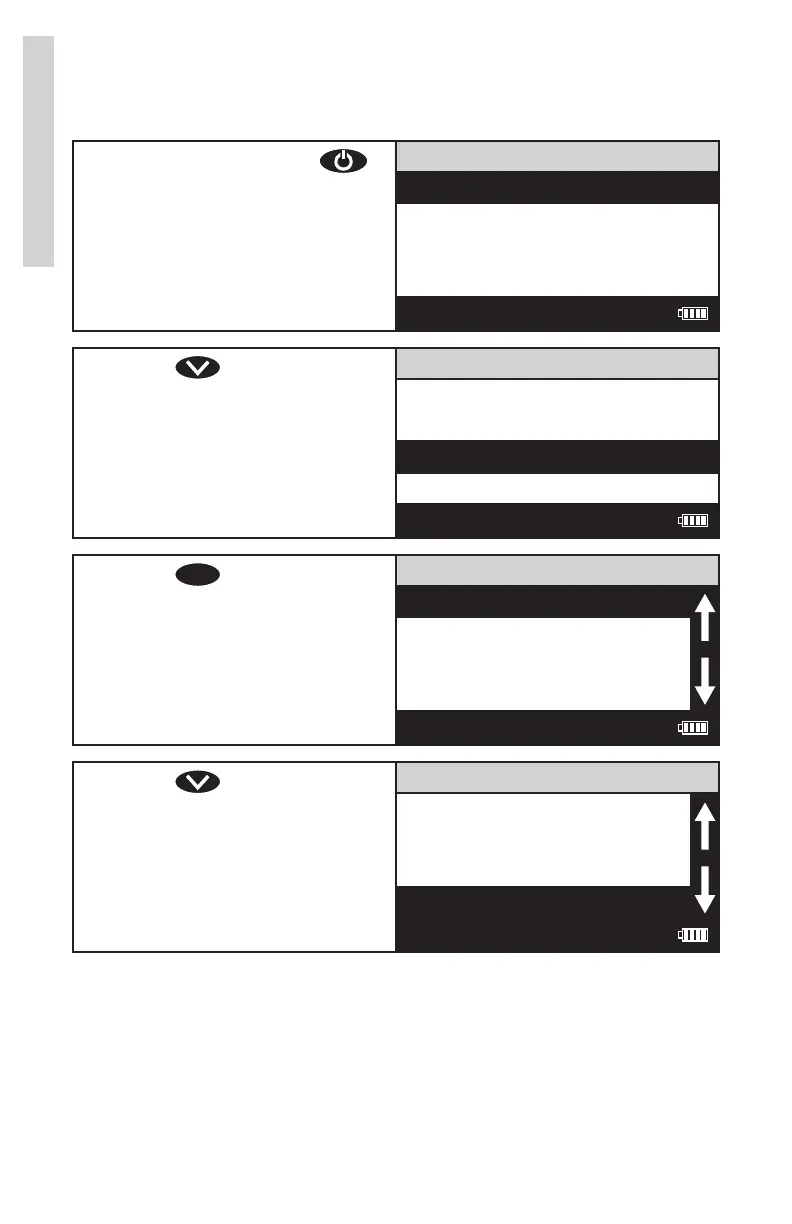
SETTING POWER SAVE
The power saving Auto Shutoff feature will turn the meter off when a
button has not been pushed for a set amount of time. The default setting
is 5 minutes. To change the setting:
1. Press and briefl y hold
to turn the meter on. The
LaMotte logo screen will
appear for about 3 seconds
and the Main Menu will
appear.
Main Menu
Measure
Data Logging
Options
Run PC Link
12:00:00 001/500
2. Press to scroll to
Options.
Main Menu
Measure
Data Logging
Options
Run PC Link
12:00:00 001/500
3. Press
ENTER
to select
Options.
Options Menu
Averaging
Turbidity Options
Set Clock
Set PWR Save
12:00:00 001/500
4. Press to scroll to Set
PWR Save.
Options Menu
Averaging
Turbidity Options
Set Clock
Set PWR Save
12:00:00 001/500
26
Options/Set Up













 To Next Page