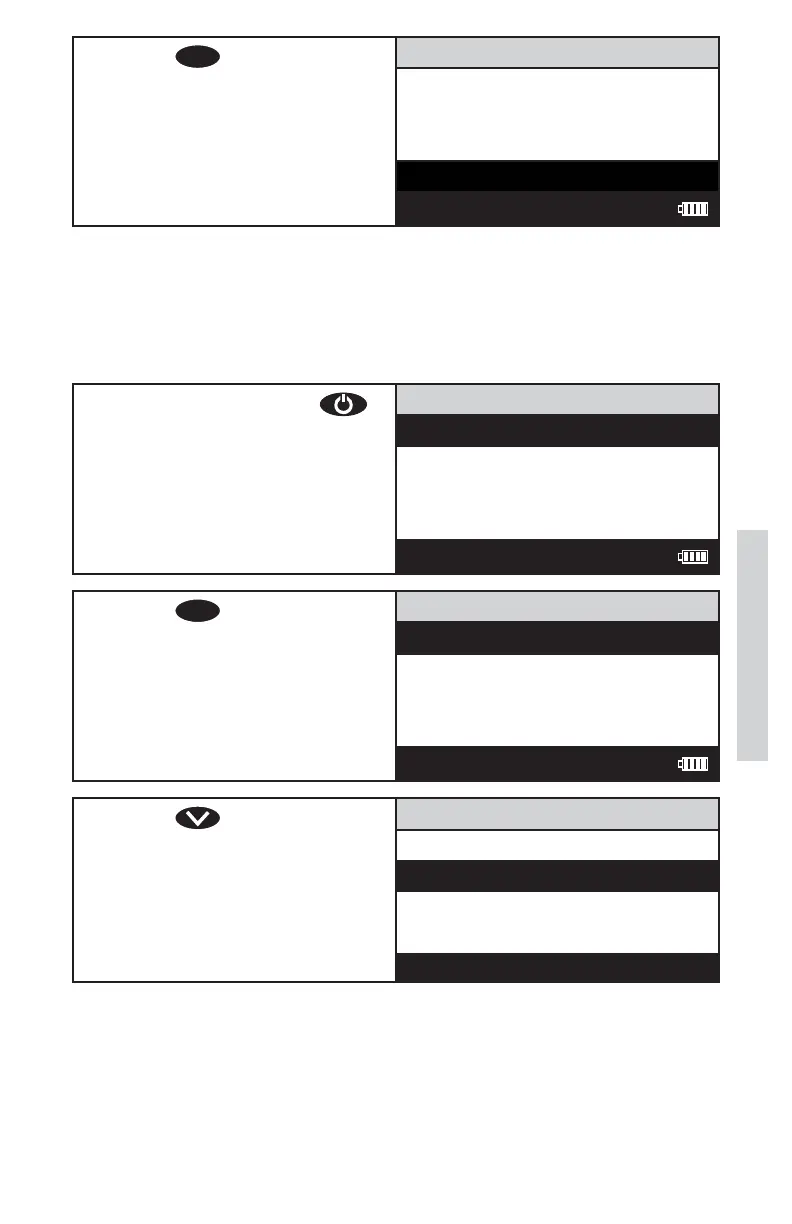
8. Press
ENTER
to select Scan
Sample. The screen will
display Reading for about 1
second. The result will appear
on the screen.
Turbidity NB (F)
10.22 NTU
Scan Blank
Scan Sample
12:00:00 001/500
ANALYSIS WITH BLANKING PROCEDURE
To obtain the most accurate results the meter should be blanked before
measuring a sample. The blanking step is not as critical for samples
above 10 NTU. The meter should always be blanked before reading
samples below 10 NTU.
1. Press and briefl y hold
to turn the meter on. The
LaMotte logo screen will
appear for about 3 seconds
and the Main Menu will
appear.
Main Menu
Measure
Data Logging
Options
Run PC Link
12:00:00 001/500
2. Press
ENTER
to select
Measure.
Measure Menu
Turbidity - No Blank
Turbidity - With Blank
12:00:00 001/500
3. Press to scroll to
Turbidity - With Blank.
Measure Menu
Turbidity - No Blank
Turbidity - With Blank
43
Analysis













 To Next Page