SELECTING A LANGUAGE
There are seven languages available in the 2020we/wi: English, Spanish,
French, Portuguese, Italian, Chinese, and Japanese (Kana).
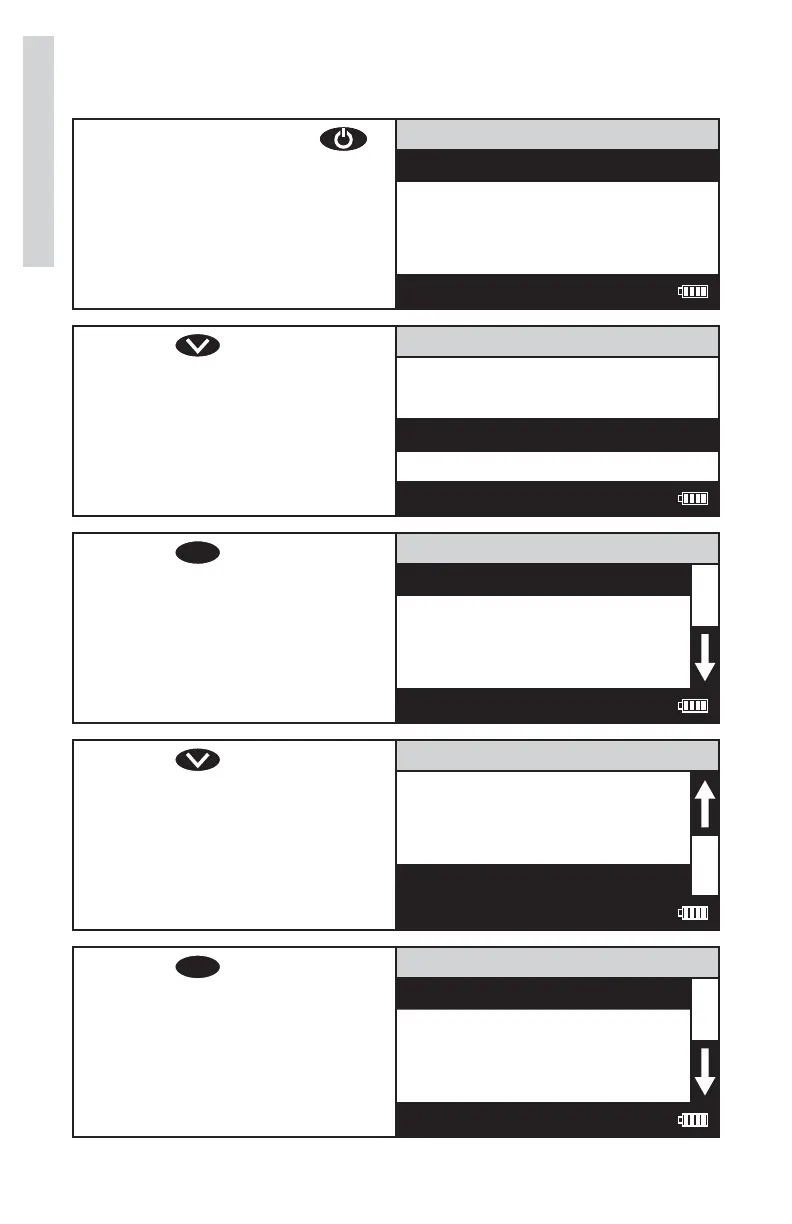
1. Press and briefl y hold
to turn the meter on. The
LaMotte logo screen will
appear for about 3 seconds
and the Main Menu will
appear.
Main Menu
Measure
Data Logging
Options
Run PC Link
12:00:00 001/500
2. Press to scroll to
Options.
Main Menu
Measure
Data Logging
Options
Run PC Link
12:00:00 001/500
3. Press
ENTER
to select
Options.
Options Menu
Averaging
Turbidity Options
Set Clock
Set PWR Save
12:00:00 001/500
4. Press to scroll to Select
Language.
Options Menu
Set PWR Save
Set Backlight Time
Factory Reset
Select Language
12:00:00 001/500
5. Press
ENTER
to select to
Select Language.
Select Language
English
Spanish
French
Portuguese
12:00:00 001/500
32
Options/Set Up













 To Next Page