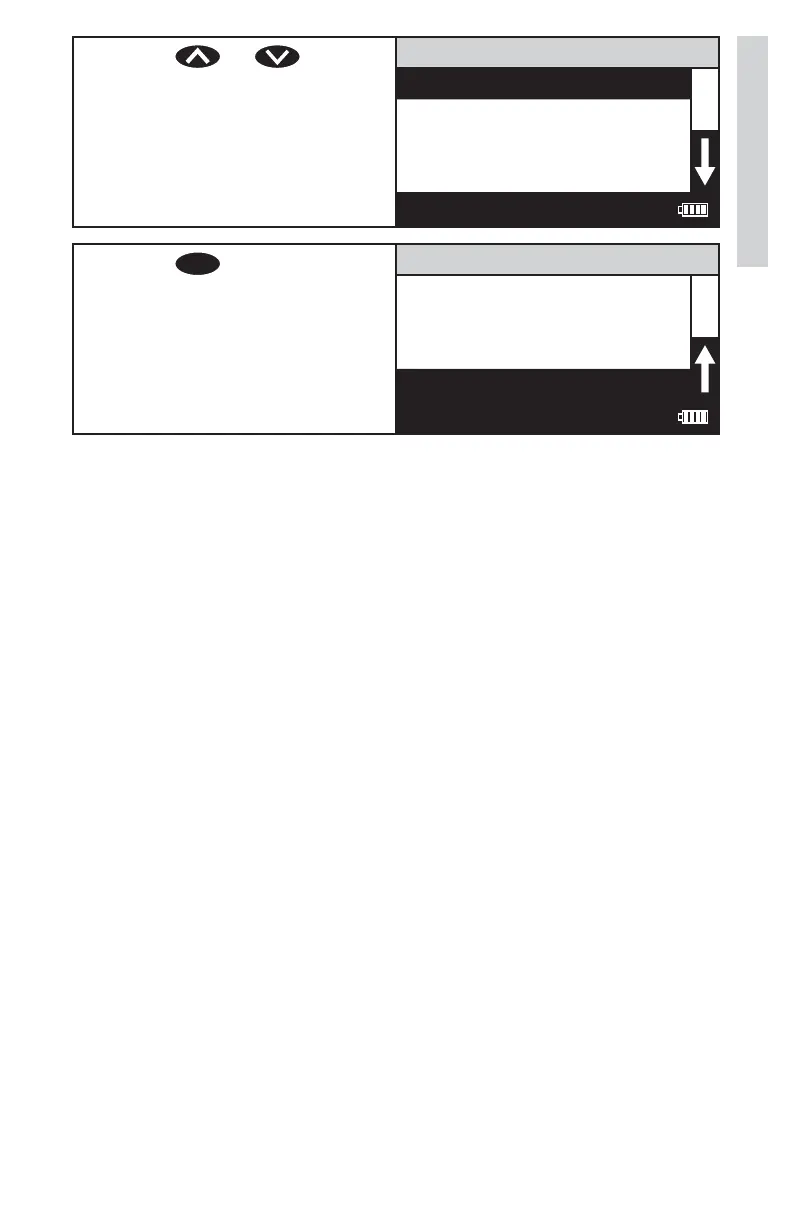
6. Press or to scroll
to desired language.
Select Language
English
Spanish
French
Portuguese
12:00:00 001/500
7. Press
ENTER
to select desired
language. The screen
will momentarily display,
Storing...for about 1 second
and return to the Options
Menu.
Options Menu
Set PWR Save aging
Set Backlight Time
Factory Reset
Select Language
12:00:00 001/500
NOTE: If the meter unintentionally switches to another language, use
the procedure above to reset the meter to the desired language. For
example, to reset the meter to English:
1. Turn the meter on.
2. Press down arrow twice. Press ENTER.
3. Press down arrow seven times. Press ENTER.
4. Press ENTER.
33
Options/Set Up













 To Next Page