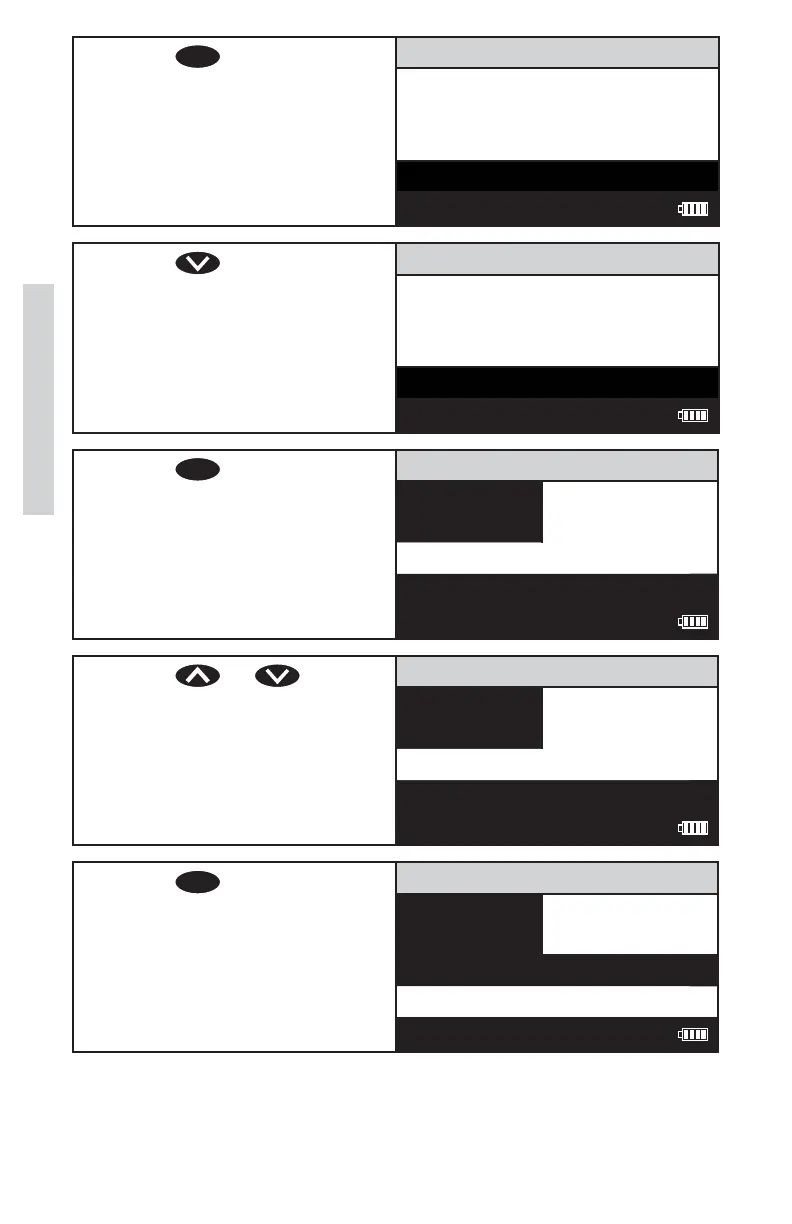
14. Press
ENTER
to scan the
standard. The screen will
display Reading for about 1
second. The result will appear
on the screen.
Turbidity WB (F)
0.99 NTU
Scan Blank
Scan Sample
12:00:00 001/500
15. Press to scroll to
Calibrate.
Turbidity WB (F)
0.99 NTU
Scan Sample
Calibrate
12:00:00 001/500
16. Press
ENTER
to select
Calibrate. A reverse font
(dark background with light
characters) will appear to
indicate that the reading can
be adjusted.
Turbidity WB (F)
0.99 NTU
Scan Sample
Calibrate
12:00:00 001/500
17. Press or to
scroll to the concentration
of the standard, 1.00 in the
example. Note: The allowable
adjustment is ±20%.
Turbidity WB (F)
1.00 NTU
Scan Sample
Calibrate
12:00:00 001/500
18. Press
ENTER
to select
Caibrate. Two menu
choices will be offered, Set
Calibration and Factory
Setting.
Calibrate Menu
1.00 NTU
Set Calibration
Factory Setting
12:00:00 001/500
40
Calibration













 To Next Page