10
Running Built-in Programs
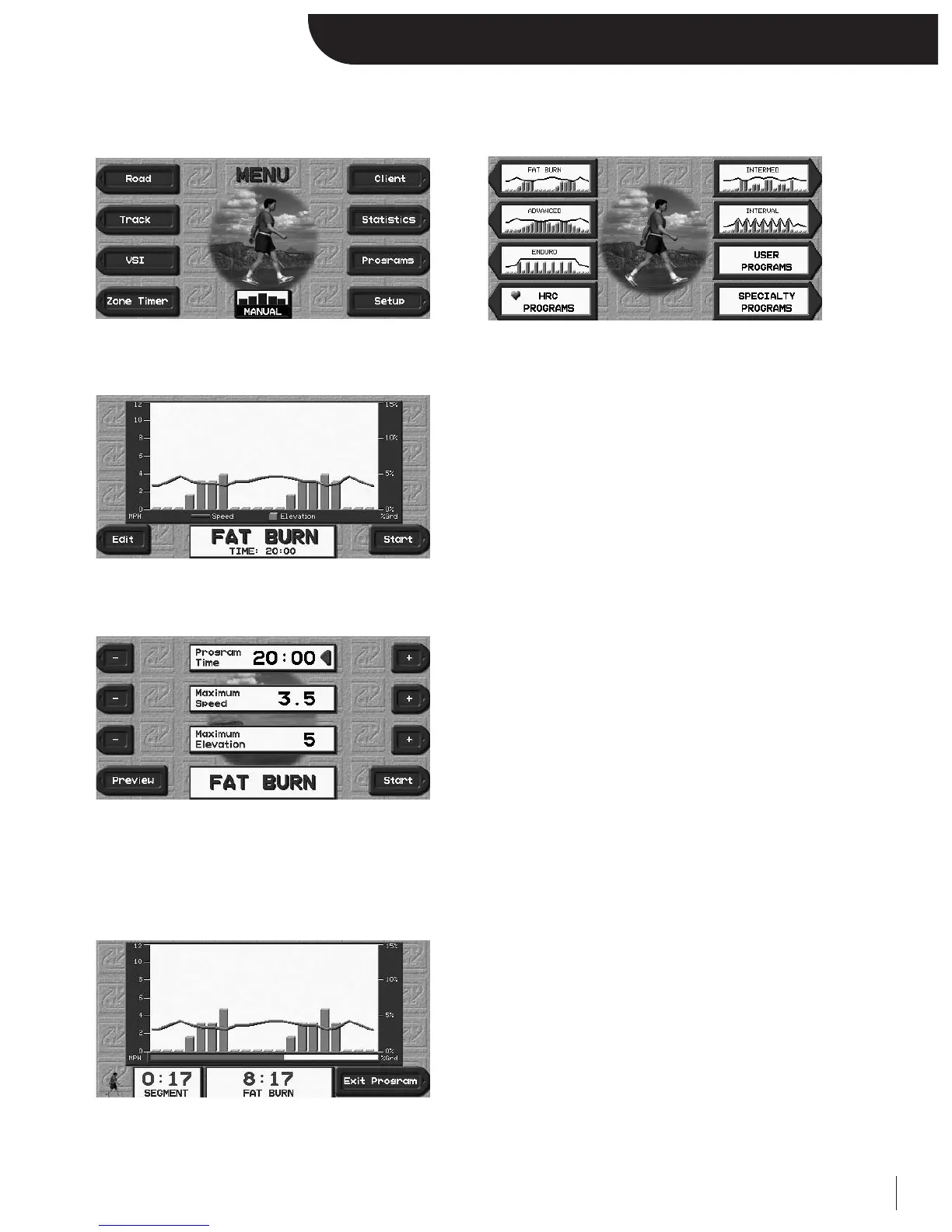
From the Menu screen, select PROGRAMS to view all programming options.
Once you select the built-in program that best suits your need, you will be prompted with a Program Preview screen.
The program preview is a graphical representation of the program
you have selected which displays:
• Maximum Speed and Elevation
• Minimum Speed and Elevation
• Program Time
You have the option to START if you are happy with the program’s parameters or EDIT them to your liking.
This screen allows you to customize the program’s parameters.
Use the designated “+/-” keys or the numeric keypad to adjust the
Program Time, Maximum Speed, and Maximum Elevation.
Once you are content with your modifications, you have the option to START or PREVIEW your changes in the Program
Preview before starting.
As soon as you start the program, the Program Progress Screen becomes available as one of the selectable displays. You can
press NEXT or BACK to view the other motivational screens.
Features:
• Progress Bar
• Total Time Remaining
• Segment Time Remaining
• Designated “Exit Program” key
Once the program is complete or you choose to prematurely terminate it by selecting the featured “Exit Program” key, the
treadmill will automatically default back into Manual Mode.


 To Next Page