Laser 5089 Code Reader User’s Guide_ Laser 5089 Code Reader User’s Guide_
2. Press the YES/NO key to confirm.
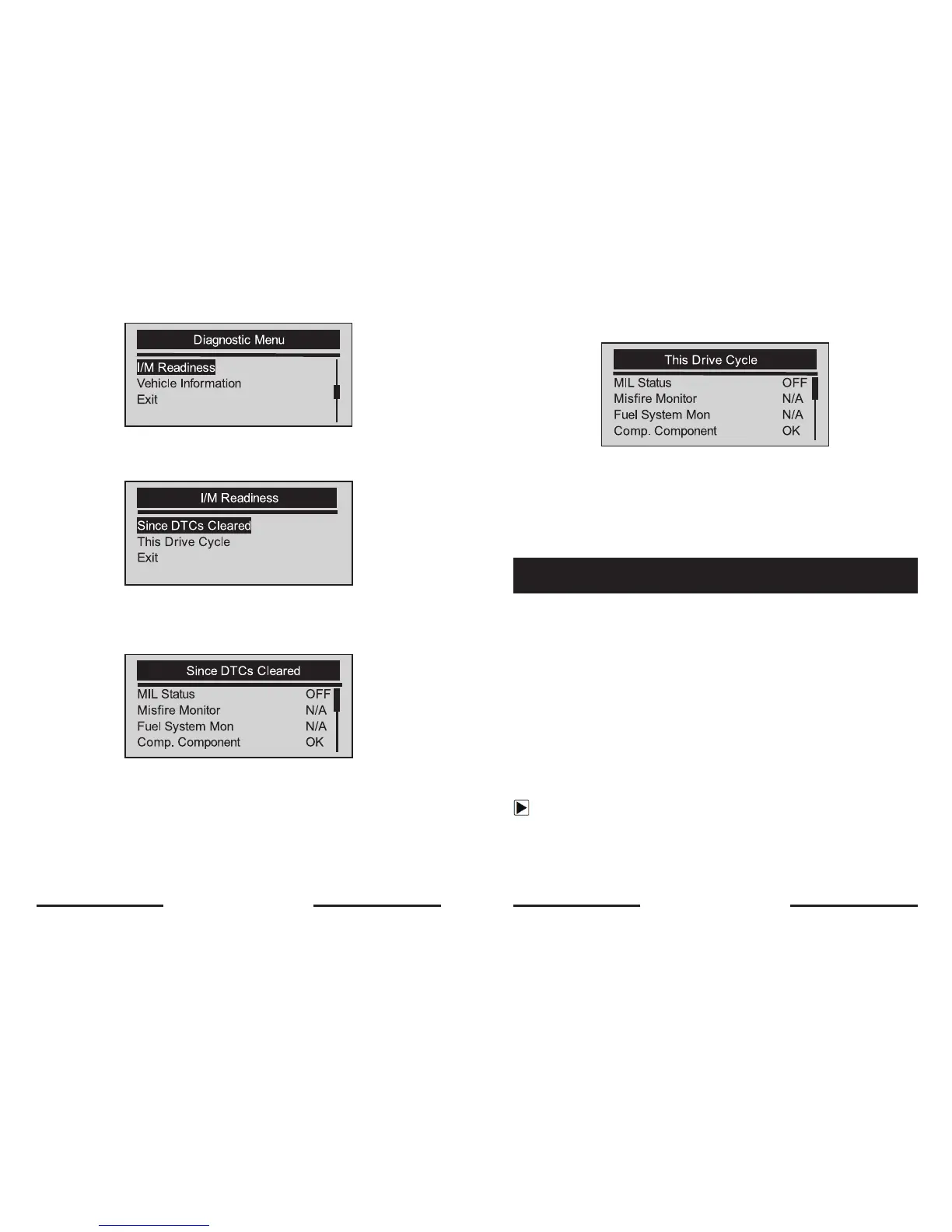
√ If vehicle supports both types of monitors, please following screen:
√ Use the SCROLL key to select a monitor type and press the YES/NO
key to confirm.
3. Depending on readiness test, one of these 2 screens will be present.
Or
√ If more than one screen of information is retrieved, use the
SCROLL key to view additional data.
√ Some vehicle may not support this function, and a
“Not Support This Function!” message display.
4. Press the YES/NO key to return to Diagnostic Menu.
The Vehicle Information function is used to request the vehicle’s VIN number,
calibration ID(s) which identifies software version in vehicle control module(s),
calibration verification numbers (CVN(s)) and in-use performance tracking on
model year 2000 and newer OBD II compliant vehicles.
√ CVNs are calculated values required by OBD II regulations. They are
reported to check if emission-related calibrations have been
changed. Multiple CVNs may be reported for a control module. It
may take several minutes to do the CVN calculation.
√ In-use performance tracking tracks performance of key readiness
monitors.
To request vehicle information:
1. Use the SCROLL key to select Vehicle Information from Diagnostic
Menu screen.
5.6 Reading Vehicle Information
26 27


 To Next Page