EasyManua.ls Logo

LAUMAS LCB - ETHERCAT (LCBETHERCAT Only); Pc;Plc Setup; Status Led

LAUMAS LCB
80 pages
Print Icon
To Next Page IconTo Next Page
To Previous Page IconTo Previous Page
Loading...
- 51 -
ETHERCAT (LCBETHERCAT only)
PC/PLC SETUP
The instrument works as slave in an EtherCAT network and features a dual port that allows to
exchange the weight and the main parameters with an EtherCAT master. Load the xml file attached
to the instrument to the development system and configure the device.
The data exchanged by the instrument are:
Output Data
from instrument (reading)
Addresses
Input Data
to instrument (writing)
Addresses
Gross weight
0x0000-0x0003
Command Register
0x0000-0x0001
Net weight
0x0004-0x0007
Digital outputs command
0x0002-0x0003
Exchange register R1
0x0008-0x000B
Exchange register W1
0x0004-0x0007
Exchange register R2
0x000C-0x000D
Exchange register W2
0x0008-0x0009
Status Register 1
0x000E-0x000F
Status Register 2
0x0010
Instrument status
0x0011
Execution register
0x0012-0x0013
Digital inputs status
0x0014
Digital outputs status
0x0015
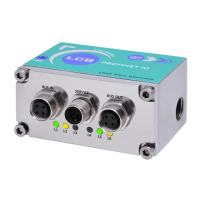
STATUS LED
LED
Status
Description
L1
green
off
BUS IN - Ethernet link not established
on
BUS IN - Ethernet link established
blinking
BUS IN - Ethernet activity detected
L3
red
blinking
general configuration error
single blinking
local error
double blinking
timeout error
L4
green
off
INIT status
blinking
Pre-Operational status
single blinking
Safe-Operational status
on
Operational status
L5
green
off
BUS OUT - Ethernet link not established
on
BUS OUT - Ethernet link established
blinking
BUS OUT - Ethernet activity detected

Table of Contents