22
LAUNCH X-431 PAD V
User's Manual
5.3.2.1 Health Report (Quick Test)
This function varies from vehicle to vehicle. It enables you to quickly
access all the electronic control units of the vehicle and generate a
detailed report about vehicle health.
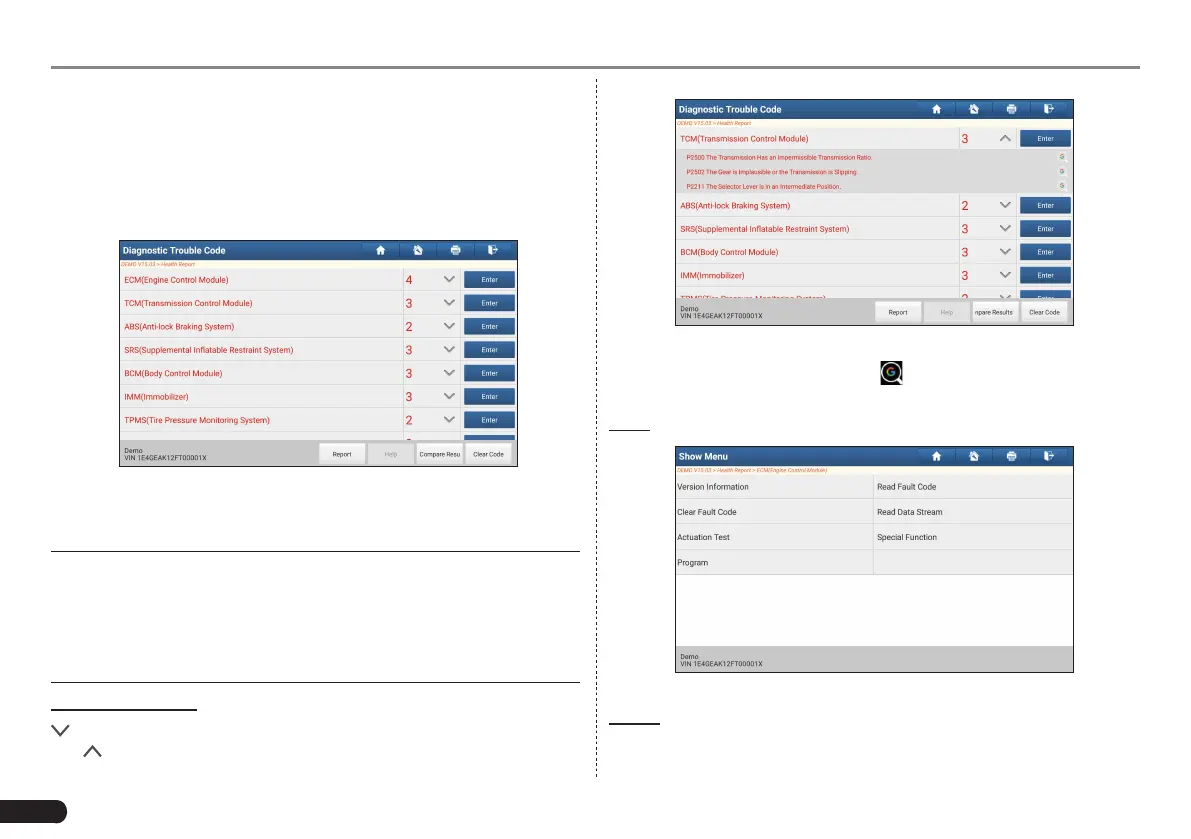
Tap “Health Report”, the system starts scanning the ECUs. Once the
scanning is complete, a screen similar to the following appears:
Fig. 5-17
In Fig. 5-17, the tested system with fault code appears in red and the
system with OK displays in white (normally).
*Note: Diagnostic Trouble Codes or Fault Codes can be used to identify
which engine systems or components that are malfunctioning. Never
replace a part based only on the DTC definition. Retrieving and using
DTCs for troubleshoong vehicle operaon is only one part of an overall
diagnosc strategy. Follow tesng procedures (in vehicle’s service manual),
instrucons and owcharts to conrm the locaons of the problem.
On-screen Buttons:
: Tap to display the details of DTCs existing in the current system.
Tap to hide it.
Fig. 5-18
Highlight certain DTC item, and tap to open the browser to retrieve
it in Google engine.
Enter: Tap to select other test functions.
Fig. 5-19
Report: Tap to save the diagnostic result as a report.



 To Next Page