LAUNCH X-431 Euro Mini User Manual
18
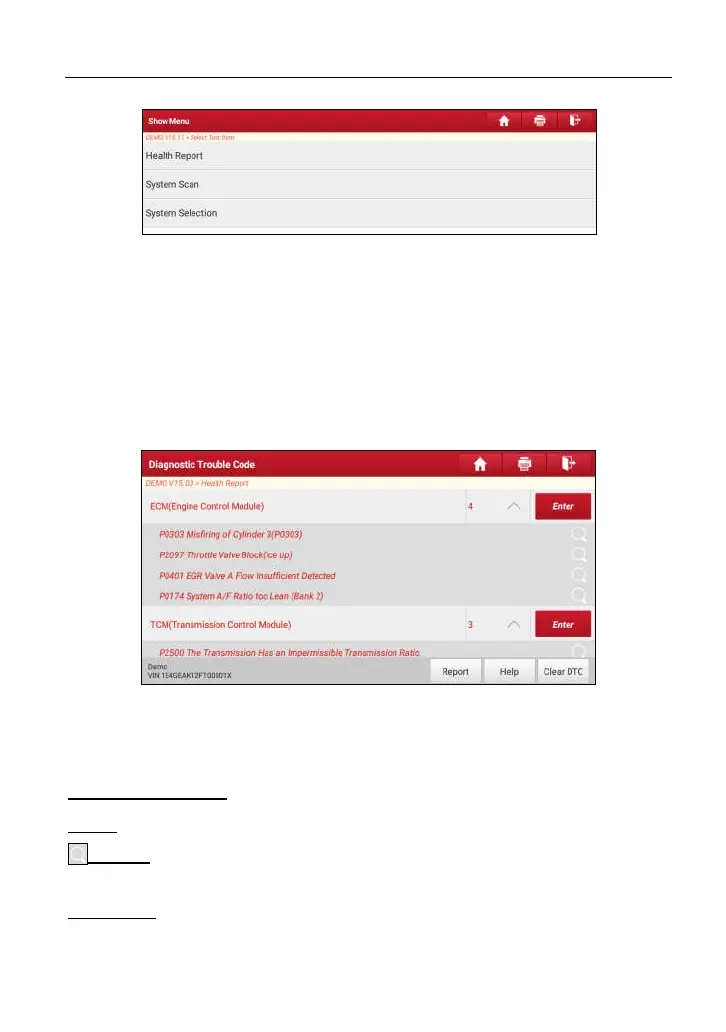
Fig. 5-2
5.1.1 Health Report (Quick Test)
This function varies from vehicle to vehicle. It enables you to quickly access all
the electronic control units of the vehicle and generate a detailed report about
vehicle health.
Tap “Health Report”, the system start scanning the ECUs.
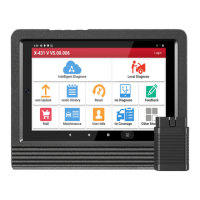
Once the scanning is complete, a screen similar to the following appears:
Fig. 5-3
In the above figure, the tested system with fault code appears in red and the
system with OK displays in black (normally).
On-screen Buttons:
Enter:
Tap to enter the diagnostic menus of the current system.
Search:
Tap to launch the browser to search for more detailed information
about the current DTC online.
Clear DTC:
Tap to clear the existing diagnostic trouble codes.
*Note: Clearing DTCs does not fix the problem(s) that caused the code(s) to be set. If
www.diagtools.eu, Pernavas 43A, Riga, Latvia, LV-1009, +37129416069, info@diagtools.eu




 To Next Page