7
. CONFIGURATION
7.1. Machine alarms
The pilot light of the key dose is flashing: abnormal or
absent reading of the dose during dispensing.
LEDS of the keyboard are flashing: the Time-out device
is activated.
7.2. Programming
Attention
Machine programming must be carried out by te-
chnical staff. Be careful when accessing the inside
of the machine (programming lever set) the tempe-
rature of some components is very high and there
are powered parts.
7.2.1. Programming of coffee doses
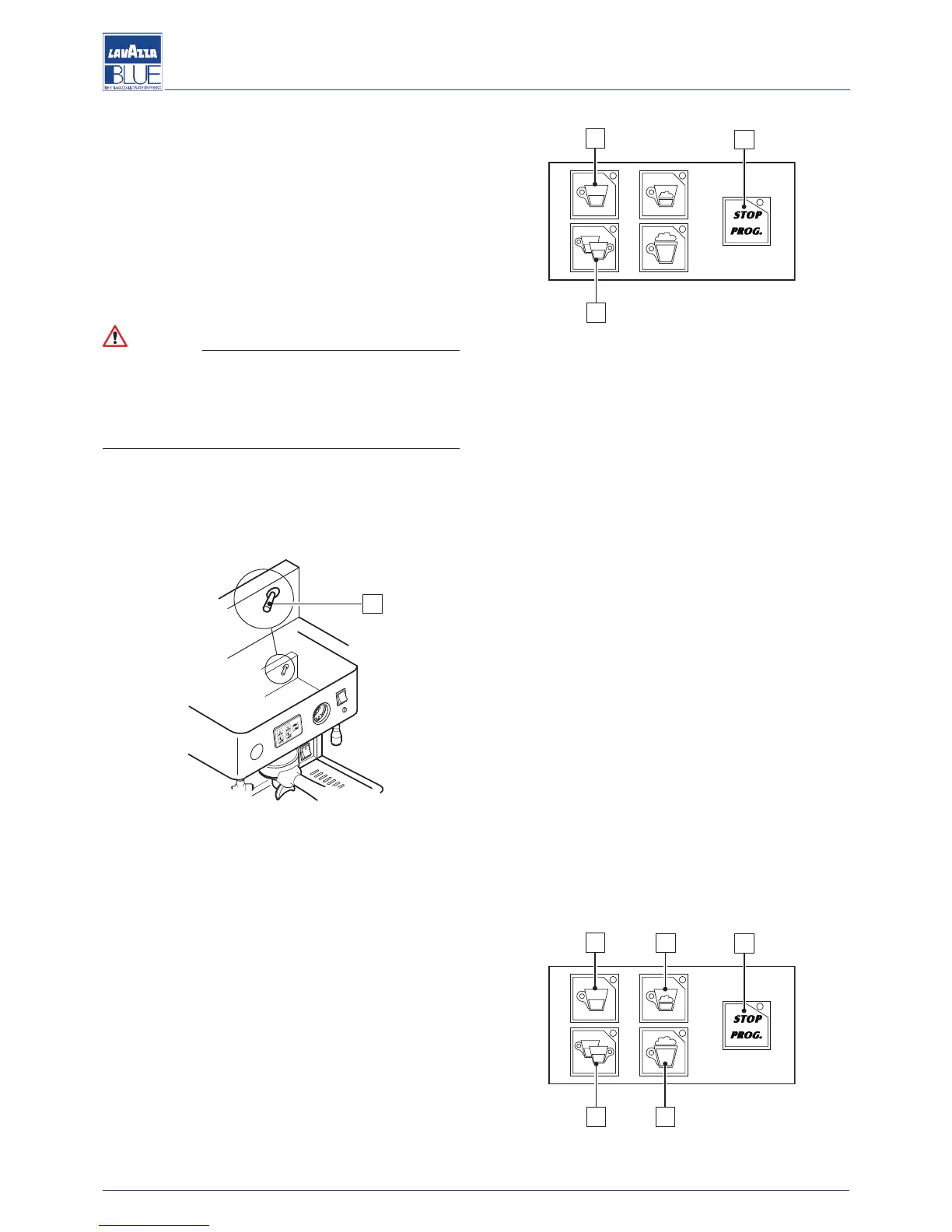
Put the programming lever (1), situated under the ma-
chine boiler cover, to the ON position.
Insert a capsule into the capsule holder, attach the cap-
sule-holder to the brewing unit and tighten it firmly.
Place the cup under the dispensing spout.
Press the PROG/STOP key (2) for at least 5 seconds: all
the LEDs of the dose keys light up.
Press the desired dose key (3).
When the desired dose is reached it by pressing the
PROG/STOP key (2).
Repeat this operation for the other dose key.
When the programming is completed, place the pro-
gramming lever (1) to the OFF position.
7.2.2. Programming of cappuccino doses (only LB
2800-LB 2810 models)
Put the programming lever (1), situated under the ma-
chine boiler cover, to the ON position.
Insert a capsule into the capsule holder, attach the cap-
sule-holder to the brewing unit and tighten it firmly.
Place the cup under the cappuccinatore dispensing
spout.
Immerse the suction pipe in the milk.
Press the PROG/STOP key (2) for at least 5 seconds: all
the LEDs of the dose keys light up.
Press the desired cappuccino dose key (4).
Coffee brewing will start, when the desired dose of cof-
fee is reached, confirm it by pressing the PROG/STOP
key (2).
Milk dispensing will start automatically.
When the desired dose of milk is reached, confirm it by
pressing the PROG/STOP key (2).
Repeat this operation for the other dose key.
When the programming is completed, place the pro-
gramming lever (1) to the OFF position.
3
4
2
3
4




 To Next Page